Tuesday, August 9, 2011

Build error related to SQL Express in Microsoft LightSwitch
The following message still shows up sometimes while creating and
building Microsoft LightSwitch applications. This has not been rectified
in the recently released RTM version as seen in the next paragraph.
.....................
Error 1 An error occurred while establishing a connection to SQL Server instance '.\SQLEXPRESS'.
Failed to generate a user instance of SQL Server due to a failure in starting the process for the user instance. The connection will be closed. C:\Program Files\MSBuild\Microsoft\VisualStudio\LightSwitch\v1.0\Microsoft.LightSwitch.targets 157 10 BusinessTypeTest
.................................
However a work around exists which works very well. Here is the work around as suggested by Steven Hoag in his forum post.
However when you come to the step of deleting the files you may still get an error, that the files are being used by the SQL Server (despite the fact that you stopped SQL Express in the Control Panel).
To remove them go to the task master (Ctrl+Alt+Del) and bring up the WindowsTask Master window as shown.
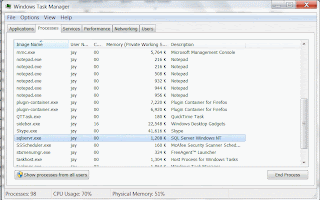
Click End Process.
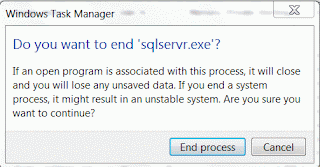
Click End Process for sqlserver.exe in the next window.
Now you can delete all files in the SQLExpress folder
After this start SQLEXPRESS and the previous application which threw the error should build without this error.
.....................
Error 1 An error occurred while establishing a connection to SQL Server instance '.\SQLEXPRESS'.
Failed to generate a user instance of SQL Server due to a failure in starting the process for the user instance. The connection will be closed. C:\Program Files\MSBuild\Microsoft\VisualStudio\LightSwitch\v1.0\Microsoft.LightSwitch.targets 157 10 BusinessTypeTest
.................................
However a work around exists which works very well. Here is the work around as suggested by Steven Hoag in his forum post.
- Stop SQL Express from Control Panel
- Close all LightSwitch apps
- Move to the following location:
- Delete all the files in the SQLEXPRESS Folder.
However when you come to the step of deleting the files you may still get an error, that the files are being used by the SQL Server (despite the fact that you stopped SQL Express in the Control Panel).
To remove them go to the task master (Ctrl+Alt+Del) and bring up the WindowsTask Master window as shown.

Click End Process.
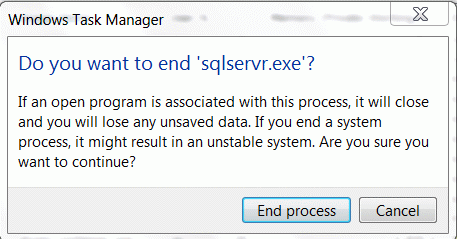
Click End Process for sqlserver.exe in the next window.
Now you can delete all files in the SQLExpress folder
After this start SQLEXPRESS and the previous application which threw the error should build without this error.
Tuesday, August 2, 2011
SQL Azure - July 2011 Service Release
The new release will support multiple data base administrators (Ye! Windows Azure is not going taking away your jobs, you just need to upgrade your skills). Also much better support for spatial data types making it a perfect fit for location aware apps both mobile and immobile.
The one thing that needs to be done on your side is the following: you should get hold of the latest version of SQL Server Management Tools, because the version number will change. Many users of lower versions might have already noted this while trying to connect to 'Denali' from older versions. The links to get the latest updates available in SQL Server 2008 R2 SP1 are:
* SQL Server Management Studio (http://www.microsoft.com/download/en/details.aspx?displaylang=en&id=26727)
* SQL Server Management Studio Express(http://www.microsoft.com/download/en/details.aspx?displaylang=en&id=26729)
If you are using SMO (SQL Server Management Objects) then you should get the
Cumulative Update package 7 for SQL Server 2008 R2 (http://support.microsoft.com/kb/2507770)
When all is said and done your version of SSMS should have a version greater or equal to 10.50.1777.0 in order not to have connectivity issues.
This one is for SSMS that came with SQL Server 2008 R2: No good!

This one is for SSMS installed when CTP1 'Denali' was installed:

Clearly if I use the above I should not have any connectivity problems.
If you are a DBA trying to upgrade your skills to understand SQL Azure, my book is a must read. You could get a free copy by sending an email to me at mysorian@gmail.com with 'SQL Azure' in the subject line. Who knows you may be lucky and get a book or a ebook in the raffle.
Monday, July 4, 2011
Review of my SQL Azure book from a SQL Azure developer
Anton Staykov (http://www.staykov.net) was a frequent visitor to the SQL Azure Forum when SQL Azure appeared on the web. Anthony is a Microsoft MVP from Bulgaria. I was also a frequent visitor trying to learn from others about SQL Azure. Recently, I saw his review of my book (http://blogs.staykov.net/2011/03/sql-azure-enterprise-application.html) which described some positive aspects of my book. He was kind enough to permit me to reproduce his review to the visitors of my blog.
Here it follows:
SQL Azure: Enterprise Application Development reviewed
"As I blogged earlier this year, there are two books on Windows Azure from Packt publishing. I was personally involved as technical reviewer with one of them, and now I am sharing my feedback on the second.
Microsoft SQL Azure: Enterprise Application Development, is the second one from the "Azure" series. Published right after the "Microsoft Azure: Enterprise Application Development" the book is the perfect complement to it. Reading Microsoft SQL Azure, you will learn the basics of cloud services (i.e. what is a Cloud, what types of clouds are there and who are the big players). You will, of course catch up with Windows Azure, as it is briefly described, in case you missed the "Microsoft Azure" book.
Focusing on the SQL Azure service it self, the book covers all the steps required for you to leverage a cloud based RDMS. All the information you find there is well structured and accompanied with good number of screenshots and sample SQL statements. You will not miss any of the features delivered from SQL Azure. All the answers are there – what is the security model of SQL Azure; how to connect and execute queries against the cloud (how to use Sql Server Management Studio); how can you use Sql Server Integration Services (a.k.a. SSIS) and what are the limitations; how to sync your cloud data with on-premise data; what are the tools supported by SQL Azure; and more and more questions and answers. I could hardly find a question for SQL Azure that this book does not answer!
I would highly recommend this book as a complement to the "Microsoft Azure: Enterprise Application Development". These two books are the complete guide to develop application for the Microsoft's Cloud! "
It is still not too late you may enter the raffle and win a hard copy or a eBook. Just send an email to mysorian@gmail.com with SQL Azure in the subject line.
Here it follows:
SQL Azure: Enterprise Application Development reviewed
"As I blogged earlier this year, there are two books on Windows Azure from Packt publishing. I was personally involved as technical reviewer with one of them, and now I am sharing my feedback on the second.
Microsoft SQL Azure: Enterprise Application Development, is the second one from the "Azure" series. Published right after the "Microsoft Azure: Enterprise Application Development" the book is the perfect complement to it. Reading Microsoft SQL Azure, you will learn the basics of cloud services (i.e. what is a Cloud, what types of clouds are there and who are the big players). You will, of course catch up with Windows Azure, as it is briefly described, in case you missed the "Microsoft Azure" book.
Focusing on the SQL Azure service it self, the book covers all the steps required for you to leverage a cloud based RDMS. All the information you find there is well structured and accompanied with good number of screenshots and sample SQL statements. You will not miss any of the features delivered from SQL Azure. All the answers are there – what is the security model of SQL Azure; how to connect and execute queries against the cloud (how to use Sql Server Management Studio); how can you use Sql Server Integration Services (a.k.a. SSIS) and what are the limitations; how to sync your cloud data with on-premise data; what are the tools supported by SQL Azure; and more and more questions and answers. I could hardly find a question for SQL Azure that this book does not answer!
I would highly recommend this book as a complement to the "Microsoft Azure: Enterprise Application Development". These two books are the complete guide to develop application for the Microsoft's Cloud! "
It is still not too late you may enter the raffle and win a hard copy or a eBook. Just send an email to mysorian@gmail.com with SQL Azure in the subject line.
Sunday, January 23, 2011
New article on the SQL Azure 'Houston' Project
Read this 'How-to' article on the Packt Site.
The 'Houston' project was one of the incubation projects of the windows Azure cloud services. This project has entered into production and you will find it in the new Windows Azure Portal (https://windows.azure.com). All New services can be accessed from the 'Ribbon' under Common Tasks.

This article is about the 'Houston' project when it was still in incubation. You can still access the labs portal(http://www.sqlazurelabs.com/). In this article some of the features of this web based tool as well as how carry out few of the basic tasks are described. Houston project provided the following basic database management tasks:
•Authoring and executing queries
•Designing and editing database schema
•Editing table data
Readers are encouraged to read my comprehensive book on SQL Azure. Also you may enter a raffle to win a copy of the book.
The 'Houston' project was one of the incubation projects of the windows Azure cloud services. This project has entered into production and you will find it in the new Windows Azure Portal (https://windows.azure.com). All New services can be accessed from the 'Ribbon' under Common Tasks.

This article is about the 'Houston' project when it was still in incubation. You can still access the labs portal(http://www.sqlazurelabs.com/). In this article some of the features of this web based tool as well as how carry out few of the basic tasks are described. Houston project provided the following basic database management tasks:
•Authoring and executing queries
•Designing and editing database schema
•Editing table data
Readers are encouraged to read my comprehensive book on SQL Azure. Also you may enter a raffle to win a copy of the book.
Friday, January 21, 2011
Free SQL Azure Book.
My latest book on SQL Azure (details below) covers comprehensively all aspects of Microsoft's relational database on the Windows Azure Platform. If you are interested in getting a free copy of the book all you need to do is to enter your email and mailing address (send them to mysorian@gmail.com with subject line text - SQL Azure Book) to a raffle organized by my publisher. Two lucky winners will be picked from the first 50 who respond, the first winner will be getting a hard-copy and the second getting an eBook version. You are not required to do anything else, but I do appreciate if you would let me know through email what you think about it (the good,the bad and the ugly). If you have a blog/website kindly put up a book link there and if you are the reviewing type please get in touch with Sunil Chakravarthy (sunilc@packtpub.com).
Thank you

https://www.packtpub.com/microsoft-sql-azure-enterprise-application-development/book
Thank you

https://www.packtpub.com/microsoft-sql-azure-enterprise-application-development/book
Wednesday, January 5, 2011
No connection to SQL Server Compact from Microsoft SQL Server 2011
 There appears to be no way to connect to SQL Server Compact using the SSMS installed with SQL Server 2011 (Denali). There is however a menu item that indicates that one should be able to connect but it stops there. This menu item when chosen does not provide a SQL Compact Editor icon which used to be available in earlier versions.
The !sorry Mozilla you could not show this (Firefox Version 3.6.13.)!

Subscribe to:
Posts (Atom)
When Identity Security Becomes a Wall — Not a Shield
After a breach that forced a reset of my digital identity, I hit a roadblock I never anticipated: multi-factor authentication (2FA) locked m...

-
 This post provides a tutorial approach to authoring a report with Microsoft PowerBI using data on a SQL Server 2012. PowerBI is Microsof...
 -
 Linked servers offer the following advantages as noted in MSDN documentation: •The ability to access data from outside of SQL Server. •T...
 -
 This post is describes connecting to SQL Server 2022 using the SQL Server Management Studio and the encryption of connection. For installin...