Showing posts with label SQL Azure. Show all posts

Saturday, January 11, 2025

What is SQLAlchemy?

 SQLAlchemy a toolkit for Python programming language. You can build full blown database applications with it and use the full range of the SQL Language. It is also a Object Relational Mapper(ORM).

SQLAlchemy is what you need (libraries and other tools) for building data-centric apps using Python and using other libraries the possibilities are limitless including AI and Machine Learning.


SQLAlchemy and connecting to data:

The connectors are elements that connect your application to data but in the case of SQLAlchemy they are called 'database dialects'. There are database dialects for each kind of database. These are the most common kinds:


SQLite: A lightweight, disk-based database that doesn’t require a separate server process.

https://hodentekmsss.blogspot.com/2016/09/sqlite-using-visual-studio-community.html


PostgreSQL: A powerful, open-source object-relational database system.

https://hodentekmsss.blogspot.com/search?q=postgresql


MySQL: A widely used open-source relational database management system.

https://hodentekmsss.blogspot.com/2024/11/install-latest-mysql-and-improve.html


Oracle: A proprietary database management system by Oracle Corporation.

https://hodentekmsss.blogspot.com/2013/11/a-collection-of-sql-server-related.html


Microsoft SQL Server: A relational database management system by Microsoft.

https://hodentekmsss.blogspot.com/2024/11/sql-server-2025-ready-to-go.html


MariaDB: A community-developed fork of MySQL.

https://hodentekhelp.blogspot.com/2015/11/how-do-you-access-mariadb-in-xampp.html

These connectors make it easy to connect SQLAlchemy to various database systems, ensuring compatibility and flexibility in developing data-centric applications.

If you are looking for working with databases, stay in and learn from over 15 years of blogging on databases here.

You may also have a look at my database related books:


You may


Wednesday, December 2, 2015

SQL Azure Databases are the core of many Azure Offerings

 Including this one announced in December 2015.

As announced today Targit's BI and Analytics platform announced its first offering of Microsoft Azure Virtual Machines.

This allows access to advanced data discovery; simple self-service BI analytics; comprehensive reporting with cutting edge dashboards in Azure Cloud. It works using the Bring Your Own License Model similar to its on-premises infrastructure (pay-as-you-go).

These are the declared benefits as seen on the Targit site:
  • No upfront investment for hardware and software licensing: TARGIT on Azure users are able to scale up or out over time without the typical massive reinvestment in additional hardware and software.
  • Full support for Azure database technologies: TARGIT Decision Suite 2015 comes with official support for Azure SQL Database, the dedicated relational database service hosted on Azure.  
  • Fast ROI realization: TARGIT on Azure has a rapid timeline for deployment, and is the most cost-effective way to get started with BI. Users don’t need to have IT resources dedicated to managing an on-premises solution to glean problem-solving BI insights
Targit Decision Suite and data in SQL Server is expected to make all of the above possible


If have an Azure account you can create a new VM for Targit quite easily:
Read more here or go to Azure Portal

Their BI implementation overview from an image on their ebook which can be downloaded from their site.


Wednesday, March 11, 2015

Latest: Microsoft PHP drivers for SQL Servers

Microsoft Drivers 3.2, 3.1, 3.0, and 2.0 for PHP for SQL Server provide connectivity to Microsoft SQL Server from PHP applications.

If you are interested in yet older versions of PHP review these posts:
http://hodentekmsss.blogspot.com/2014/11/php-driver-for-sql-server-released.html

http://hodentekmsss.blogspot.com/2010/05/phpbb-brings-interoperability-with-sql.html

You may install PHP from XAMPP here:
http://www.windows8downloads.com/win8-xampp.html

Recently 3/7/2015 Microsoft released Php drivers for SQL Servers. This single download consists of a number of drivers. Details area as shown:


These drivers are PHP 5 extensions that allow you to connect to SQL Server from PHP applications/scripts.

The SQLSRV3X extension provides a procedural interface while the PDO_SQLSRV extension implements PDO for accessing data in all editions of SQL Server 2005 and later (versions 3.2 and 3.1 require SQL Server 2008 and later).

The following OS are supported:
Windows 7, Windows 8, Windows 8.1, Windows Server 2008 R2, Windows Server 2008 Service Pack 2, Windows Vista Service Pack 2

Of course you need PHP 5x to make use of these drivers.

Driver / PHP versions support:
  • Version 3.2 supports PHP 5.6, 5.5, and 5.4
  • Version 3.1 supports PHP 5.5 and 5.4
  • Version 3.0 supports PHP 5.4.

  • When you run the executable (SQLSRV32.exe for example) you will be asked to point to the path of the extension. You may have multiple version related paths as shown here on Windows 8.1 here:

    C:\Program Files (x86)\PHP\v5.6  
    C:\Program Files (x86)\PHP\v5.3

    Download the driver to mathc your PHP version here:
    http://www.microsoft.com/en-us/download/details.aspx?id=20098&WT.mc_id=Blog_SQL_Announce_DI
     

    Monday, November 24, 2014

    Accessing SQL Server via SMO using PowerShell - A quick workout

    In order to understand SQL Server the surest way is to get to understand the SQL Server Management Objects known by its acronym 'SMO'. You can programmatically access and manage SQL Servers with this object model.

    I have described with code listing as to how you may access Azure SQL Database in my comprehensive Azure SQL Database related book.
    "A step-by-step procedure to connect to SQL Azure using SMO" is described on page 119, Chapter 3 of this book.
    Microsoft SQL Azure: Enterprise Application Development, Packt Publishing,  Dec 2010.


    SMO is the foundation using which the SSMS was built. The name space for the SMO is Microsoft.SqlServer.SMO.

    In a previous post, I showed you how to run PowerShell in SQL Server Management Studio. Here is a quick screen shot to refresh your memory.

    As you can imagine the SMO object model is quite large and starts off with the Server at the top. This image shows only a part of this object model.


    You should be able to access the complete model at this link:
    http://msdn.microsoft.com/en-us/library/ms162209.aspx

    In order to access SMO using PowerShell you need to load the assembly as shown in the next image.


    With the following you can get all the members as shown.

    Once you do that you can access the top-level object, the Server.

    SMO is object based and hierarchical. You define the SQL Server as a new object using the next listing where "servername" is your computer or the server and instance name is the SQL Server instance. In the present listing it is "Hodentek\RegencyPark"
    -----------
    PS C:\Users\Jayaram> $sqlServer = new-object ("Microsoft.SqlServer.Management.Smo.Server") "Hodentek8\RegencyPark"

    Since you defined  the server, you can find its version as shown in the following listing:
    ----
    PS C:\Users\Jayaram> $sqlServer.version
    Major  Minor  Build  Revision
    -----  -----  -----  --------
    11     0      2218   -1


    ---------------
    The next two lines of code finds the status of the server as well as the root directory of the instance. 
    -------------
    PS C:\Users\Jayaram> $sqlserver.status
    Online
    PS C:\Users\Jayaram> $sqlserver.RootDirectory
    c:\Program Files\Microsoft SQL Server\MSSQL11.REGENCYPARK\MSSQL
    ----------
    Accessing the databases:

    Databases are also objects and you need declare a variable for them as shown here:
    ----
    PS C:\Users\Jayaram> $sqlDatabase=$sqlServer.Databases
    ----
    The above declaration will not display a response but you have indeed declared the variable $sqlDatabase
    Since there are more than one database, you need to get information from this collection as shown in the next listing:
    -------------
    PS C:\Users\Jayaram> foreach($sqlDatabse in $sqlServer.Databases){$sqlDatabase.name}
    AdventureWorks2012
    master
    model
    msdb
    ReportServer$REGENCYPARK
    ReportServer$REGENCYPARKTempDB
    tempdb


    These are the databases in my SQL Server Instance named RegencyPark.


    In a future post we will see how to query database and other tasks


    Tuesday, November 12, 2013

    Don't miss this huge collection of SQL Server related articles

    These were mostly reported during the time SQL Server 2008 was the recent version. The migration related articles and front end related articles basically used SQL Server 2008.


    Creating a matrix report using the Analysis Services Cube 


     In this article by Dr. Jayaram Krishnaswamy, we will be authoring a report based on an analysis services CUBE. Reviewing Jayaram's other OLAP related articles may greatly help in understanding this article. Creating the CUBE will be essential to work with this...
      
    Manage SQL Azure Databases with the Web Interface 'Houston'
     

    version of SQL Server 2008 is R2. This article by Jayaram Krishnaswamy , is based on a project named 'Houston' which is a web based SQL Azure management tool that has not gone into production but can be tested using the SQL Azure Labs portal at http://www.SQLAzureLabs.com . In this article we look at some of the features of this web...
      
    Working with Data Application Components in SQL Server 2008 R2
     

    Jayaram Krishnaswamy In the August CTP Microsoft introduced Data-Tier Applications and several new features were introduced in the Nov 2009 CTP. Registering, Viewing & comparing and upgrading Data-Tier applications were added. This article by Dr. Jayaram...

    Creating an Analysis Services Cube with Visual Studio 2008 - Part 2
     

    Jayaram Krishnaswamy As noted in Part 1 , OLAP presents Business Intelligence via what is known as a CUBE. A Cube has many dimensions and it provides a faster method to access the intelligence compared to the structured querying...
     
    Creating a Web Page for Displaying Data from SQL Server 2008


    Dr. Jay Krishnaswamy This article by Jayaram Krishnaswamy describes how you may connect to SQL Server 2008 and display the retrieved data in a GridView Control on a web page. Trying to establish a connection to the SQL Server 2008 is ...


    Jayaram Krishnaswamy SQL 2008 server is the latest in the line of Microsoft database servers and this article by Dr. Jayaram Krishnaswamy discusses the challenges one may face in installing the Developer version of this product  ....


    Microsoft Lightswitch Application using SQL Azure Database


    on August 23rd for the general public while it has been used by MSDN members and Microsoft insiders for couple of months. This article by Jayaram Krishnaswamy shows how you may download and install this program. The article also shows how you may develop a simple database application using this product retrieving data from the Cloud hosted relational ....
      
    MySQL Data Transfer using Sql Server Integration Services (SSIS)
     

    Jayaram Krishnaswamy There are a large number of posts on various difficulties experienced while transferring data from MySQL using Microsoft SQL Server Integration Services. While the transfer of data from MySQL to Microsoft SQL Server...
      
    MySQL Linked Server on SQL Server 2008
     

    Jayaram Krishnaswamy Linking servers provides an elegant solution when you are faced with running queries against databases on distributed servers or looking at your distributed assets on disparate databases. This article by Dr. Jay Krishnaswamy explains how...
     
    Migrating from MS SQL Server 2008 to EnterpriseDB


    Dr. Jayaram Krishnaswamy In this article by Dr. Jayaram Krishnaswamy , we will learn about migration of data from MS SQL Server 2008 to EnterpriseDB. Migration Studio bundled with the EnterpriseDB download is a collection of tools to...


    Creating an Analysis Services Cube with Visual Studio 2008 - Part 1


    data. This two part article by Dr. Jayaram Krishnaswamy describes how a Cube is designed using Visual Studio 2008 and how it may be browsed on the Analysis Server. In Part 1, the necessary items for creating the Cube, namely the Data Source and Data Source Views are described.   Reviewing Jayaram's other OLAP...
      
    Transferring Data from MS Access 2003 to SQL Server 2008


    two non-Microsoft databases. Both Microsoft and proprietary data source providers are available to connect to many different database products. In this article by Dr. Jayaram Krishnaswamy , we will be transferring data from an MS Access database to a database on SQL Server 2008. Both the source of data and the destination database are on the same...
      
    Creating a Simple Report with Visual Studio 2008


    Jayaram Krishnaswamy Report Services, Analysis Services, and Integration Services are the three pillars of Business Intelligence in Microsoft's vision that continues to evolve. Reporting is a basic activity, albeit one of the...


    Displaying SQL Server Data using a Linq Data Source

    provided by the Linq to SQL classes, a class generator that maps SQL server objects to the model. The class files generated support CRUD operations. In this article by Dr. Jay Krishnaswamy , we will be adding a LinqDataSource control in Visual Studio 2008 to a ASP.NET website and configuring it by providing a data context. The data context will...
      
    Overview of SQL Server Reporting Services 2012 Architecture, Features, and Tools


    MDX with Microsoft SQL Server 2008 R2 Analysis Services Cookbook () () This article by Jayaram Krishnaswamy  the author of  Learning SQL Server Reporting Services 2012,  provides a summarized overview of SQL Server Reporting Services 2012 and the background information ...
      
    Using the Data Pager Control in Visual Studio 2008


    or it can be installed manually after installing the ListView. In this article both of them are described. While the number of items displayed in a list can be declaratively coded, it is possible to set it at page load time as well. This article by Dr. Jayaram Krishnaswamy describes how you may connect to SQL Server 2008 and display the retrieved...
    Moving a Database from SQL Server 2005 to SQL Server 2008 in Three Steps


    Jayaram Krishnaswamy There are several options if one wishes to move a database from a SQL Server 2005 to SQL 2008 Server. First of all there is a 'Copy Database Wizard' in SQL 2008 Server which is meant for transferring...


    Microsoft Lightswitch: Querying and Filtering Data


    will not be wrong. Just like you take information out of the table, make changes to it and return it to the table, you do likewise with entity sets. In this article by Jayaram Krishnaswamy , author of Microsoft Visual Studio Lightswitch Business Application Development , we will take a look at querying a single entity...

     
    SSIS Applications using SQL Azure
     

    Report Server providing full support with a web service frontend for a variety of reporting needs—from web-based reporting to embedded reporting. In this article by Jayaram Krishnaswamy , author of Microsoft SQL Azure Enterprise Application Development , we will be leveraging SSIS, SSRS, and the tools used to address ETL processes, and Report...


    Oracle SQL Developer Tool 1.5 with SQL Server 2005
     

    party vendor products to Oracle. Please review the following articles on the earlier versions 1.1 and 1.2: MS Access Queries with Oracle SQL Developer 1.2 Tool and Migrating MS Access 2003 Data using the Oracle SQL Developer 1.2 . In the present article by Dr. Jayaram Krishnaswamy the latest version of this tool [Oracle SQL Developer 1...


    Jayaram Krishnaswamy In this article by Dr. Jay Krishnaswamy , a Microsoft Chart Control will be bound to a Linq Data Source using LinqDataSource control and a pie chart displays the data. We will be going through the following ...

    Ground to SQL Azure migration using MS SQL Server Integration Services

    Jayaram Krishnaswamy In this article by Dr. Jayaram Krishnaswamy , you will learn how to migrate a table from your ground based SQL Server 2008 to your cloud based SQL Azure instance using MS SQL Server Integration Services...
     
    Copying a Database from SQL Server 2005 to SQL Server 2008 using the Copy Database Wizard


    Jayaram Krishnaswamy This article by Jayaram Krishnaswamy shows how to migrate a database from SQL Server 2005 (should work for 2000 as well) to SQL Server 2008 using the Copy Database tool in SQL Server 2008. In an earlier article we saw how this can ...


    features 128-bit file level encryption. It is referential integrity compliant; supports multiple connections; has transactions support with rich data types. In this tutorial by Jayaram Krishnaswamy , various scenarios where you may need to connect to SQL Server Compact using Visual Studio IDE (both 2008 and 2010) are described in detail. Connecting ...

    Authoring an EnterpriseDB report with Report Builder 2.0

    Jayaram Krishnaswamy This article by Dr. Jayaram Krishnaswamy shows step-by-step how you may retrieve data from a database on a Postgres Plus server and display the results in a report generated using Report Builder 2.0. Report ... 
     
      
    Term Extraction Tasks in SQL Server Integration Services 

    stop the flow review it and turn it on to let the data flow to the next step. You may provide a name to the Data Viewer. There are four types of data viewers (Grid, Histogram, Scatter Plot, and Chart) and the 'Grid' type is used in this article. Build the Project and Execute the Package This is easy. Click on the menu item Build...  


    the tools that can be leveraged working with SQL Azure, but a few third-party vendors and others have also created tools for SQL Azure. In this article by Jayaram Krishnaswamy , author of Microsoft SQL Azure Enterprise Application Development , we will discuss the Microsoft Tools.   Microsoft...

      
    Data Access with ADO.NET Data Services 


    operating on the data. In this article by Dr. Jayaram Krishnaswamy , you will learn how to create a ADO.NET Data Service from scratch. You will also learn how you may access data using the URI constructs. The backend data for this tutorial comes from a copy of Northwind database named TestNorthwind on a named instance of SQL Server 2008. In order...

      
    Writing XML data to the File System with SSIS

    Jayaram Krishnaswamy This article by Dr. Jayaram Krishnaswamy , shows how you may retrieve XML data from a relational database and write it to a folder on your file system as a text or xml file using Microsoft SQL Server Integration...

      
    Working with the Report Builder in Microsoft SQL Server 2008: Part 1 

    Jayaram Krishnaswamy Report Builder 2.0 is feature-rich reporting tool with the latest Microsoft Office look and feel. In this two part article by Jayaram Krishnaswamy , we will see how the Report Builder 2.0 provides an extremely ...

      
    Programmatically Creating SSRS Report in Microsoft SQL Server 2008
     
    Jayaram Krishnaswamy In this article by Dr. Jayaram Krishnaswamy , the process of programmatically creating the SQL Server Reporting Services (SSRS) tabular report is described. You will be creating a very simple report using the...

     
    Working with the Report Builder in Microsoft SQL Server 2008: Part 2
     
    Jayaram Krishnaswamy In the previous part of the article, we had a look at the Report Builder overview and described the Report Builder 2.0 interface . In this part by Jayaram Krishnaswamy , we will discuss about Enabling and reviewing ...

    Friday, August 9, 2013

    SQL Azure- Open source access

    In my 2011 book, I have described the procedure for connecting to SQL Azure using OpenOffice Version 3.2.1. Basically OpenOffice supports this connectivity using ODBC. Follow this link:

    http://msdn.microsoft.com/en-us/library/windowsazure/hh974312.aspx

    Download Microsoft ODBC Driver 11 for SQL Server (windows) here:
    http://www.microsoft.com/en-us/download/details.aspx?id=36434

    This should let you create an ODBC connection which allows connection to SQL Servers.

    Once you have this you can follow the procedure in "Microsoft SQL Azure: Enterprise Application Development,2011, ISBN:978-1-849680-80-6, Chapter 10: Recent Developments #OpenOffice access to SQL Azure"

    Please note that I have not tested this with new version of Apache OpenOffice and the new ODBC driver.

    The above example shows running reports using SQL Azure Data.

    Tuesday, June 18, 2013

    Links in the book, Learn SQL Server Reporting Services 2012

    My new book on SQL Server Reporting Services 2012 is about to be released and this post provides a list of links referenced in the book, sorted chapter wise.


    Hyperlinks provide a gateway to the extensive literature that can be accessed on the Internet. They provide information (collective knowledgebase) above and beyond what one finds in a single article,book,blog or other media formats. However links in a printed book are useful to only those readers who would go to any lengths to find information but irksome, frustrating and almost useless to the others. They are of course useful in online formats such as eBooks.

    In order to conform to page count limit set by the publishers (as you might have noticed computer books have become heftier and heftier) and yet provide guidance to the readers there is no better way than publishing a list of links that is chapter-wise sorted and placed in a location that is easy to access. This post is an attempt to do just that. However some essential information from Microsoft Documentation is used as is in the book in some of the chapters.

    Chapter 1: Overview and Installation – SQL Server Reporting Services 2012

    Operating System Requirements

    http://msdn.microsoft.com/en-us/library/ms144275.aspx.

    Software requirements (Power Shell)

    http://msdn.microsoft.com/en-us/library/ff637750(v=azure.10).aspx

    Finding processor cores of the computer

    http://hodentekhelp.blogspot.com/2013/01/how-do-i-find-number-of-cores-in.html

    Download link for SQL Server2012 Enterprise Evaluation x64 bit

    http://www.microsoft.com/en-us/download/details.aspx?id=29066

    Options for SharePoint Integration

    http://technet.microsoft.com/en-us/library/hh213532.aspx

    Distributed replay controller

    http://msdn.microsoft.com/en-us/library/ff878183(v=SQL.110).aspx

    Configuring reporting services 2012

    http://msdn.microsoft.com/en-us/library/cc281311.aspx

    SQL Server 2012 Security related link

    http://msdn.microsoft.com/en-us/library/ms144228.aspx

    Setting up IE browser to start with Administrator Privileges

    http://hodentekhelp.blogspot.com/2013/01/how-to-start-ie-browser-with.html

    SQL Server 2000 database files

    http://www.microsoft.com/en-us/download/details.aspx?id=23654

    Attaching and detaching databases

    http://msftdbprodsamples.codeplex.com/workitem/19203

    Attaching/Detaching step-by-step

    http://hodentek.blogspot.com/search?q=Sample+databases

    Running script files, step-by-step

    http://hodentekmsss.blogspot.com/2013/01/how-do-i-install-sample-database-using.html

    Choosing SharePoint Server for SQL Server 2012 Integration

    http://technet.microsoft.com/en-us/library/dc6a3372-db26-43f0-b7aa-f725acc635c2

    Installing SharePoint 2010 on Windows 7(x64)

    http://msdn.microsoft.com/en-us/library/ee554869(office.14).aspx

    SharePoint 2010 hardware and software requirements

    http://technet.microsoft.com/en-us/library/cc288751(v=office.14).aspx

    Download link SharePoint2010 Trial

    http://www.microsoft.com/en-us/download/details.aspx?id=16631

    Installing Microsoft Sync Frame work 1.0(x64)

    http://go.microsoft.com/fwlink/?LinkID=141237

    Get Microsoft SQL Server 2008 Native Client MSI

    http://go.microsoft.com/fwlink/?LinkId=123718

    Download and Install Windows 6.1-KB974405-x64.msu

    http://www.microsoft.com/en-us/download/details.aspx?id=17331

    Get Microsoft Chart Controls for Microsoft .NET Framework 3.5 (KB2500170).

    http://support.microsoft.com/kb/2500170

    SharePoint2010 and SQL Server 2012 choice

    http://msdn.microsoft.com/en-us/library/dc6a3372-db26-43f0-b7aa-f725acc635c2

    Reporting Services 2012 Add-in for SharePoint 2010

    http://www.microsoft.com/en-us/download/details.aspx?id=29068

    Making changes to application pool identity

    http://hodentekhelp.blogspot.com/2013/04/how-do-you-make-changes-to-application.html

    Chapter 2: SQL Server Reporting Services 2012 Projects with Visual Studio 2012

    SSDT and SQL Server 2012

    http://msdn.microsoft.com/en-us/library/hh272686(v=vs.103).aspx

    SSDT first time problems

    http://www.sqlservercentral.com/blogs/jamesserra/2012/04/13/ssdt-installation-confusion/print/

    http://blogs.msdn.com/b/ssdt/archive/2012/06/06/getting-started-with-localdb-debugging-using-ssdt.aspx?CommentPosted=true#commentmessage

    SSDT and SSRS 2012

    http://social.msdn.microsoft.com/Forums/en-US/sqlreportingservices/thread/1f005f31-82a6-4e1c-b221-cb2c798c4caa

    SSDT December 2012 update

    hodentekmsss.blogspot.com/2012/12/december-update-to-ssdt.html

    http://msdn.microsoft.com/en-us/data/hh297027

    Report Designer

    http://technet.microsoft.com/en-us/library/ms173745.aspx

    Problem with report preview in VS Designer

    http://social.technet.microsoft.com/Forums/en-US/sqlreportingservices/thread/41d46c69-5a18-4915-8b5e-fc3c19da8db9

    http://social.technet.microsoft.com/Forums/en-US/sqlreportingservices/thread/38ff8d54-06aa-40c3-8916-378d5185320e

    First edition

    Learning SQL Server Reporting Services 2008, ISBN: 9781847196187, Packt Publishing, 2009

    Export problem to MS Access

    http://connect.microsoft.com/SQLServer/feedback/details/735375/business-intelligence-bids-ssdt-missing-referenced-assembly

    Visual Studio 2012 Ultimate download site

    http://www.microsoft.com/visualstudio/eng/downloads

    Report Viewer Controls

    http://msdn.microsoft.com/en-us/library/ms251671.aspx

    Visual Studio 2010 download site

    http://www.microsoft.com/en-us/download/details.aspx?id=12187

    Detailed description of Report Builder 2.0

    http://dotnet.sys-con.com/node/982742 Part 1

    http://jayaramkrishnaswamy.sys-con.com/node/1227111 Part 2

    RDL and RDLC Schemas

    http://msdn.microsoft.com/en-us/library/ms252109.aspx

    Report Viewer Runtime 2008 version

    http://www.microsoft.com/en-us/download/details.aspx?id=6576

    Report Viewer Runtime 2010 package

    http://www.microsoft.com/en-us/download/details.aspx?id=6442

    Report Viewer Runtime 2010 SP1

    http://www.microsoft.com/en-us/download/details.aspx?id=6610

    Report Viewer Runtime 2012

    http://www.microsoft.com/en-us/download/details.aspx?id=35747

    Chapter 3: Overview of SQL Server Reporting Services 2012 Architecture, Features, and Tools

    Major Components of Native Mode installation

    http://msdn.microsoft.com/en-us/library/ms157231.aspx

    SharePoint Standalone Deployment for SQL Server 2012 Integration

    http://msdn.microsoft.com/en-us/library/bb510781(v=sql.105).aspx

    Reporting Services 2012 Configuration details

    http://msdn.microsoft.com/en-us/library/ms155866.aspx

    Regarding Report Parts and their usage

    http://msdn.microsoft.com/en-us/library/ee635721.aspx

    ESRI Shape Files

    http://www.esri.com/library/whitepapers/pdfs/shapefile.pdf

    Regarding Report scheduling

    http://go.microsoft.com/fwlink/?linkid=232473

    Creating, modifying and deleting Schedules

    http://msdn.microsoft.com/en-us/library/ms155897.aspx

    Power View Features

    http://office.microsoft.com/en-us/excel-help/power-view-explore-visualize-and-present-your-data-HA102835634.aspx

    Authentication – Report Servers

    http://msdn.microsoft.com/en-us/library/bb283249.aspx

    URL access parameters

    http://msdn.microsoft.com/en-us/library/1c3e680a-83ea-4979-8e79-fa2337ae12a3

    Reporting Services Default Extensions

    http://msdn.microsoft.com/en-us/library/ms157231.aspx

    Security, Data Processing, Rendering, Report Processing and Delivery Extensions

    http://msdn.microsoft.com/en-us/library/hh213576.aspx

    Chapter 4: Working with Report Manager

    Report Manager 2012 - Overview

    http://msdn.microsoft.com/en-us/library/ms157147.aspx

    Configure a Report Server for Local Administration on Windows Vista and Windows Server 2008

    http://msdn.microsoft.com/en-us/library/bb630430.aspx

    Tasks and permissions on Native mode report server

    http://msdn.microsoft.com/en-us/library/ms159840.aspx

    Launch error from while launching Report Builder from Report Manager

    http://social.msdn.microsoft.com/Forums/enUS/sqlreportingservices/thread/ec0a6b15-1816-4d6c-87c0-b2f1f28f3d04

    Report Manager Site Settings

    http://msdn.microsoft.com/en-us/library/ms181194.aspx

    Report Manager F1 Help

    http://msdn.microsoft.com/en-us/library/ms189690.aspx

    System Role assignments (New/Edit)

    http://msdn.microsoft.com/en-us/library/ms186541.aspx

    Clickthrough Reports (SSRS)

    http://technet.microsoft.com/en-us/library/ms345252.aspx

    Exporting Reports (Report Builder and SSRS)

    http://msdn.microsoft.com/en-us/library/dd239307.aspx

    Caching Reports (SSRS)

    http://msdn.microsoft.com/en-us/library/ms155927.aspx

    Chapter 5: Working with Report Manager

    Learning SQL Server 2008 Reporting Services, Jayaram Krishnaswamy, Packt publishing, ISBN: 9781847196187, 1st Edition, March 2009


    http://www.packtpub.com/learning-sql-server-2008-reporting-services/book/mid/010409ofvkyp

    Chapter 5: Working with Report Builder 3.0

    Report Builder: ENU\x86\ReportBuilder3.msi (24.8 MB) file download link

    http://www.microsoft.com/en-us/download/details.aspx?id=29072

    Report Builder 2.0 Interface description

    http://dotnet.sys-con.com/node/982742 Part 1

    Authoring Reports with Report Builder 2

    http://jayaramkrishnaswamy.sys-con.com/node/1227111 Part 2

    Data source properties - credentials

    http://msdn.microsoft.com/en-us/library/ms178308.aspx

    Chapter 7: Report Authoring with Report Builder 2.0

    Learning SQL Server 2008 Reporting Services, Jayaram Krishnaswamy, Packt publishing, ISBN: 9781847196187, 1st Edition, March 2009

    Report Parts in Report Designer (SSRS)

    http://technet.microsoft.com/en-us/library/ee635721.aspx

    Chapter 6: Power View and Reporting Services

    Business Intelligence Semantic Model

    http://blogs.msdn.com/b/analysisservices/archive/2012/03/09/xvelocity-and-analysis-services.aspx

    What̢۪s new in Power View

    http://office.microsoft.com/en-us/excel-help/whats-new-in-power-view-in-excel-2013-and-in-sharepoint-server-HA102901475.aspx

    Comparison of Multidimensional and Tabular Model

    http://www.jamesserra.com/archive/2012/04/sql-server-2012-multidimensional-vs-tabular/

    Overview of Power View

    http://social.technet.microsoft.com/wiki/contents/articles/3726.power-view-overview.aspx#Useful_links_for_Project_Crescent_and_SQL_Server_Denali

    Power View Visualization

    http://office.microsoft.com/en-us/excel-help/power-view-explore-visualize-and-present-your-data-HA102835634.aspx

    Practicing Power View online

    http://blogs.msdn.com/b/oneclickbi/archive/2011/12/27/more-demos-of-power-view-available.aspx

    News about Windows Azure HDInsight; and Power View/Power Pivot

    http://redmondmag.com/blogs/the-schwartz-report/2013/03/big-data-fray.aspx

    Tabular Model and default field set

    http://msdn.microsoft.com/en-us/library/hh479569.aspx

    Measures: Tabular Data Model

    http://msdn.microsoft.com/en-us/library/hh230824.aspx

    Power View with Multidimensional model

    http://blogs.msdn.com/b/analysisservices/archive/2012/11/29/power-view-for-multidimensional-models-preview.aspx

    Chapter 7: Self-service Data Alerts in SSRS 2012

    Data Alerts details

    http://msdn.microsoft.com/en-us/library/gg492252.aspx

    Setting up content types in SharePoint site

    http://msdn.microsoft.com/en-us/library/bb326289.aspx

    SharePoint Integrated Reporting Services proxy site

    http://msdn.microsoft.com/en-us/library/gg492284.aspxhttp://msdn.microsoft.com/en-us/library/gg492284.aspx

    About alert Rules and Alert Scheduling

    http://technet.microsoft.com/en-us/library/gg492254.aspx

    Chapter 8: Reporting Services and Programming

    URL Access

    http://msdn.microsoft.com/en-us/library/1c3e680a-83ea-4979-8e79-fa2337ae12a3

    Deprecated prefixes (DSU and DSP) in SQL Server Reporting Services 2012

    http://social.msdn.microsoft.com/Forums/en-US/sqlreportingservices/thread/72f83019-9d2b-4ede-a526-e096a0cabc5b/

    URL Access syntax for SharePoint Integrated Reporting Services server

    http://msdn.microsoft.com/en-us/library/ms153586.aspx

    Report Viewer: CodePlex Site link

    http://reportviewer.codeplex.com/

    Stream callback and Report Viewer

    http://msdn.microsoft.com/en-us/library/microsoft.reporting.winforms.createstreamcallback.aspx

    Report Server Web Services Management Endpoints

    http://msdn.microsoft.com/en-us/library/ms155398.aspx

    ReportExecution2005 end point

    http://msdn.microsoft.com/en-us/library/ms154052.aspx

    SharePoint proxy endpoints

    http://msdn.microsoft.com/en-us/library/ms155398.aspx

    SharePoint Integrated mode ReportService2006

    http://technet.microsoft.com/en-us/library/reportservice2006.reportingservice2006

    Windows Management Framework 3.0 (PowerShell) download

    http://www.microsoft.com/en-us/download/details.aspx?id=34595

    Power Shell quick reference (Cheat sheets)

    http://www.microsoft.com/en-us/download/details.aspx?id=30002

    PowerShell script for getting all Prerequisites to install SharePoint server 2010

    http://gallery.technet.microsoft.com/scriptcenter/bcf3332d-f726-4ac7-b01a-eeda4b7ece8e

    Making changes to Application Pool

    http://hodentekhelp.blogspot.com/2013/04/how-do-you-make-changes-to-application.html

    Power Shell – In depth link

    http://msdn.microsoft.com/en-us/library/gg492249.aspx

    System.Management namespace details

    http://msdn.microsoft.com/en-us/library/aa719480.aspx

    RSS disambiguation

    http://en.wikipedia.org/wiki/RSS_(disambiguation))

    Configuring Reporting Services URL

    http://msdn.microsoft.com/en-us/library/bb630447.aspx

    Writing custom code for reports

    http://msdn.microsoft.com/en-us/library/ms156028.aspx

    Chapter 9: Windows Azure SQL Reporting

    Windows Azure SQL Reporting Services limitations

    http://msdn.microsoft.com/en-us/library/windowsazure/gg430132.aspx

    Pricing for hosting reports on Windows Azure SQL Reporting

    http://social.msdn.microsoft.com/Forums/en-US/ssdsgetstarted/thread/fecb288a-d1a8-4eda-b6f7-85f6dc1e4b4e

    Main link for pricing

    http://www.windowsazure.com/en-us/pricing/details/

    MSDN Forums

    http://social.msdn.microsoft.com/Forums/en-US/category/windowsazureplatform

    Technet forums

    http://social.technet.microsoft.com/Forums/en-US/ssdsgetstarted/threads

    Windows Azure Portal- link to old portal

    http://www.windowsazure.com/en-us/home/features/portals/

    Windows Azure Service - known issues

    http://msdn.microsoft.com/en-us/library/windowsazure/hh667464

    Comprehensive reference to SQL Azure with hands-on examples

    Microsoft SQL Azure: Enterprise Application Development, ISBN:9781849680806, Packt Publishers, 2010

    https://www.packtpub.com/microsoft-sql-azure-enterprise-application-development/book

    Chapter 10: Applications Accessing Report Servers

    Windows Presentation Foundation in Visual Studio

    http://msdn.microsoft.com/en-us/library/bb546194(v=vs.90).aspx

    Web Browser Class (.NET Framework 4.5)

    http://msdn.microsoft.com/en-us/library/system.windows.controls.webbrowser.aspx

    Browser WebBrowser.Navigate () method

    http://msdn.microsoft.com/en-us/library/system.windows.forms.webbrowser.navigate.aspx

    View and Explore Native Mode Reports Using SharePoint Web Parts (SSRS)

    http://msdn.microsoft.com/en-us/library/ms159772.aspx

    SQL Server Integration Services

    http://msdn.microsoft.com/en-us/library/ms141026.aspx

    Chapter 14: Web Service task to convert miles to kilometres

    SQL Server Integration Services Using Visual Studio 2005, ISBN: 9781847193315, Packt Publishers, 2007

    http://www.packtpub.com/sql-server-integration-services-visual-studio-2005/book

    Friday, June 15, 2012

    Now SQL Server Reporting Services is on Azure

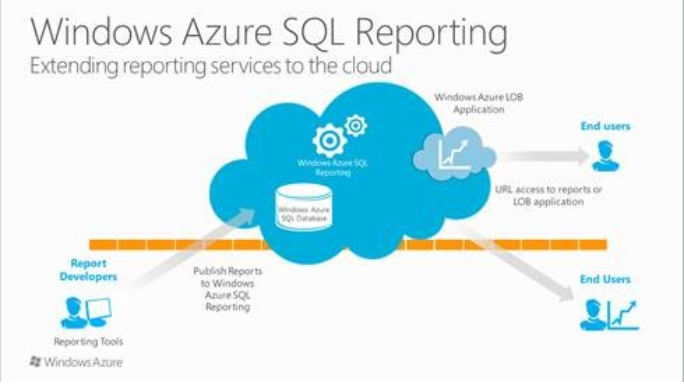
    On June 13 Microsoft released the Windows Azure SQL Reporting. Now the name is official and replaces the SQL Azure Reporting Services. Here is a screen image from one of Microsoft's Advertisment.


    Now developers can build reports on Azure using familiar tools such as BI Development Studio and SQL Server Data Tools. Creating reports will be no different from the way on-premises reports are authored. SQL Reporting on Azure provides consistent APIs for viewing, managing and executing reports. It also provides for rich formatting, data visualization and exporting reports in a variety of formats.

    These features (Elastic scale and high availability; and secure access)t has already attracted customers to implement this service such as Fujitsu and Biobest (an agriculture based business).

    The good news is it is free to use till August 1, 2012 after which you get charged. You need to have an account on Azure to utilize this service.

    More details here: http://blogs.msdn.com/b/microsoft_business_intelligence1/archive/2012/06/12/announcing-windows-azure-sql-reporting-general-availability.aspx

    For Reporting Services, I recommend my popular book here:


    For getting the ins and outs of SQL Azure I recommend my comprehensive book here:


    You want to develop front-end with SQL Azure, look no further. Here is a link to my book which is somewhat weighted for data access:
    Mahalo

    Jay (mysorian)

    Friday, September 2, 2011

    SQL Express 2011 on the horizon

    Presently it is Denali CTP3 Express from none other than Microsoft. A lightweight edition of Denali CTP3 which will eventually be released as SQL Server 2011 Express (I guess) like the other express editions of this great software. This is a 'made for web developers and asp.net developers" edition and make sure you download and enjoy working with it.
    From the MSDN link here, http://msdn.microsoft.com/en-us/evalcenter/hh230763.aspx you can download Denali CTP3 Express edition which takes you to https://www.microsoft.com/betaexperience/pd/SQLDENEXPPRE/enus/ where you can make your choices as to version and language. Of course you need to register. The options are the same and one of the choices includes the tools as well.
    The top features from the MSDN site are copied over here:
    • Same database engine as other versions of SQL Server.
    • Supports 10 GB of storage per database.
    • Backup and restore with ease.
    • Compatible with all editions of SQL Server and SQL Azure.
    • Designed to work with Visual Studio and ASP.NET.
    • Available with a graphical management tool.
    • Offers reporting capabilities, full-text search, and spatial support.
    What else do you need to test drive exccept the will?

    Monday, July 4, 2011

    Review of my SQL Azure book from a SQL Azure developer

    Anton Staykov (http://www.staykov.net) was a frequent visitor to the SQL Azure Forum when SQL Azure appeared on the web. Anthony is a Microsoft MVP from Bulgaria. I was also a frequent visitor trying to learn from others about SQL Azure. Recently, I saw his review of my book (http://blogs.staykov.net/2011/03/sql-azure-enterprise-application.html) which described some positive aspects of my book. He was kind enough to permit me to reproduce his review to the visitors of my blog.
    Here it follows:

    SQL Azure: Enterprise Application Development reviewed
    "As I blogged earlier this year, there are two books on Windows Azure from Packt publishing. I was personally involved as technical reviewer with one of them, and now I am sharing my feedback on the second.
    Microsoft SQL Azure: Enterprise Application Development, is the second one from the "Azure" series. Published right after the "Microsoft Azure: Enterprise Application Development" the book is the perfect complement to it. Reading Microsoft SQL Azure, you will learn the basics of cloud services (i.e. what is a Cloud, what types of clouds are there and who are the big players). You will, of course catch up with Windows Azure, as it is briefly described, in case you missed the "Microsoft Azure" book.
    Focusing on the SQL Azure service it self, the book covers all the steps required for you to leverage a cloud based RDMS. All the information you find there is well structured and accompanied with good number of screenshots and sample SQL statements. You will not miss any of the features delivered from SQL Azure. All the answers are there – what is the security model of SQL Azure; how to connect and execute queries against the cloud (how to use Sql Server Management Studio); how can you use Sql Server Integration Services (a.k.a. SSIS) and what are the limitations; how to sync your cloud data with on-premise data; what are the tools supported by SQL Azure; and more and more questions and answers. I could hardly find a question for SQL Azure that this book does not answer!
    I would highly recommend this book as a complement to the "Microsoft Azure: Enterprise Application Development". These two books are the complete guide to develop application for the Microsoft's Cloud! "

    It is still not too late you may enter the raffle and win a hard copy or a eBook. Just send an email to mysorian@gmail.com with SQL Azure in the subject line.

    Sunday, January 23, 2011

    New article on the SQL Azure 'Houston' Project

     Read this 'How-to' article on the Packt Site.


    The 'Houston' project was one of the incubation projects of the windows Azure cloud services. This project has entered into production and you will find it in the new Windows Azure Portal (https://windows.azure.com). All New services can be accessed from the 'Ribbon' under Common Tasks.


    This article is about the 'Houston' project when it was still in incubation. You can still access the labs portal(http://www.sqlazurelabs.com/). In this article some of the features of this web based tool as well as how carry out few of the basic tasks are described. Houston project provided the following basic database management tasks:

    •Authoring and executing queries
    •Designing and editing database schema
    •Editing table data

    Readers are encouraged to read my comprehensive book on SQL Azure.  Also you may enter a raffle to win a copy of the book.


    Monday, December 6, 2010

    Regarding my book on SQL Azure

    I hope my latest book "Microsoft SQL Azure Enterprise Application Development" which should be available in a couple of days appeals to the readers as much as my two other books on Microsoft BI. This book covers most of the changes that took place between the CTP and the updates in October 2010. Even as I am writing this post it must be undergoing more changes, a fact that may take away the shine from what is written in the past. Notwithstanding, the core ideas do not change; what changes perhaps are, a few more modified screens; a new UI; and some additional hooks. The more profound changes will be totally new elements that gets added to product with time and that is the time for yet another book.

    I take this opportunity to record my sincere thanks to, Microsoft Corporation for evaluation software and allowing me to participate in their events including the boot camps; the third party vendors for evaluation copy of their cloud related software and to Neudesic for giving me a chance to attend their boot camp. I am benefited immensely with my association with the Microsoft MSDN and TECHNET forums and I am thankful for the many forum participants and the moderators for helpful suggestions and answering some of my questions.

    Here are the chapter titles of the new book:

    1. Cloud Computing and Microsoft Azure Services    Platform
    2. SQL Azure Services
    3. Working with SQL Azure Databases from Visual  Studio 2008
    4. SQL Azure Tools
    5. Populating SQL Azure Databases
    6. SSIS and SSRS applications using SQL Azure
    7. Working with Windows Azure Hosting
    8. Database applications on Windows Azure Platform    accessing SQL Server
    9. Synchronizing SQL Azure
    10.Recent Developments

    Some of the details of what you can learn copied from Packt Site is reproduced here:

    •  An easy to understand briefing on Microsoft Windows Azure Platform Services
    •  Connect to SQL Azure using Microsoft SQL Server Management Studio
    •  Create and manipulate objects on SQL Azure using different tools
    •  Master the different types of Cloud offerings
    •  Access SQL Azure through best practices using Client and Server API’s in VB and C# and using hosted services with user authentication Windows Azure
    •  Learn how to populate the SQL Azure database using various techniques
    •  Create Business Intelligence Applications using SSIS and SSRS
    •  Synchronize databases on SQL Azure with on-site enterprise and compact SQL Servers
    •  Learn how to write an application to access on-site data from a cloud hosted service
    •  Get a comprehensive briefing on various updates that have been made to SQL Azure and the projects still in incubation
    •  Understand the future and evolving programs such as the Houston Project, OData Services, Sync Services, and more built to support SQL Azure and transform it into a global enterprise data platform

    Tuesday, August 31, 2010

    Hook up with SQL Azure using Microsoft LightSwitch

    Jump start on Microsoft's latest RAD developmental tool - the Microsoft LightSwitch.It is still in Beta but looks very cool. You have data sources and screens. Hook them up and you are done. It has screens that are representative of most of the likely usage scenarios such as searching, point to parent and all the children show up, edit data, etc. You hardly need to write code for most of the common business use. In case you want to write code, you could. There are lot of events to which you can hook up code. I used VS 2010 Express and some coding is limited but I understand with a better VS versio you can do a lot more.
    Before you do the big things get a head start knowing about this interface. Read this article and jump start on LightSwitch.
    Start here and if you have a problem send me an email

    Thursday, June 3, 2010

    MS ACCESS finds a home on SQL Azure

    My wish has been finally granted and MS Access can now have a footing on SQL Azure. 3499 views and 37 replies back and forth has finally provided a solution. Blog entries and forum participation work after all.

    How this got started may be found here.

    Tuesday, May 11, 2010

    phpBB brings interoperability with SQL Servers on Windows OS

    One of the bastions of LAMP has arrived at Windows OS with full regalia . This highlights two facts, firstly Microsoft's increasing willingness to accept PHP despite the rich flora and fauna of .NET technology; secondly the world got that much larger with ability to fork out in other directions. It is not just because Microsoft is nice, but because PHP user-base is large and sky is the limit for the cloud. Most importantly it is free.

    There are a number of databases including SQL Server 2000 and abvee that this driver can configure connections. The list of databases that is supported is in the read me file.
    Where to get phpBB3?
    It may be downloaded from here.[http://www.phpbb.com/]

    Installation basic steps:
    1. Unpack the zip file and place it in the root directory of your web server or a directory accessible by the web server. In my case (Windows 7), I have used C:\inetpub\wwwroot. Make sure you make the config.php altered to have write permission.

    2. After you have done this, assuming your IIS7 is working, browse to the index.php in the web folder from within the IIS 7 console as shown.


    You should see the following web page:


    Now click on Install button and on the displayed page click Proceed to next. In the displayed page scroll down on the right to see if you have a game waiting. Looks like I have both MySQl and SQLServers. Actually I have at least 3 or 4 SQL Servers on this machine. Too bad it did not recognisze by SQL Anywhere server.
     

    Well you can also use an ODBC connection.
    I believe this can connect to SQL Azure on Windows Azure as well.

    When Identity Security Becomes a Wall — Not a Shield

    After a breach that forced a reset of my digital identity, I hit a roadblock I never anticipated: multi-factor authentication (2FA) locked m...