Tuesday, April 17, 2012

Hodentek moves to Hawaii

Aloha,

After spending some 20 years in the Garden State Hodentek moved out in October 2010. From October to February it was trying to find a new home. During this time Hodentek was in Bengaluru, India, the great software capital in India.
Finally Hodentek arrived in Hawaii in February 2012 and the last few posts were made from Honolulu, Hawaii.

I hope my readers continue to read my posts and give their valuable feedback.

Mahalo,
Jayaram Krishnaswamy

Tuesday, September 13, 2011

SQL Server Database Project with SSDT

SQL Server Developer Tool also known as SSDT is a new Microsofft Tool debuting with Denali which is in CTP3. You need to install 'Juneau' to take advantage of this tool in Visual Studio. My previous post did not use the SQL Server Database project which was targeting DENALI but only previous versions. LocalDB is a feature of Denali which is to SQL Server as Cassini (the localhost in Visual Studio web applications) is to IIS.
Visual Studio 2010 does support LocalDB provided the new SQL Server Developer Tool (SSDT) is installed. After installing SSDT you need to create a SQL Server Database project as shown.


The SQL Server Database that is used within the project is the LocalDB. Here you can call up the table designer using Add Table as shown.

Sunday, September 11, 2011

LocalDB table design in VS 2010 SP1

LocalDB is a feature of Denali CTP3 SQL Server Express. While you can connect to LocalDB, a file based database file, the designer data designer which is invoked from Data | Add New shown below does not support creating objects in SQL Server versions beyond SQL Server 2008 within the VS 2010.


It is interesting however; one can create database objects in SQL Server Express 2011 (presently Denali CTP3 Express) as seen in this image.


One can conclude therefore that VS 2010 SP1 needs some kind of upgrade before it can provide UI support for designing database objects in LocalDB.

Or

The LocalDB has to be created directly in the application that uses the application instance of this database and not via the the connection in the Server Explorer.

Note added 9/14/2011
The upgrade that is needed is to install SSDT with the present code name 'JUNEAU'

Friday, September 2, 2011

SQL Express 2011 on the horizon

Presently it is Denali CTP3 Express from none other than Microsoft. A lightweight edition of Denali CTP3 which will eventually be released as SQL Server 2011 Express (I guess) like the other express editions of this great software. This is a 'made for web developers and asp.net developers" edition and make sure you download and enjoy working with it.
From the MSDN link here, http://msdn.microsoft.com/en-us/evalcenter/hh230763.aspx you can download Denali CTP3 Express edition which takes you to https://www.microsoft.com/betaexperience/pd/SQLDENEXPPRE/enus/ where you can make your choices as to version and language. Of course you need to register. The options are the same and one of the choices includes the tools as well.
The top features from the MSDN site are copied over here:
• Same database engine as other versions of SQL Server.
• Supports 10 GB of storage per database.
• Backup and restore with ease.
• Compatible with all editions of SQL Server and SQL Azure.
• Designed to work with Visual Studio and ASP.NET.
• Available with a graphical management tool.
• Offers reporting capabilities, full-text search, and spatial support.
What else do you need to test drive exccept the will?

Tuesday, August 9, 2011

Link to be bookmarked if you are using SQL Servers

You often come across a problem in your interaction with SQL Servers and you may often wonder where to go for help. This link gives you a list of other links that points in the right direction. Google, Bing or Yahoo search may ultimately lead you to the correct place, but why not look this one up first.

Build error related to SQL Express in Microsoft LightSwitch

The following message still shows up sometimes while creating and building Microsoft LightSwitch applications. This has not been rectified in the recently released RTM version as seen in the next paragraph.
.....................
Error    1    An error occurred while establishing a connection to SQL Server instance '.\SQLEXPRESS'.
Failed to generate a user instance of SQL Server due to a failure in starting the process for the user instance. The connection will be closed.    C:\Program Files\MSBuild\Microsoft\VisualStudio\LightSwitch\v1.0\Microsoft.LightSwitch.targets    157    10    BusinessTypeTest
.................................

However a work around exists which works very well. Here is the work around as suggested by Steven Hoag in his forum post.

  • Stop SQL Express from Control Panel
  • Close all LightSwitch apps
  • Move to the following location:
C:\Users\jay\AppData\Local\Microsoft\Microsoft SQL Server Data\SQLEXPRESS
  • Delete all the files in the SQLEXPRESS Folder.

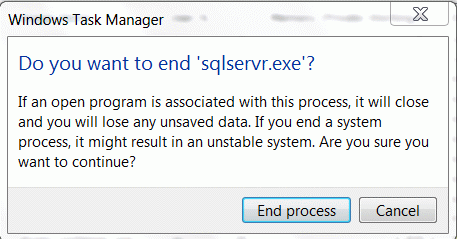
However when you come to the step of deleting the files you may still get an error, that the files are being used by the SQL Server (despite the fact that you stopped SQL Express in the Control Panel).

To remove them go to the task master (Ctrl+Alt+Del) and bring up the WindowsTask Master window as shown.


Click End Process.


Click End Process for sqlserver.exe in the next window.


Now you can delete all files in the SQLExpress folder

After this start SQLEXPRESS and the previous application which threw the error should build without this error.

Tuesday, August 2, 2011

SQL Azure - July 2011 Service Release

In order to improve performance and scaling an update is in process spanning all the global data centers. The upcoming enhancements are not released but will be announced towards the end of the year. This is an important release as it targets the underlying engine. It is also important as it provides a common ground for SQL Azure and the near future release of SQL Server 11 - presently known with the code name  'Denali'.

The new release will support multiple data base administrators (Ye! Windows Azure is not going taking away your jobs, you just need to upgrade your skills). Also much better support for spatial data types making it a perfect fit for location aware apps both mobile and immobile.

The one thing that needs to be done on your side is the following: you should get hold of the latest version of SQL Server Management Tools, because the version number will change. Many users of lower versions might have already noted this while trying to connect to 'Denali' from older versions. The links to get the latest updates available in SQL Server 2008 R2 SP1 are:

    * SQL Server Management Studio (http://www.microsoft.com/download/en/details.aspx?displaylang=en&id=26727)
    * SQL Server Management Studio Express(http://www.microsoft.com/download/en/details.aspx?displaylang=en&id=26729)

If you are using SMO (SQL Server Management Objects) then you should get the
Cumulative Update package 7 for SQL Server 2008 R2                                                              (http://support.microsoft.com/kb/2507770)
When all is said and done your version of SSMS should have a version greater or equal to 10.50.1777.0 in order not to have connectivity issues.

This one is for SSMS that came with SQL Server 2008 R2: No good!


This one is for SSMS installed when CTP1 'Denali' was installed:


Clearly if I use the above I should not have any connectivity problems.

If you are a DBA trying to upgrade your skills to understand SQL Azure, my book is a must read. You could get a free copy by sending an email to me at mysorian@gmail.com with 'SQL Azure' in the subject line. Who knows you may be lucky and get a book or a ebook in the raffle.

When Identity Security Becomes a Wall — Not a Shield

After a breach that forced a reset of my digital identity, I hit a roadblock I never anticipated: multi-factor authentication (2FA) locked m...