Showing posts with label SSDT. Show all posts

Wednesday, August 17, 2016

Update your SQL Server Data Tools to the latest

SQL Server Data Tools is a modern development tool which can be used to build:

SQL Server Relational DBS
Azure SQL Databases
Integration Service Packages
Analysis Services Models
Reporting Services Reports


You can, not only build you can also deploy SQL Server content with same ease as you do in Visual Studio. If you already have Visual Studio 2015 Community installing SSDT will add full set of SQL Server tools into existing Visual Studio. If there is no Visual Studio, a shell Visual Studio programe will be installed which will have only SQL Server related BI templates.

You will have a stirling exprience if you all ready have Visual Studio 2015 Community which happens to be free as well. This is highly recommended.

This post is related to the July 7, 2016 update. The new version is 14.0.60812.0.

Here are the older versions on my computer:


SSDT_01

If you already have Visual Studio 2015 Community, you will have received a notification which will show the updates available for you as shown:


SSDT_00

Just hit the Update button and you will be taken to the download URL. If you do not have Visual Studio 2015 Community and you want a copy of SSDT just follow this link.(https://msdn.microsoft.com/en-us/library/mt204009.aspx)

Details of SSDT installation are at this link including links for the .ISO Images and other details:
https://msdn.microsoft.com/en-us/mt186501

The ISO images are available in several languages as well.
Portuguese (Brazil)
https://go.microsoft.com/fwlink/?LinkID=824661&clcid=0x416
Chinese (PRC)
https://go.microsoft.com/fwlink/?LinkID=824661&clcid=0x804
German
https://go.microsoft.com/fwlink/?LinkID=824661&clcid=0x407
English (United States)
https://go.microsoft.com/fwlink/?LinkID=824661&clcid=0x409
Spanish
https://go.microsoft.com/fwlink/?LinkID=824661&clcid=0x40a
French
https://go.microsoft.com/fwlink/?LinkID=824661&clcid=0x40c
Italian
https://go.microsoft.com/fwlink/?LinkID=824661&clcid=0x410
Japanese
https://go.microsoft.com/fwlink/?LinkID=824661&clcid=0x411
Korean
https://go.microsoft.com/fwlink/?LinkID=824661&clcid=0x412
Russian
https://go.microsoft.com/fwlink/?LinkID=824661&clcid=0x419
Chinese (Taiwan)
https://go.microsoft.com/fwlink/?LinkID=824661&clcid=0x404

Supported Operating Systems are:

Windows 10 (x86 and x64)
Windows 8, 8.1 (x86 and x64)
Windows 7 SP1 (x86 and x64)
Windows Server 2012 (x64), R2 (x64)
Windows Server 2008 R2 SP1 (x64)

Wednesday, September 30, 2015

SQL Server Data Tools for Visual Studio 2013

There are several options for SQL Server Data Tools depending on the version of Visual Studio as described here.

For this post we are using a Toshiba Laptop running Windows 7 (64-bit) Ultimate having a Visual Studio Express 2013 for Web which is one of the requirements in the following list:
  • Visual Studio 2013 Professional,
  • Ultimate,
  • Premium,
  • Express for Web, or
  • Express for Windows Desktop
You can download the tool here:
https://msdn.microsoft.com/en-us/dn864412

You will need approximately 1.8GB of free space at for the full install point because it includes all possible components that might be required.

You have an option for the language to choose from:


SSDT_01
Choose language and download (English here).

You double click the downloaded program SSDTSetup.exe to begin installation.


SSDT_02

Accept the license terms to proceed.
The download and installation begins immediately.


SSDT_03
It may take a while to download and install.


SSDT_04

After installation you can find Visual Studio 2013 Data Tools as shown.


SSDT_05

A number of items will be added to your Control Panel Programs as shown.


SSDT_06
You can verify it in Visual Studio 2013 Express for web also as shown.


SSDT_07

How do you create SQL Server Projects using the SSDT?
Hints for creating projects:
Launch VS 2013 Web (for example)
Create New Project choosing SQL Server Project Template
Associate a SQL Server Database for the project by directly connecting to SQL Server; choosing to run a script or via a data-tier application

In the next post we look at using SQL Server Data Tools in Visual Studio 2013 Express for Web.

Saturday, February 21, 2015

Creating a Microsoft SQL Server Integration Services using SSDT in SQL Server 2012

This post describes creating a SQL Server Integration Services using SSDT that installs with the installation of SQL Server 2012

SQL Server  Data Tools(SSDT) installs when you install SQL Server 2012 (even the SQL Server 2012 Express edition). SSDT has all the necessary project templates to start a Business Intelligence project. However it will not have the templates for other language projects such as C#, VB.NET etc.
 
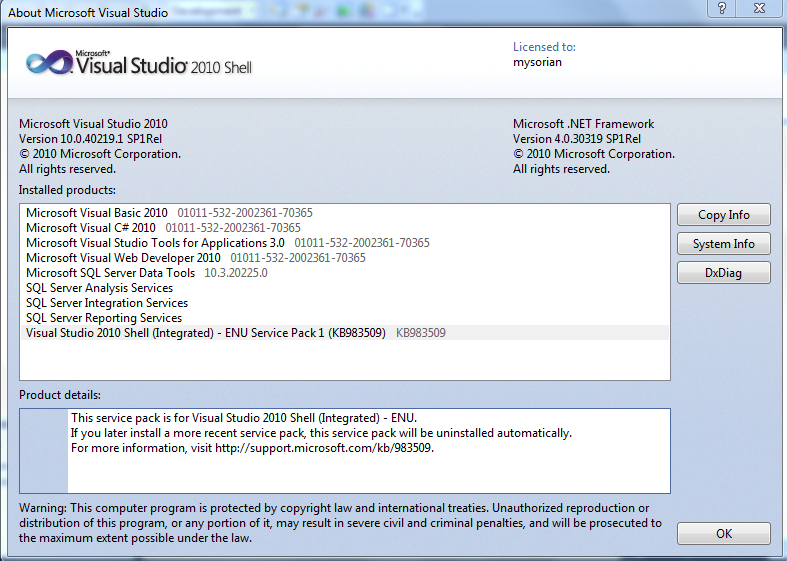
Launch SSDT from its short cut in All Programs. Review the details fo the Visural Studio Shell from File | About Microsoft Visual Studio. The following window will be displayed for Visual Studio 2010 Shell. The programs not available are all greyed out but you can that all the BI related programs are enabled.


SSIAProj01

The Start page gives you access to create a New Project, Open a project and it also lists out the Recent Projects that you can bring up as shown.

SSIAProj02

Click New Project to create a new project. The New Project window opens. Expanding the Business Intelligence node reveals all the BI related projects that you can create including the Integration Services project as shown. Note that the .NET Framework 4.0 is needed.
SSIAProj03

Click on Integration Services..Business Intelligence ant change project name to August. The default that comes up is Interation Services Project1 as shown.
SSIAProj04

A project is a container to develop Integration Services packages. Integration Services manages packages deployed to Microsoft SQL Servers Databases or SSIS Package stores. Integration Services is only available in SQL Servers. Once deployed to the Integration Services servers, the projects are managed by T-SQL and Stored Procedures in the SQL Server Management Studio.
The project may contain all the files needed for an ETL operation (Extraction, Transformation and Load).  The next figure shows the Solution Explorer for a project named August4.

SSIAProj05

SSIS 2012 is based on a project unlike the earlier version which was Package based.
Right click August 4 to access the project properties page as shown (the Common Properties node).
SSIAProj06

The Configuration properties in the debugging mode are as shown here:
SSIAProj07

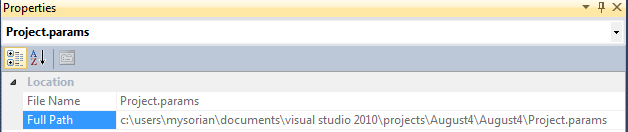
The Project.params is an XML file persisted to the hard drive as shown.

SSIAProj08

SSIAProj09

The XML file has the following entry:

SSIAProj10

Connection Managers folder is a container for connection managers used in the project.

Similarly, the SSIS Packages is a container of SSIS Packages and presently it has the default package Package.dtsx. It can be renamed to a custom name of user’s choice.

Miscellaneous is a folder for other project related items.

Package Properties
 
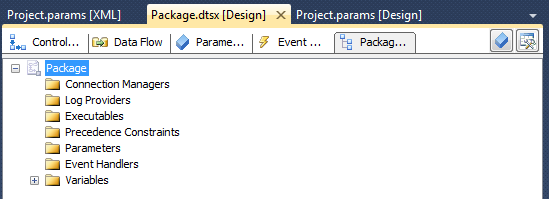
The following components constitute a package and the tabbed pages under Package.dtsx gives access to them as shown. The Package Explorer shows the various folders associated with the Package as shown.

SSIAProj11

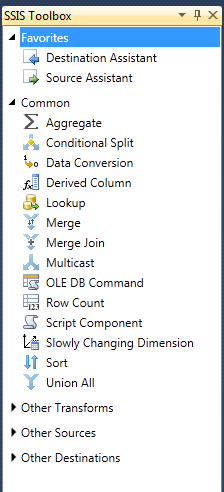
At the right extreme is the SSIS Toolbox. If the Toolbox items are not visible this button can be used to make them visible.  The Toolbox components should be visible when any of the Control Flow, Data Flow or Event Handlers pages are active.
The next figure shows the Toolbox items available.

 
Control Flow
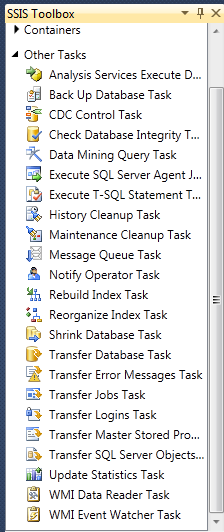
List of tasks available, under ‘Other Tasks’ in the Toolbox, with Control Flow page tab is clicked.


SSIAProj12

The tasks under  Favorites, Common and Containers with the Control Flow Page active are shown.

SSIAProj13
 

Favorites and Common folders contain the following Components:

SSIAProj14

The ‘Other Transforms’ folder contains the following components:

SSIAProj15

The components in the ‘Other Sources’ and ‘Other Destinations’ are as shown here.
SSIAProj16

You may note that the SQL Server Integration Services in 2012 is much more feature rich with enhancements  when compared to its first time debut in SQL Server Integration Services in SQL Server 2005.

However, the methodology of creating packages follow very similar lines as before.

For a very exhaustive description of the Visual Studio IDE for the 2005 version is available in my book here:


You can buy this book here:
https://www.packtpub.com/networking-and-servers/beginners-guide-sql-server-integration-services-using-visual-studio-2005

or from  Amazon

http://www.amazon.com/Beginners-Server-Integration-Services-Visual-ebook/dp/B005CG8IKQ/ref=asap_bc?ie=UTF8


Tuesday, July 22, 2014

July 2014 Update to SQL Server Data Tools

Latest release of SQL Server Data Tools(SSDT) is now available here:

http://msdn.microsoft.com/en-us/data/hh297027

This update is now available for Visual Studio 2012 and 2013

Instead of the above link you can also get it from inside Visual Stuido 2012 via Tools -> Extensions and Updates->Updates.

What's new in this:
Of course more bug fixes and some of the following enhancements:
  • Schema Compare update
         Added MSBuild support for Schema Compare with text and XML output.  A blog post is    available with more information.
  • Improved Windows Azure SQL Database node in the Server Explorer
        Added Token-based authentication using a Microsoft account (MSA) or organizational account (OrgId)
        Added supported for VS2012
  • Improved (Parallel Data Warehouse) PDW support
       PDW tooling is now part of the Microsoft Visual Studio Express 2013 for Windows Desktop SKU.  This requires the VS 2013 Update 2 or later to be installed
      Support for PDW appliance updates in both VS2012 and VS2013

Also read:
http://brianwmitchell.com/2013/11/sql-server-to-pdw-migration-whitepaper/

SSDT for SQL Server 2014 here:
http://hodentek.blogspot.com/2014/03/sql-server-data-tools-to-go-with-sql.html

SSDT BI_Templates here:
http://hodentek.blogspot.com/2013/10/ssdt-bi-templates-for-sql-server-2012.html

SSDT Web Site:
http://msdn.microsoft.com/en-us/data/tools.aspx

Thursday, February 7, 2013

Want to know more about SSDT?


I personally think Microsoft made a mess of this SSDT installation. It's really more confusion than anything else. The SSDT download is included as a project type with a name that can be stored. It's either a project or not a project. if it is it should not be a download.
In the shell that downloads with SQL Server 2012 Enterprise (Eval) which is supposed to have all features:
Product Info:
Microsoft SQL Server Integration Services Designer
Version 11.0.2100.60
Installed products:
Microsoft Visual Studio 2010
Version 10.0.40219.1 SP1Rel
Microsoft .NET Framework
Version 4.5.50709 SP1Rel
Installed Version: IDE Standard
Microsoft Visual Basic 2010 01011-532-2002361-70264
Microsoft Visual Basic 2010
Microsoft Visual C# 2010 01011-532-2002361-70264
Microsoft Visual C# 2010
Microsoft Visual Studio Tools for Applications 3.0 01011-532-2002361-70264
Microsoft Visual Studio Tools for Applications 3.0
Microsoft Visual Web Developer 2010 01011-532-2002361-70264
Microsoft Visual Web Developer 2010
Hotfix for Visual Studio 2010 Shell (Integrated) - ENU (KB2548139) KB2548139
This hotfix is for Visual Studio 2010 Shell (Integrated) - ENU.
If you later install a more recent service pack, this hotfix will be uninstalled automatically.
For more information, visit http://support.microsoft.com/kb/2548139.
Hotfix for Visual Studio 2010 Shell (Integrated) - ENU (KB2549864) KB2549864
This hotfix is for Visual Studio 2010 Shell (Integrated) - ENU.
If you later install a more recent service pack, this hotfix will be uninstalled automatically.
For more information, visit http://support.microsoft.com/kb/2549864.
Hotfix for Visual Studio 2010 Shell (Integrated) - ENU (KB2635973) KB2635973
This hotfix is for Visual Studio 2010 Shell (Integrated) - ENU.
If you later install a more recent service pack, this hotfix will be uninstalled automatically.
For more information, visit http://support.microsoft.com/kb/2635973.
Security Update for Visual Studio 2010 Shell (Integrated) - ENU (KB2645410) KB2645410
This security update is for Visual Studio 2010 Shell (Integrated) - ENU.
If you later install a more recent service pack, this security update will be uninstalled automatically.
For more information, visit http://support.microsoft.com/kb/2645410.
SQL Server Analysis Services
Microsoft SQL Server Analysis Services Designer
Version 11.0.2100.60
SQL Server Integration Services
Microsoft SQL Server Integration Services Designer
Version 11.0.2100.60
SQL Server Reporting Services
Microsoft SQL Server Reporting Services Designers
Version 11.0.2100.60
Visual Studio 2010 Shell (Integrated) - ENU Service Pack 1 (KB983509) KB983509
This service pack is for Visual Studio 2010 Shell (Integrated) - ENU.
If you later install a more recent service pack, this service pack will be uninstalled automatically.
For more information, visit http://support.microsoft.com/kb/983509.
So, what does the SSDT shortcut under Microsoft SQL Server 2012 bring up?
Analysis Services Project
Reporting Services Project
Integration Services Project
SQL Server Project which is realy not a project but points to a SSDT download (can it be any more confusing than this!!)
A Silverlight template (C# and VB) for WCF RIA Services Class Library and a Silverlight line of business application.


------------------------------------------------------------------------------------------------------------
In Visual Studio 2012 Ultimate (x64) what we have is:
Microsoft Visual Studio Ultimate 2012
Version 11.0.51106.01 Update 1
Microsoft .NET Framework
Version 4.5.50709
Installed Version: Ultimate
Architecture and Modeling Tools 04940-004-0036005-02064
Microsoft Architecture and Modeling Tools

UML® and Unified Modeling Language™ are trademarks or registered trademarks of the Object Management Group, Inc. in the United States and other countries.
LightSwitch for Visual Studio 2012 04940-004-0036005-02064
Microsoft LightSwitch for Visual Studio 2012
Office Developer Tools 04940-004-0036005-02064
Microsoft Office Developer Tools
Team Explorer for Visual Studio 2012 04940-004-0036005-02064
Microsoft Team Explorer for Visual Studio 2012
Visual Basic 2012 04940-004-0036005-02064
Microsoft Visual Basic 2012
Visual C# 2012 04940-004-0036005-02064
Microsoft Visual C# 2012
Visual C++ 2012 04940-004-0036005-02064
Microsoft Visual C++ 2012
Visual F# 2012 04940-004-0036005-02064
Microsoft Visual F# 2012
Visual Studio 2012 Code Analysis Spell Checker 04940-004-0036005-02064
Microsoft® Visual Studio® 2012 Code Analysis Spell Checker
Portions of International CorrectSpell™ spelling correction system © 1993 by Lernout & Hauspie Speech Products N.V. All rights reserved.
The American Heritage® Dictionary of the English Language, Third Edition Copyright © 1992 Houghton Mifflin Company. Electronic version licensed from Lernout & Hauspie Speech Products N.V. All rights reserved.
Visual Studio 2012 SharePoint Developer Tools 04940-004-0036005-02064
Microsoft Visual Studio 2012 SharePoint Developer Tools
NuGet Package Manager 2.0.30625.9003
NuGet Package Manager in Visual Studio. For more information about NuGet, visit http://docs.nuget.org/.
PreEmptive Analytics Visualizer 1.0
Microsoft Visual Studio extension to visualize aggregated summaries from the PreEmptive Analytics product.
SQL Server Data Tools 11.1.21208.0
Microsoft SQL Server Data Tools
Web Developer Tools 1.0.30710.0
Microsoft Web Developer Tools contains the following components:
Page Inspector: Tool that offers an efficient way to decompose Web Applications and diagnose front-end issues.
Web Publishing: Extensions required for Web Publishing for both hosted servers as well as on premises.
Web Form Templates: Includes the default templates for Web Form Applications.
Editor Extensions: Includes HTML, CSS, and JS editor extensions that greatly enhance the development experience.
So, What does Vs2012 Ultimate have by way of BI?
There is suddenly a Reports Application (I have not tried)
Of course there are the Report Viewer Controls you can use (Windows and Web)
A Sql Server Database Project template (this I suspect is part of the SSDT as originally meant)
As you pointed out you need both SSDT as well as VS2012 Pro and above.


Mahalo

Friday, January 4, 2013

Regarding the SQL Server 2012 Developer Training Kit

If the answer is yes, I recommed that you download immediately the SQL Server 2012 Developer Training Kit. This can be installed from here:
http://www.microsoft.com/en-us/download/details.aspx?id=27721


Before you install the KIT you need to install the Web Platform Installer 4.0. You can get it from the same link. Read the previous post here for installing Web PI 4.0: http://hodentek.blogspot.com/2012/12/you-can-get-lots-of-stuff-from-web.html

Note that the KIT's executable may not necessariloy show up in WEB PI4.0!!

When you run the Kit related exe (http://download.microsoft.com/download/D/0/9/D098DCF2-1888-4624-920B-B2DE71B2728F/SQL2012DevTrainingKit.WebInstaller.exe) file you will download the kit.


On this computer it was installed in the default folder "C:\Program Files\Microsoft\Web Platform Installer\WebPlatformInstaller.exe". Note that you have to allow Activex on your IE and you may get this warning, better pay attention to it and enable it.


When you run this program you will find the default.htm, the starting point of your journey.
C:\SQL2012UpdateForDevsTrainingKit\Default.htm

Default.htm opens out like this. You can learn a lot, not just DBA, but also development and of course BI.


Good luck.

Aloha from Honolulu

Saturday, December 15, 2012

December Update to SSDT

In December 2012 SSDT got updated. Here are some details:

If you are planning to use Visual Studio 2012 you are better off installing the December 2012 update. The December 2012 update to SSDT relates to what you have on your computer in terms of Visual Studio version.

1. If you already have Professional, Ultimate or Premium Edition of Visual Studio 2012 and agreed to install SSDT during installation then the machine will have an earlier version of SSDT. This update will replace the version with the latest.

2. If you do not have Visual Studio Professional or above SSDT will install the Visual Studio 2012 Integrated Shell. This Shell perform very much like the BIDS in the past and you will not be able to do programming as it neither include any Visual Studio programming languages such as VB or C# nor does it support the various types of projects that you can create with the non-shell, full versions of Visual Studio Professional and above. This December update updates the functionality of Express SKUs of Visual Studio 2012. The following are the improvements over the previous version:

Database Unit Testing

Integration of SSDT Power Tools

Updated Data-Tier Application Framework

Bug fixes


If Visual Studio Professional or above is present, SSDT will be integrated with the existing VS program. However SP1 must be manually installed before installing the update.

If VS Professional or above SSDT is not present SSDT installs only the Visual Studio 2010 Integrated Shell. SP1 must first be installed before installing the SSDT (However when the blogger used the web installer the SP1 was already in place). The shell as the name suggests contains only SSDT related items and does not include programming languages such as VB and C#.
Program installed in July 2012 using web installer

The following are the improvements over the previous version:

Database Unit Testing

Integration of SSDT Power Tools

Updated Data-Tier Application Framework

Bug fixes


The platforms that support the updated SSDT are:

Windows Vista SP2 or above

Windows 7 SP1 or above

Windows 8 RTM

Windows Server 2008 SP2 or above

Windows Server 2008 R2 SP1 or above

You can download SQL Server data tools for Visual Studio 2012 from this link:


Additionally you can get an ISO image or download SSDTSetup.exe to create an administrative install point if there is no internet access. For details visit the previous link.

Sunday, September 11, 2011

LocalDB table design in VS 2010 SP1

LocalDB is a feature of Denali CTP3 SQL Server Express. While you can connect to LocalDB, a file based database file, the designer data designer which is invoked from Data | Add New shown below does not support creating objects in SQL Server versions beyond SQL Server 2008 within the VS 2010.


It is interesting however; one can create database objects in SQL Server Express 2011 (presently Denali CTP3 Express) as seen in this image.


One can conclude therefore that VS 2010 SP1 needs some kind of upgrade before it can provide UI support for designing database objects in LocalDB.

Or

The LocalDB has to be created directly in the application that uses the application instance of this database and not via the the connection in the Server Explorer.

Note added 9/14/2011
The upgrade that is needed is to install SSDT with the present code name 'JUNEAU'

When Identity Security Becomes a Wall — Not a Shield

After a breach that forced a reset of my digital identity, I hit a roadblock I never anticipated: multi-factor authentication (2FA) locked m...