Wednesday, September 26, 2012

New service update for Azure SQL database

In a recent update to the Azure SQL database service the following features were added:
  • Support for linked servers-
  • Distributed Queries against the database-local & Azure databases
  • Support recursive triggers
  • Support for DBCC Show_Statistics
Firewall configuration at database level (previously at Server level)-You get better control
Firewalls can be set up at the portal or through T-SQL-makes life easier.
If you want to look at earlier service updates you can find them in my book:


Links to linked server, distributed queries etc. here,

MySQL Linked Server | Jayaram Krishnaswamy

jayaramkrishnaswamy.sys-con.com/node/1060191
Aug 4, 2009 – Jayaram Krishnaswamy is a technical writer, mostly writing articles that are related to the web and databases. He is the author of SQL Server ...

MS Access Linked Server, comparing providers | Jayaram ...

jayaramkrishnaswamy.sys-con.com/node/1004765Cached
Jun 16, 2009 – In this article on SSWUG.org web site, the MSDASQL OLE DB ODBC driver is compared with Microsoft Jet 4.0 as related to creating a linked ...


Microsoft Jet or MSDASQL for Linked Servers? | Jayaram ...

https://jayaramkrishnaswamy.ulitzer.com/node/1064612Cached
Aug 7, 2009 – Jayaram Krishnaswamy is a technical writer, mostly writing articles that are related to the web and databases. He is the author of SQL Server ...

Latest Articles in the Category SQL

dotnetslackers.com/articles/sql/?page=1&sort=2Cached
Jayaram Krishnaswamy, May 21, 2009. Views: 18,484 Avg Rating: 0/5 Votes: 0 Comments: 0. This article explains how to set up a Postgres linked server on SQL ...


Creating a linked Postgres Server on SQL Server 2008

dotnetslackers.com › Recent Articles › SQLCached - Similar
... on SQL Server 2008. Published: 21 May 2009. By: Jayaram Krishnaswamy. This article explains how to set up a Postgres linked server on SQL Server 2008.


MySQL Linked Server on SQL Server 2008 | Packt Publishing

www.packtpub.com › Articles › .NETCached - Similar
by Jayaram Krishnaswamy | August 2009 | .NET Microsoft. Linking servers provides an elegant solution when you are faced with running queries against ...


Monday, August 6, 2012

August 2, 2012: SQL Saturday at Honolulu


Guys here in Honolulu are serious and proactive when it comes to SQL Server. They had the
SQL Saturday event two days ahead of Saturday on 8/2/2012. The event was held at the Honolulu Community College.

This PASS event was organized locally by the Pacific Center for Advanced Technology Training.
These were the talks delivered at the event:

SQL Server 2012 EIM (SSIS, DQS, and MDS) at intermediate level was delivered by Matt Hollingsworth of Microsoft. He gave a reasonably good demo of data cleansing using all of the three tools. He barely touched on Project Barcelona (new data lineage and impact analysis) still under wraps.

Rushabh Mehta of SolidQ gave talks on:
A beginner level Introduction to Data Quality Services (DqS)
An intermediate lelvel introduction to Master Data Management
and
SSIS 2012 Management Considerations and Best Practices

I only attended the 3rd talk which was very good. Lots of enhancements to SSIS since I published my book on SSIS.


Matt gave two other talks:
Building a BI Semantic Model for Power View
SQL Server 2012 Always On Enhancements

I have not dabelled with SharePoint but Wen He of eWorld gave two talks on
Reporting Nirvana -SQL 2012 and SharePoint 2010
Self_service BI with SharePoint

Power View rhymes with Power Point!

I attended the first one which was reasonably good.

There was also a lunch break vendor talk from Nimble Storage. The talk was around Nimble Storage Solutions, I only caught the last bit.


Friday, June 15, 2012

Now SQL Server Reporting Services is on Azure

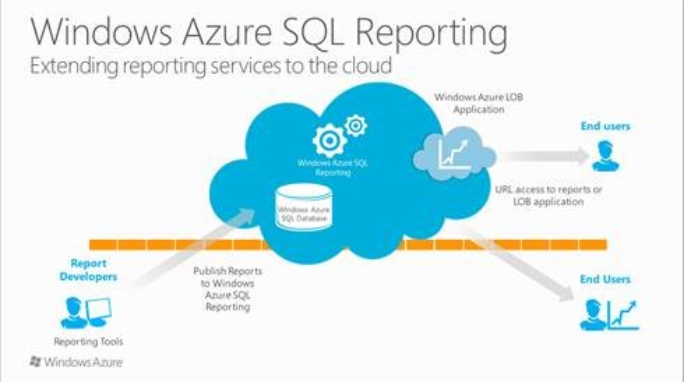
On June 13 Microsoft released the Windows Azure SQL Reporting. Now the name is official and replaces the SQL Azure Reporting Services. Here is a screen image from one of Microsoft's Advertisment.


Now developers can build reports on Azure using familiar tools such as BI Development Studio and SQL Server Data Tools. Creating reports will be no different from the way on-premises reports are authored. SQL Reporting on Azure provides consistent APIs for viewing, managing and executing reports. It also provides for rich formatting, data visualization and exporting reports in a variety of formats.

These features (Elastic scale and high availability; and secure access)t has already attracted customers to implement this service such as Fujitsu and Biobest (an agriculture based business).

The good news is it is free to use till August 1, 2012 after which you get charged. You need to have an account on Azure to utilize this service.

More details here: http://blogs.msdn.com/b/microsoft_business_intelligence1/archive/2012/06/12/announcing-windows-azure-sql-reporting-general-availability.aspx

For Reporting Services, I recommend my popular book here:


For getting the ins and outs of SQL Azure I recommend my comprehensive book here:


You want to develop front-end with SQL Azure, look no further. Here is a link to my book which is somewhat weighted for data access:
Mahalo

Jay (mysorian)

Sunday, May 13, 2012

LocalDB management using SQLLOCALDB


Sql Server Express 2012 the latest free version of SQL Server from Microsoft has five options of download from a small foot print version (SQL Express 2012 LocalDB or simply LocalDB) to the full  version with all bells and whistles. The product comes in both (32  bit) and (x64bit) versions in several European and Asian Languages.

  LocalDB, an embeddable small foot print version of SQL Server Express ideal for learning as well as providing backend support for desktop,  web, and small server applications is also installed when you choose  to install "SQL Server Express 2012 with tools". In this article the  installation of SQL Server Express 2012 with tools and moreusing the  sqllocaldb executable to administer the LocalDB is described.

Read the full article here,


http://www.sswug.org/articlesection/default.aspx?TargetID=63070

Saturday, May 12, 2012

Microsoft Carnival at Packt Publishing


This is a different kind of carnival not the one in Rio de Janeiro that takes place around February each year.


This is Packt's Microsoft Carnival. You can buy the latest books related to Microsoft's ground breaking software from the best of the breed (with great humility I add myself to this group) authors at great bargains.


Packt Publishing brings to you an exciting choice of discounts for Microsoft books and e-books. They have slashed their prices by 30%, go crazy and make the most of this Carnival before it ends…

* Buy any Microsoft print book from below and get 20% off
* Buy any Microsoft e-book from below and get 30% off
* Buy PacktLib subscription and get 10% off

Wednesday, April 25, 2012

Managing LocalDB installed with SQL Server Express 2012

The article Installing SQL Server Express 2012 and managing the LocalDB, discusses in detail with a number of screen shots the installing of SQL Server Express 2012 with tools (x64) on a Toshiba Satellite P775 Laptop computer (x64 bit). The article goes on to describe how to manage LocalDB using the SQLLOCALDB utility.

You may access this article on 5/11/2012 here:
http://www.sswug.org/

Note added on 5/14/2012
The article is published,
http://hodentek.blogspot.com/2012/05/sql-server-express-2012-and-localdb.html

Tuesday, April 17, 2012

Do you want to access SQL Server 2012 from LINUX?


Present day data originates from all kinds of devices from hand held devices to mega data centers and it is not always homogeneous even from a single enterprise. The reality is that more often heterogeneous data from disparate systems needs to be consumed whether it is data from enterprise sites or from cloud based data sources. Interoperability tools make life easier to deal with this multifaceted data.

  • Connectivity to data is the first thing that you need to take care of and in case you are accessing data on SQL Server 2012 from your LINUX box you need a connector and SQL Server 2012 provides the SQL Server ODBC Driver (v1.0) for LINUX. This release provides ODBC to support 64-bit Red Hat Enterprise Linux 5 and 6 and tools such as SQLCMD and BCP. You need to download this here.


  • ADO.NET Backward compatibility would be provided by Windows 8 but to have this now and leverage AlwaysON and SQL Server Express LocalDB support you need to apply an update for the Microsoft .NET Framework 4.0 you pick up from here.


  • Connecting to SQL Servers from Java applications was provided by JDBC Drivers. The Microsoft JDBC Driver 4.0 now provides you with the following:

*Access data on SQL Server and SQL Azure from Java Applications
*Pure Java Implementation of Kerberos Integrated Security
*SQL Server AlwaysOn feature
*Support for SQL Server Parallel Datawarehouse
*Easy access to diagnostic info in extended events log
*Support for UTF-16
*SQL Azure support
Of course you need to download the following here.

Check out my SQL Azure book to find out how Java applications connect to SQL Azure

  • A new SQL Server 2012 Native Client (with tasty acronym-Snac) consisting of a single driver (dll) which combines both a SQL Server OLE DB provider (hey! I thought this was being sent to oblivion) and an ODBC driver to connect to SQL Servers that ships with SQL Server 2012. It supports all the great features such as SQL Server Express 2012 LocalDB, AlwaysOn etc. Download this text file which lists all the features that you can have and the links from where you can get them. SQL Server Native Client 2012 is one of the features which you can install.


  • PHP is another language that enjoys wide popularity and of course Microsoft does not want to leave out this very important language. For PHP applications to work with SQL Servers you need a helper. The Microsoft PHP Driver (version 3.0) provides this important support and you may want to download it from here.


While support for Java and PHP applications were available in earlier versions including SQL Azure, these new versions will be able to support all the new features of SQL Server 2012 discussed earlier like AlwaysOn, SQL Server Express 2012 LocalDB, etc.

If you want to learn everything about connecting securely to SQL Azure you may want to take a look at my book on SQL Azure. If you want to create front end applications with data on different versions of SQL Servers you may want to take a look at my book on Microsoft Lightswitch.

Of course my books on SSRS and SSIS will provide a strong background when you work with Business Intelligence projects with SQL Servers. BI, Interoperability and Cloud is all the rage in coming years!


When Identity Security Becomes a Wall — Not a Shield

After a breach that forced a reset of my digital identity, I hit a roadblock I never anticipated: multi-factor authentication (2FA) locked m...