Showing posts sorted by relevance for query SQLite. Sort by date Show all posts

Saturday, September 17, 2016

SQLite using Visual Studio Community 2015 Update 3

SQLite is a relational database well suited for mobile applications.

SQLite was described in a previous post here. As the Internet of Things is the trending area on the Internet, SQLite with its no administration feature is well suited. It is also the relational database for smart devices, cell phones, TVs, cameras etc. If you want fast and reliable data provider than SQLite is recommended. The other option which is gaining in importance and a HTML5 feature supported by many browsers is the IndexedDB. IndexedDB is not relational.

sqlite_00

You can download SQLite from here:

http://sqlite.org/download.html

There are many options depending on your operating system. These are the options for Windows alone.
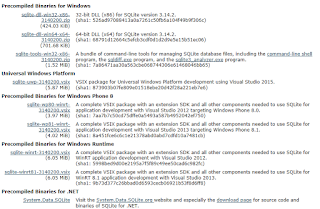
sqlite_01

Connecting/Accessing SQLite from Visual Studio 2015 Community (herein VS for short).

SQLite has no GUI for its management and VS is well suited.

Launch Visual Studio 2015 Community (Update 3 used here).

From Tools click on Extensions and Updates.

Well I seem to have installed the  SQL Server Compact/SQLite toolbox

sqlite_02

Indeed, I can see the SQL Server Compact/SQLite Toolbox as shown. However I see only (SQL Server Compact 4.0) database.


sqlite_03

Right click Data Connections to display the menu as shown.


sqlite_04

Click Add SQLite Connection to open the detailed window for adding a SQLite Connection as shown.


sqlite_05a

I try to Browse for one and It is looking for the shown file types in the default location.


sqlite_05

I try to create one assuming that this toolbox  interface allows me to create. I click the Create... button in the Add SQLite Connection window shown earlier.

It seems to create the file in this directory.

C:\Users\Jayaram\Documents\Blog2015\HodentekMSSS2015\DownloadedPrograms\C#\CSWindowsStoreAppAccessSQLServer\AccessSQLService\bin\System.Data.SqlServerCe.Entity

I choose a different directory (C:\Users\Jayaram\Documents\Blog2016\HodentekMSSS2016\SQLite) with a file name, Sept17-2016) as shown.


sqlite_06

I try to test the connection and it looks like it succeeded. But I do not see all the information except for the few shown in the next image.


sqlite_07

I click OK and close the window. The SQLite connection I created gets added to the Data Connections.


sqlite_08

I expand the Sept17-2016.db file and I see the following default objects (all empty): Tables, Views and Triggers


sqlite_09

Come back to this blog for more on SQLite.


SQLite using Visual Studio Community 2015 Update 3

SQLite is a relational database well suited for mobile applications.

SQLite was described in a previous post here. As the Internet of Things is the trending area on the Internet, SQLite with its no administration feature is well suited. It is also the relational database for smart devices, cell phones, TVs, cameras etc. If you want fast and reliable data provider than SQLite is recommended. The other option which is gaining in importance and a HTML5 feature supported by many browsers is the IndexedDB. IndexedDB is not relational.
sqlite_00

You can download SQLite from here:

http://sqlite.org/download.html

There are many options depending on your operating system. These are the options for Windows alone.

sqlite_01

Connecting/Accessing SQLite from Visual Studio 2015 Community (herein VS for short).

SQLite has no GUI for its management and VS is well suited.

Launch Visual Studio 2015 Community (Update 3 used here).

From Tools click on Extensions and Updates.

Well I seem to have installed the  SQL Server Compact/SQLite toolbox

sqlite_02

Indeed, I can see the SQL Server Compact/SQLite Toolbox as shown. However I see only (SQL Server Compact 4.0) database.


sqlite_03

Right click Data Connections to display the menu as shown.


sqlite_04

Click Add SQLite Connection to open the detailed window for adding a SQLite Connection as shown.


sqlite_05a

I try to Browse for one and It is looking for the shown file types in the default location.


sqlite_05

I try to create one assuming that this toolbox  interface allows me to create. I click the Create... button in the Add SQLite Connection window shown earlier.

It seems to create the file in this directory.

C:\Users\Jayaram\Documents\Blog2015\HodentekMSSS2015\DownloadedPrograms\C#\CSWindowsStoreAppAccessSQLServer\AccessSQLService\bin\System.Data.SqlServerCe.Entity

I choose a different directory (C:\Users\Jayaram\Documents\Blog2016\HodentekMSSS2016\SQLite) with a file name, Sept17-2016) as shown.


sqlite_06

I try to test the connection and it looks like it succeeded. But I do not see all the information except for the few shown in the next image.


sqlite_07

I click OK and close the window. The SQLite connection I created gets added to the Data Connections.


sqlite_08

I expand the Sept17-2016.db file and I see the following default objects (all empty): Tables, Views and Triggers


sqlite_09

Come back to this blog for more on SQLite.


Saturday, March 18, 2017

Querying a SQLite database using the RSQLite Package

SQLite is a server-less SQL Database that does not require a separate server process. You do not need a configuration (Zero configuration) and it does not need any administration. The whole database is stored in a single cross-platform disk (or on your mobile device). It is very popular and widely used with mobile applications as the database is stored in the device and can be used without network connection. No external dependencies.

RSQLite is a R Package that is useful in manipulating a SQLite database. The Package can be downloaded from on of the CRAN mirrors. The one I got was from a mirror in France.
When you install the package you will be installing the following:


Packages.png

The RSQLite package has a built-in database with many tables called datasets db which is actually a file called datasets.sqlite.

In a previous post I described in detail creating a SQLite database table  using Visual Studio 2015 Community and an extension. The database created has an extension .db.

SQLite database can be extension .db or .sqlite. The database created using the Visual Studio 2015 called Sept27-2016.db was renamed Sept27-2016.sqlite.

After installing the package you can run the following code in RGUI to connect to the database created using Visual Studio by indicating the path to the .db file as shown.

---------------------
library("RSQLite")
Warning message:
package ‘RSQLite’ was built under R version 3.2.5

> db <-dbConnect(SQLite(),dbname="C:\\Users\\Jayaram\\Documents\\Blog2017\\MSSS\\SQLite\\RSQLite\\Sept17-2016.sqlite")

> dbListTables(db)
[1] "Sept22"
>
---------------------
Once you get the table, you can query as shown:

> dbReadTable(db,"Sept22")
[1] Id    Fname LName Age 
<0 rows> (or 0-length row.names)
> dbGetQuery(db, "SELECT * from Sept22")
[1] Id    Fname LName Age 
<0 rows> (or 0-length row.names)
---------------
Here is the table created in Visual Studio 2015 which has no data in it at present.


Tuesday, April 10, 2018

Get the new version of SQLite

A new version of SQLite is available

SQLite 64-bit is an in-process library that provides you with a zero config, transactional database engine.

The latest version, SQLite 3.23.0(x64) is available for download from here:
https://www.filehorse.com/download-sqlite-64/SQLite

Features of SQLite from the above link listed here:

SQLite Features:
  • Transactions are atomic, consistent, isolated, and durable (ACID) even after system crashes and power failures.
  • Zero-configuration - no setup or administration needed.
  • Full SQL implementation with advanced features like partial indexes and common table expressions. (Omitted features)
  • A complete database is stored in a single cross-platform disk file. Great for use as an application file format.
  • Supports terabyte-sized databases and gigabyte-sized strings and blobs. (See limits.html.)
  • Small code footprint: less than 500KiB fully configured or much less with optional features omitted.
  • Simple, easy to use API.
  • Written in ANSI-C. TCL bindings included. Bindings for dozens of other languages available separately.
  • Well-commented source code with 100% branch test coverage.
  • Available as a single ANSI-C source-code file that is easy to compile and hence is easy to add into a larger project.
  • Self-contained: no external dependencies.
  • Cross-platform: Android, *BSD, iOS, Linux, Mac, Solaris, VxWorks, and Windows (Win32, WinCE, WinRT) are supported out of the box. Easy to port to other systems.
  • Sources are in the public domain. Use for any purpose.
  • Comes with a standalone command-line interface (CLI) client that can be used to administer SQLite databases.


However, if you are a Visual Studio user, you can get the SQLite for Universal Windows Platform from the Visual Studio Marketplace that you can access from within Microsoft Visual Studio 2017 Community as shown here.


Get to review all the SQLite posts on this blog here.

Sunday, April 15, 2018

Problem connecting to SQLite from a UWP app is still not solved

SQLite is the right relational database with zero configuration for mobile apps. There is a recipe in Microsoft documentation on using a SQLite database in a UWP app. This should be quite straight forward given a recipe but there are problems. Probably because of a plethora of versions of just about everything.

This post is not about a successful follow up of the recipe to its successful end, but steps in the way of achieving, trying to document as much as possible, firstly to find where things did not happen as expected, secondly to make sure it works, at least for me.

The computer is Windows 10 Version 1803, build 17133.73
SQLite for Universal Windows Platform added via Extensions and Update

The Solution for the app, UWPDataTest:

Universal Windows project-UWPDataTest
DataAccessLibrary -DataAccesLibrary


UWPDataTestPost_0

Microsoft.NETCore.UniversalWindowsPlatform used in the DataAccessLibrary(version 6.0.8)


UWPDataTestPost_2

Installed Microsoft.NETCore.UniversalWindowsPlatform


UWPDataTestPost_2a

DataAccessLibrary referenced in UWPDataTest


UWPDataTestPost_3

Using DataAccessLibrary in MainPage.xaml.cs


UWPDataTestPost_4

Using DataAccessLibrary in app.xaml.cs


UWPDataTestPost_5

DataAccess class made static.


UWPDataTestPost_6

Cannot add using Microsoft.Data.SQLite to class library. Data is not an option. If you add it and try to build you get build errors.


UWPDataTestPost_7
Build errors: DataAccessLibrary.dll could not be found. The DataAccessLibrary build has errors.


UWPDataTestPost_8.png

Error persists after upgrading the SQLite version from within VS Studio 2017.


UWPDataTestPost_9.png

Microsoft Visual Studio 2017 Community edition used.


UWPDataTestPost_10.png

I am not sure where the sqliteSample.db is in the computer. It does not seem to be present anywhere, although search is not guaranteed to work always.


UWPDataTestPost_11.png

The problem at present seems to be related to the absence of SQLite on the computer. Perhaps there is an independent source for the database.
Another possible source of error could be the Insiders Preview build may not support the SQLite added.


Sunday, June 21, 2015

The most popular relational SQL database


SQlite is a serverless SQL Database that does not require a separate server process. You do not need a configuration (Zero configuration) and it does not need any administration. The whole database is stored in a single cross-platorm disk (or on your mobile device). It is very popular and widely used with mobile applications as the database is stored in the device and can be used without network connection. No external dependencies.

SQLite as opposed to client/server relational database engines is serverless and it's use is indicated where efficency, reliability, independence and simplicity are required and it does not look for a shared repository. SQLite trasactions are fully ACID-compliant. SQLite supports most query languages that are SQL92 compliant and it is written in ANSI-C which provides simple APIs.

SQLite is available on Linux, Mac OS-x, Android, iOS and Windows 32, WinCE and WinRT platforms.

SQLite download from here:
http://sqlite.org/download.html
Read more here:

http://sqlite.org/

Saturday, April 21, 2018

ODBC Driver for the SQLite Databases x32bit and x64bit

The problem of creating an UWP with SQLite is still not settled.

Probably the SQLite ODBC driver will make way for more extensive use of this zero-configuration database. Now ODBC drivers are available to developers as posted earlier.

Please go to this site  to download your ODBC driver.

The current version are as described in my previous post. Download the one appropriate for you use:

LiteODBC_00

I downloaded the one shown here,


LiteODBC_0

You double click the executable show above to begin the installation.

Follow the wizard. Here are some screens shown for your guidance.


LiteODBC_1


LiteODBC_2

I chose the default folder.


LiteODBC_3


LiteODBC_4
As you may know Windows OS has two ODBC Data Source (x32) and (x64). You can verify that you find the driver in the (x64) version as shown here:


LiteODBC_5

Now you start using SQLite.

In the Install directory (in my case: C:\Program Files\SQLite ODBC Driver for Win64), you can find the ODBC Drivers for two versions,
SQLite 2.8.17 
 SQLite 3.22.0 .

When Identity Security Becomes a Wall — Not a Shield

After a breach that forced a reset of my digital identity, I hit a roadblock I never anticipated: multi-factor authentication (2FA) locked m...