Showing posts with label SQL. Show all posts

Wednesday, January 15, 2020

Get head start in Basic SQL at PCATT

A new session is going to start soon. Sign-up here.


Microsoft SQL Azure Database: SQL Server in Microsoft Cloud
Windows PowerShell for SQL Server


My sincere thanks and best wishes to my students in the previous meets of this course.

Friday, August 10, 2018

If you want to learn one programming language, it should be Python

Of course, you want the most popular and the most valuable.

According to the Institute of Electrical and Electronics Engineers (IEEE) , it is Python, the clear winner.

Here are the top ten in its rankings:


Why Python?

The answer appears to the fact that it iss now used for embedded applications and because it has beefed up its repertoire related to AI and Machine learning. It is for this reason R language (somewhat speccialized) has seen some decline.

Microsoft C# is still handing there at 5 and probably its place will be solid 5 for all types of programming - Web, desktop and Mobile. SQL is also there but does not show up as top 10 which is understandable given its area of usage.

Well here is the first 20. Find if your favorite is here


Well, you may want to know the basis for the ranking. You can get to know here.

You can find a lot of posts on R and Python on this site.


You can find a lot of Python and R posts in my blogs.

Tuesday, March 20, 2018

Hands-on Learning Event in Honolulu 1 : Introduction to Structured Query Language


Database skills are essential in whatever organization and in whatever position and it is crucial that you have this in your arsenal (Resume')
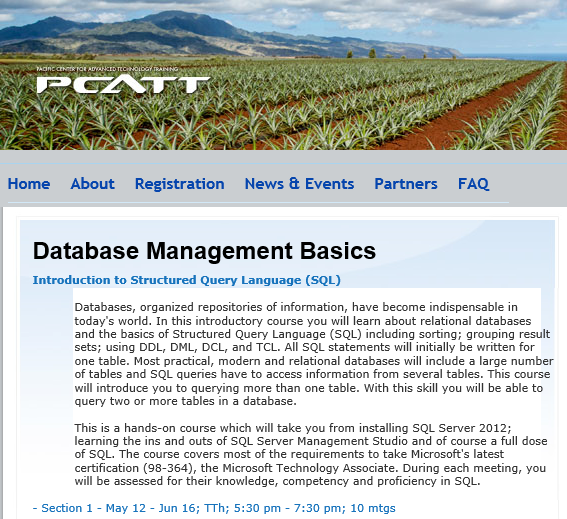
Databases, organized repositories of information, have become indispensable in today's world. In this introductory course you will learn about relational databases and the basics of Structured Query Language (SQL) including sorting; grouping result sets; using DDL, DML, DCL, and TCL. All SQL statements will initially be written for one table. Most practical, modern and relational databases will include a large number of tables and SQL queries have to access information from several tables. This course will introduce you to querying more than one table. With this skill you will be able to query two or more tables in a database.
This is a hands-on course which will take you from installing SQL Server 2016 to learning the ins and outs of SQL Server Management Studio and of course a full dose of SQL. The course covers most of the requirements to take Microsoft's certification (98-364), the Microsoft Technology Associate. During each meeting, you will be assessed for your knowledge, competency and proficiency in SQL.

What's new in this session:

SQL Server Using Powershell
JSON and XML

 Section 1 - Apr 24 - May 24; TTh; 5:30 pm - 7:30 pm; 10 meetings (Register Online)

Saturday, August 12, 2017

Sunday, July 23, 2017

Testing a comparison operator in an SQL Query?

Let us say we want to know if a variable x is greater or less than another variable y. How do we write a query to test it?

One way to do this is as follows:

declare @x int
set @x=5
declare @y int
set @y=10
    IF @x < @y
 print 1
    ELSE
 print 0

Sunday, June 4, 2017

Hands-on Learning Event in Honolulu 1 : Introduction to Structured Query Language


Course summary:

Databases - organized repositories of information have become indispensable. Knowledge of databases is a must for professionals and in fact even more relevant since the emergence of Big Data in today's world.

In this introductory course you will learn all about relational databases and the basics of Structured Query Language (SQL) including sorting; grouping result sets; using DDL, DML, DCL, and TCL. All SQL statements will initially be written for one table. Most practical, modern and relational databases will include a large number of tables and SQL queries have to access information from several tables. This course will then introduce you to querying more than one table. With this skill you will be able to query two or more tables in a database. This is a hands-on course which will take you from installing SQL Server 2016; learning the ins and outs of SQL Server Management Studio and of course a full dose of SQL. You will be both coding as well using Graphical User Interface during this training.

During each meeting the students will be assessed for their knowledge, competency and proficiency in SQL.


Databases, organized repositories of information, have become indispensable in today's world. In this introductory course you will learn about relational databases and the basics of Structured Query Language (SQL) including sorting; grouping result sets; using DDL, DML, DCL, and TCL. All SQL statements will initially be written for one table. Most practical, modern and relational databases will include a large number of tables and SQL queries have to access information from several tables. This course will introduce you to querying more than one table. With this skill you will be able to query two or more tables in a database.

This is a hands-on course which will take you from installing SQL Server 2012 to learning the ins and outs of SQL Server Management Studio and of course a full dose of SQL. The course covers most of the requirements to take Microsoft's certification (98-364), the Microsoft Technology Associate. During each meeting, you will be assessed for your knowledge, competency and proficiency in SQL.
Section 1 - Jul 6 - Aug 8; TTh; 5:30 pm - 7:30 pm; 10 mtgs (Register Online)

Microsoft SQL Azure Database: SQL Server in Microsoft Cloud
Windows PowerShell for SQL Server
SQL Server 2016


You may also contact the instructor: Dr. Jayaram Krishnaswamy at hodentek@live.com

Friday, August 19, 2016

Hands-on Learning Event in Honolulu 1 : Introduction to Structured Query Language

The above course will be offered again for the fourth time (Oct 4 - Nov 3, 2016) as a non-credit course by the Pacific Center for Advanced Technology Training.


Course summary:

Databases, organized repositories of information, have become indispensable. Knowledge of databases is a must for professionals and in fact even more relevant since the emergence of Big Data in today's world.

In this introductory course you will learn all about relational databases and the basics of Structured Query Language (SQL) including sorting; grouping result sets; using DDL, DML, DCL, and TCL. All SQL statements will initially be written for one table. Most practical, modern and relational databases will include a large number of tables and SQL queries have to access information from several tables. This course will then introduce you to querying more than one table. With this skill you will be able to query two or more tables in a database. This is a hands-on course which will take you from installing SQL Server 2016; learning the ins and outs of SQL Server Management Studio and of course a full dose of SQL. You will be both coding as well using Graphical User Interface during this training.

During each meeting the students will be assessed for their knowledge, competency and proficiency in SQL.

New this session:

Microsoft SQL Azure Database: SQL Server in Microsoft Cloud
Windows PowerShell for SQL Server
SQL Server 2016


My sincere thanks and best wishes to my students in the previous meets of this course.

Wednesday, March 9, 2016

Hands-on Learning Event in Honolulu 1 : Introduction to Structured Query Language

The above course will be offered again (April 14-May 17, 2016) as a non-credit course by the Pacific Center for Advanced Technology Training.


Course summary:

Databases, organized repositories of information, have become indispensable and in fact even more relevant despite the emergence of Big Data in today's world.

In this introductory course you will learn about relational databases and the basics of Structured Query Language (SQL) including sorting; grouping result sets; using DDL, DML, DCL, and TCL. All SQL statements will initially be written for one table. Most practical, modern and relational databases will include a large number of tables and SQL queries have to access information from several tables. This course will then introduce you to querying more than one table. With this skill you will be able to query two or more tables in a database. This is a hands-on course which will take you from installing SQL Server 2012; learning the ins and outs of SQL Server Management Studio and of course a full dose of SQL.

During each meeting the students will be assessed for their knowledge, competency and proficiency in SQL.

New this session:
SQL Azure Database: SQL Server in Microsoft Cloud
Windows PowerShell for SQL Server

My sincere thanks and best wishes to the January batch of students.

Sunday, November 8, 2015

SQL, CLR and SQLCLR

SQL is a language that is needed to run queries (post questions to) against SQL Server databases. It is not specific to Microsoft SQL Server. It can also be used with other databases like Oracle, Sybase, etc.

However Transact SQL (T-SQL) is the enhancement to add some programming capability to SQL. Each database vendor has his own database specific programming capability. For example PL/SQL is Oracle specific procedural programming capability on top of SQL.

Common Language Runtime is the programming that manages the execution of programs written in any of the supported languages such as C#, VB, Visual C++ etc to share common object orineted classes. Thiss is somewhat like Java Virtual Machine for programs run from Java. CLR is also called 'managed execution environment'. CLR is therefore related to .NET programming.

SQL Common Language Runtime (SQLCLR) is the combo technology (SQL Server and .NET) for hosting .NET common language runtime engine within SQL Server. In other words you can run managed code from within SQL Server.

Creating a Visual C++ CLR Console Application in Visual Studio 2015 go here.
http://hodentekhelp.blogspot.com/2015/08/how-do-you-create-visual-c-clr-console.html

Thursday, October 29, 2015

Get SQL Server 2016 CTP3 and work on SQL Server 2016 soon


SQL Server Team blog on 10/18/2015 announced the availability of SQL Server 2016 CTP3 besides quite a few others. This post is related to CTP2 only.

Microsoft has been very active in working on its database product SQL Server 2016 this year as seen in the number of posts. It is still in CTP but then it is not 2016 yet. These are the quoted kye words for this version,'faster transactions and queries, deeper insights on any device, advanced analytics, new security technology, and new hybrid cloud scenarios'.

http://hodentek.blogspot.com/2015/05/sql-serverr-2016-early-bird-special.html -5/13
http://hodentek.blogspot.com/2015/05/start-evaluating-sql-server-2016-ctp2.html -5/28
http://hodentek.blogspot.com/2015/07/sql-server-2016-ctp-21-is-ready-for.html -7/11
http://hodentek.blogspot.com/2015/07/upgrading-sql-server-2016-ctp-2-to-sql.html -7/11
http://hodentek.blogspot.com/2015/07/notes-2-sql-server-management-studio.html -7/13
http://hodentek.blogspot.com/2015/08/regarding-sql-server-2016-ctp-22.html -8/06
http://hodentek.blogspot.com/2015/09/download-sql-server-ctp-23-and-check.html -9/11

You can download from here after the sign in ritual.
https://www.microsoft.com/en-us/evalcenter/evaluate-sql-server-2016.
From the other links on the above site you can download the previous versions of SQL Servers(2014 SP1 and 2012 SP1; both evaluation versions valid for 180 days)

The stated benefits of the CTP3 are the following:
  •     Enhanced in-memory performance provide up to 30x faster transactions, more than 100x faster queries than disk based relational databases and real-time operational analytics
  •     New Always Encrypted technology helps protect your data at rest and in motion, on-premises and in the cloud, with master keys sitting with the application, without application changes
  •     Built-in advanced analytics– provide the scalability and performance benefits of building and running your advanced analytics algorithms directly in the core SQL Server transactional database
  •     Business insights through rich visualizations on mobile devices with native apps for Windows, iOS and Android
  •     Simplify management of relational and non-relational data with ability to query both through standard T-SQL using PolyBase technology
  •     Stretch Database technology keeps more of your customer’s historical data at your fingertips by transparently stretching your warm and cold OLTP data to Microsoft Azure in a secure manner  without application changes
  •     Faster hybrid backups, high availability and disaster recovery scenarios to backup and restore your on-premises databases to Microsoft Azure and place your SQL Server AlwaysOn secondaries in Azure
File formats are 64bit ISO or CAB. The installation is as usual except if you are using Microsoft Edge, you cannot save, you just run. However you do get an option to name a directory (with a default) to save extracted files.

Keep coming back to Hodentek and HodentekMSSS for more posts on SQL Server related information.

Monday, October 5, 2015

If you know SQL then SCOPE is easy

SCOPE is an acronym for Structured Computations Optimized for Parallel Execution, a declarative language for working with large-scale data. It is still under development at Microsoft. If you know SQL then working with SCOPE will be quite easy as SCOPE builds on SQL.
The execution environment is different from that RDBMS oriented data.
Data is still modeled as rows. Every row has typed columns and eveyr rowset has a well-defined schema. There is a SCOPe compiler that comes up with optimized execution plan and a runtime execution plan.

Look at this QCount query in SCOPE:

SELECT query, COUNT(*) AS count
FROM "search.log" USING LogExtractor
GROUP BY query
HAVING count > 1000
ORDER BY count DESC;
OUTPUT TO "qcount.result";


You probably know most and the rest you are able to guess.

In the above there is a built-in LogExtractor. You can get it step-by-step going line by line; each step output being the input of next step.

SCOPE requires a software platform for storing and analyzing massive amounts of data and Microsoft has one called 'Cosmos'. Here is graphic of SCOPE processing is carried out.

This post is based on the PDF document you will find here and the image is taken from the same PDF.

Monday, August 17, 2015

Hands-on Learning Event in Honolulu 1 : Introduction to Structured Query Language

The above course will be offered again as a non-credit course by the Pacific Center for Advanced Technology Training.

Course summary:
Databases, organized repositories of information, have become indispensable and in fact even more relevant despite the emergence of Big Data in today's world.
In this introductory course you will learn about relational databases and the basics of Structured Query Language (SQL) including sorting; grouping result sets; using DDL, DML, DCL, and TCL. All SQL statements will initially be written for one table. Most practical, modern and relational databases will include a large number of tables and SQL queries have to access information from several tables. This course will then introduce you to querying more than one table. With this skill you will be able to query two or more tables in a database. This is a hands-on course which will take you from installing SQL Server 2012; learning the ins and outs of SQL Server Management Studio and of course a full dose of SQL.

  During each meeting the students will be assessed for their knowledge, competency and proficiency in SQL.

New this session:
SQL Azure Database: SQL Server in Microsoft Cloud
Windows PowerShell for SQL Server


Schedule:
Sept 22 - Oct 22, 2015; Tuesdays and Thrusdays; 5:30 pm - 7:30 pm; 10 mtgs

Sunday, June 21, 2015

The most popular relational SQL database


SQlite is a serverless SQL Database that does not require a separate server process. You do not need a configuration (Zero configuration) and it does not need any administration. The whole database is stored in a single cross-platorm disk (or on your mobile device). It is very popular and widely used with mobile applications as the database is stored in the device and can be used without network connection. No external dependencies.

SQLite as opposed to client/server relational database engines is serverless and it's use is indicated where efficency, reliability, independence and simplicity are required and it does not look for a shared repository. SQLite trasactions are fully ACID-compliant. SQLite supports most query languages that are SQL92 compliant and it is written in ANSI-C which provides simple APIs.

SQLite is available on Linux, Mac OS-x, Android, iOS and Windows 32, WinCE and WinRT platforms.

SQLite download from here:
http://sqlite.org/download.html
Read more here:

http://sqlite.org/

Monday, May 11, 2015

Migarting from SQL to JSON using DocumentDB migration tool

Recently Microsoft made it easy to migrate data form certain sources to DocumentDB on Microsoft Azure. Review post here.

The following source data can be migrated to DocumentDB using the migration tool:
  • CSV file or files
  • JSON file or files
  • SQL
  • MongoDB
  • DocumentDB

  • This post shows how you may obtain response to your SQL query in JSON format using the migration tool.

    Although it seems it is not supported on Windows 8.1 from download documents, the present post was created using the DocumentDB run on a Windows 8.1 machine. The download details are here.

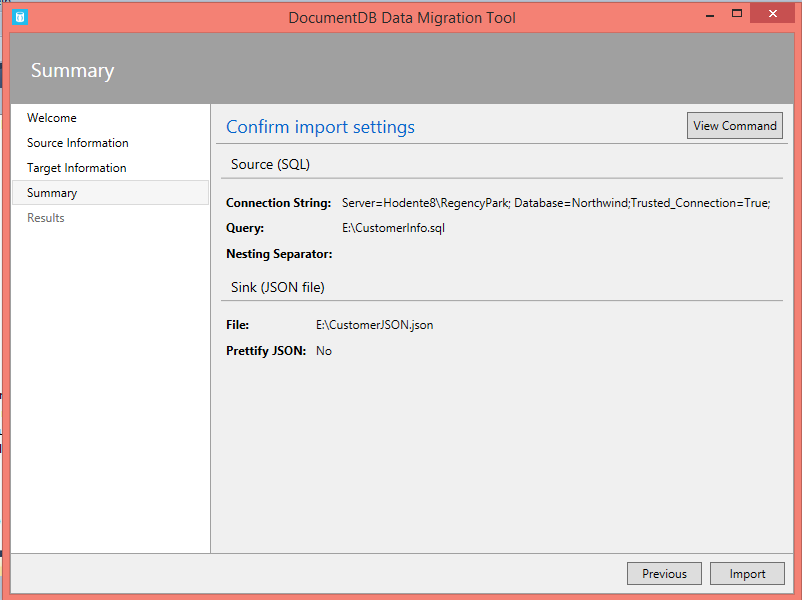
    The following steps show how the SQL response is obtained in JSON format, a format more suitable for Internet of Things.

    This screen shows up after launch

     
    Specifying source information. Source chosen here is SQL.

    Source of SQL is an instance of SQL Server 2012 on the local machine and the query is run against the Northwind database. The connection string is OK except it is case sensitive. Type it exactly as shown. Trying to get to read from a .sql file on the drive.


    Locating the file on the drive.

     
    Just before processing.

     
    Processing in progress.

     
    The above process failed.
    -------------------------------------
    New Process to import, this time providing a query as shown.

     
    Providing location for the response from processing.


    Details of processing.

    Processing completed, zero errors.

     
    Sample of response from the migration tool at the specified file location (only a small part is reproduced)
     
     
    SQL Comments are ignored.
     
    Happy migration!


    Friday, May 1, 2015

    Can Azure SQL Data Warehouse beat up Amazon's Red Shift?

    In recent times both Amazon.com and Microsoft have made bundles of cash with their cloud assets. Amazon had the advantage of being the first to get into action (2 years earlier) with Red Shift. In the Data Warehouse scenario Microsoft’s Azure SQL Data Warehouse and Red Shift are clear competitors.

    Now Scott Guthrie has challenged Amazon's Red Shift (http://aws.amazon.com/redshift/). According to Scott, Azure allows you to make adjustments to compute in just seconds that is beyond the capability of Red Shift.

    The other Azure capabilities are,
    • can pause/resume a cluster
    • can be turned 0ff so you only pay for storage
    • can be deployed and run from on premises
    Read more here:

    https://visualstudiomagazine.com/blogs/data-driver/2015/04/new-data-products.aspx
    http://sdtimes.com/microsoft-introduces-free-cross-platform-ide/2/

    Watch this Red shift video


    Tuesday, April 28, 2015

    Hands-on Learning Event in Honolulu: Introduction to Structured Query Language

    This was offered once in 2012 and once in the beginning of this year and was a total success. It is offered once again to those who could not make it.
    Please register at the PCATT.ORG site.

    New in 2015: You will also get an introduction to Windows PowerShell. SQL Server 2012 Express will be used.

    For details you can also write to:
    Hodentek@live.com with course name in the Subject line.

    Friday, April 17, 2015

    Can you use Windows Power Shell to find the login you created?

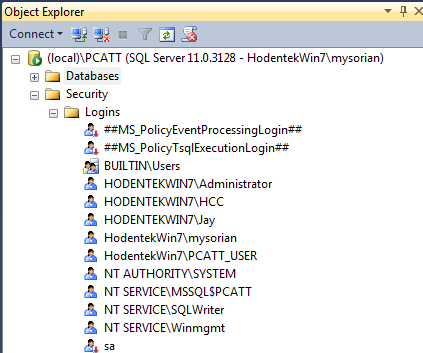
    In the previous post you created a login and verified using SQL Server Management Studio but you can also use Windows PowerShell to verify it.
    You can do it two-ways. Using Invoke-SQLCMD or use the SQL Server SQL provider -SQLPS

    Here are the logins for my instance named PCATT on my laptop Hodentek\Win7 for whim the administrator.


    I can use SQLPS after launching as follows:

     
    Or I can invoke SQLCMD via Window PowerShell's Invoke as shown here with some sample output:

    PS SQLSERVER:\> invoke-sqlcmd -ServerInstance '(local)\PCATT' -Query 'Select * from Sys.syslogins'| export-csv "C:\Users\Public\PCATTLogins"
    PS SQLSERVER:\>

    The following is a cutout of the PCATTLogins text file on Notepad.


    Monday, December 15, 2014

    Honolulu learning event: Basic SQL

    You are welcome to attend my course at the Pacific Center for Advanced Technology Training (PACTT). Please register at the PCATT.org site.

    Summary:

    Databases, organized repositories of information, have become indispensable in today's world. In this introductory course you will learn about databases and the basics of Structured Query Language (SQL) including sorting, distinct, and aggregate functions and grouping of data. All SQL statements will initially be written from one table. Most practical, modern and relational databases will include a large number of tables. SQL queries have to access information from several tables. This course will then introduce you to querying more than one table. With this skill you will be able to query two or more tables in a database. This is a hands-on course.


    New in 2015: You will also get an introduction to Power Shell.

    Dates: (Section 1) Section 1 - Feb 17 - Mar 12, 2015; TTh; 5:30 pm - 7:30 pm; 10 mtgs.
    Venue: Honolulu Community College;

    Note: SQL Server 2012 Express will be used and a knowledge of SQL Server is not assumed. Students will be using the free version.

    For details : Access http://pcatt.org/index.php/search and look up the course or write to:
    Hodentek@live.com with course name in the Subject line.

    Sunday, March 30, 2014

    SQL Training and SQL Server Reporting Services 2012 training in Honolulu

    These are the training schedules for the2nd Quarter of 2014 at the Pacific Center for Advanced Technical Training (PCATT). There are two courses that you may be interested in, it is recommended that they are taken in the order shown to reap maximum benefit.

    You can also access the reviews of the previous session in 2013 at the PCATT site.

    Introduction to Structured Query Language (SQL)


    SQL Server Reporting Services 2012: Native Mode Implementation

    Please register with  http://pcatt.org/registration    or send an email to gcerny@hawaii.edu

    When Identity Security Becomes a Wall — Not a Shield

    After a breach that forced a reset of my digital identity, I hit a roadblock I never anticipated: multi-factor authentication (2FA) locked m...