Showing posts with label OData. Show all posts

Friday, October 21, 2016

Progress DataDirect delivers open connectivity to cater to all of your needs

Progress DataDirect uses leading industry standards ODBC, ADO.NET, OLE DB, JDBC or OData. It connects to database; to an application or to your cloud data.


DataDirect_01

Here is a schematic of DataDirect Connectivity.


DataDirect_02

In its own words,
"Deliver your own fully branded open connectors built on a codebase that is certified across third party applications such as Tableau, Excel, Qlik, Spotfire, Alteryx, SSIS, IBM Cognos, SAP Business Objects, Informatica PowerCenter, Salesforce and more. You can also get run-time installers with our SDK for easy distribution to your customers
"
Looks like nothing is left out!


These are in more details for each of connectivity categories:
Connectivity to databases:
NoSQL, NewSQL, Graph, Object, Document
Multi-dimensional, OLAP
Data Pipelines
Modelling Multi tenant databases
Private DB clouds

Connectivity with Applications/Business Logic:
logic layer for ERP, CRM, marketing or finance systems
Data service layers (expose a common data model)
4GL languages such as ABL
Web Services (SOAP/REST)
In-memory analytics model

File based data stores:
C-ISAM, COBOL, BTree, CTree, XML, JSON
Data archives
Financial transaction message files
Log files
EDI messages

Download a trial and experience the thrill from here:
https://www.progress.com/trial-datadirect

Sunday, August 30, 2015

Managing relationships in Power BI

The previous version of Power BI did not correctly recognize pre-existing relationships in the tables when data was accessed from ODATA Service. The recent August 20 update works much better and was able to recognize relationships without a hitch.

This post is about accessing data from ODATA Service feed.

If you are not already having Power BI, you can access the same (review this file).

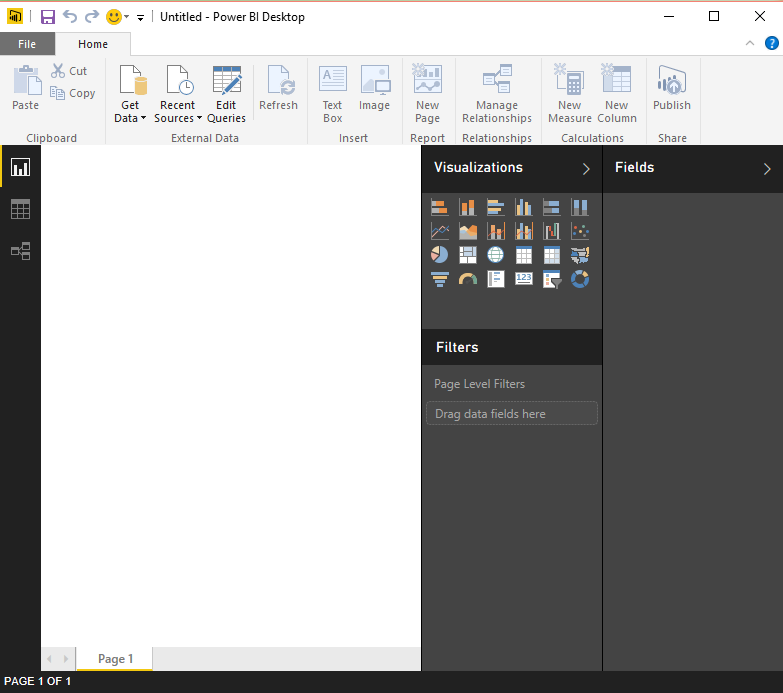
Launch Power BI and do not use the start screen. However, if you want to read about it, you can go on to the online resources. The following page will be open when you launch this application from its shortcut.


Odata_01.PNG

Click on Get Data to open the following:


Odata_02.PNG

From the drop-down list pick ODATA Feed and the following is opened. Enter the ODATA feed URL. This is a reference library feed from Odata.org and gives access to Northwind database as an OData Service.


Odata_03.PNG

Click OK. The Navigator appears on the left pane and the selected items are shown on the right pane taken one at a time. Presently nothing is selected.


Odata_04.PNG

You can chose one table or any number of tables from the tables in the left pane. When you select a table the data in the tables is displayed in the right pane as shown. My last item selected was the Products table and you see the data in the right pane. I have selected three tables for which I know beforehand that relationship between tables exists. Of course you can create relationships as well.

Odata_05.PNG

After selecting the tables click on Load and the tables are loaded as queries to the interface and you will see this transient screen providing some loading details.

Odata_06.PNG

After loading is complete, the screen changes to this. The tables appear as Fields in the Power BI's UI as shown.

Odata_07.PNG

Click on Manage Relationships in the main menu, the following page is displayed. The program has correctly recognized the existing relationships and marks them as active. These relationships can be managed by using the set of buttons in the above page, New | Autodetect..|Edit|Delete.

 Odata_08.PNG

Since it has already detected the existing relationships there is nothing to be discovered should you click Autodetect... as shown here.

 Odata_09.PNG

You can see how they are related graphically as seen here. Placing your cursor on the line joining the tables in the middle, displays how they are related.

Odata_11.png


Monday, December 6, 2010

Regarding my book on SQL Azure

I hope my latest book "Microsoft SQL Azure Enterprise Application Development" which should be available in a couple of days appeals to the readers as much as my two other books on Microsoft BI. This book covers most of the changes that took place between the CTP and the updates in October 2010. Even as I am writing this post it must be undergoing more changes, a fact that may take away the shine from what is written in the past. Notwithstanding, the core ideas do not change; what changes perhaps are, a few more modified screens; a new UI; and some additional hooks. The more profound changes will be totally new elements that gets added to product with time and that is the time for yet another book.

I take this opportunity to record my sincere thanks to, Microsoft Corporation for evaluation software and allowing me to participate in their events including the boot camps; the third party vendors for evaluation copy of their cloud related software and to Neudesic for giving me a chance to attend their boot camp. I am benefited immensely with my association with the Microsoft MSDN and TECHNET forums and I am thankful for the many forum participants and the moderators for helpful suggestions and answering some of my questions.

Here are the chapter titles of the new book:

1. Cloud Computing and Microsoft Azure Services    Platform
2. SQL Azure Services
3. Working with SQL Azure Databases from Visual  Studio 2008
4. SQL Azure Tools
5. Populating SQL Azure Databases
6. SSIS and SSRS applications using SQL Azure
7. Working with Windows Azure Hosting
8. Database applications on Windows Azure Platform    accessing SQL Server
9. Synchronizing SQL Azure
10.Recent Developments

Some of the details of what you can learn copied from Packt Site is reproduced here:

  •  An easy to understand briefing on Microsoft Windows Azure Platform Services
  •  Connect to SQL Azure using Microsoft SQL Server Management Studio
  •  Create and manipulate objects on SQL Azure using different tools
  •  Master the different types of Cloud offerings
  •  Access SQL Azure through best practices using Client and Server API’s in VB and C# and using hosted services with user authentication Windows Azure
  •  Learn how to populate the SQL Azure database using various techniques
  •  Create Business Intelligence Applications using SSIS and SSRS
  •  Synchronize databases on SQL Azure with on-site enterprise and compact SQL Servers
  •  Learn how to write an application to access on-site data from a cloud hosted service
  •  Get a comprehensive briefing on various updates that have been made to SQL Azure and the projects still in incubation
  •  Understand the future and evolving programs such as the Houston Project, OData Services, Sync Services, and more built to support SQL Azure and transform it into a global enterprise data platform

When Identity Security Becomes a Wall — Not a Shield

After a breach that forced a reset of my digital identity, I hit a roadblock I never anticipated: multi-factor authentication (2FA) locked m...