Showing posts with label SQL Server 2008 R2. Show all posts

Saturday, February 21, 2015

Creating a Microsoft SQL Server Integration Services using SSDT in SQL Server 2012

This post describes creating a SQL Server Integration Services using SSDT that installs with the installation of SQL Server 2012

SQL Server  Data Tools(SSDT) installs when you install SQL Server 2012 (even the SQL Server 2012 Express edition). SSDT has all the necessary project templates to start a Business Intelligence project. However it will not have the templates for other language projects such as C#, VB.NET etc.
 
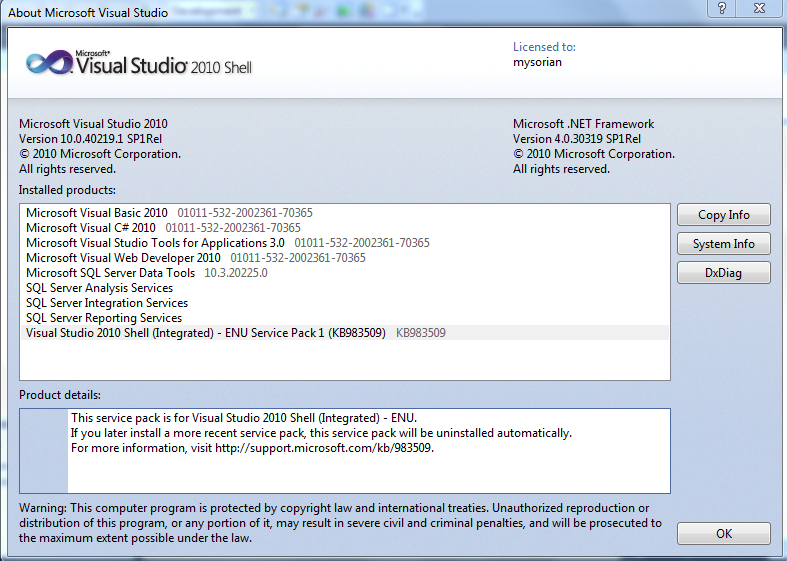
Launch SSDT from its short cut in All Programs. Review the details fo the Visural Studio Shell from File | About Microsoft Visual Studio. The following window will be displayed for Visual Studio 2010 Shell. The programs not available are all greyed out but you can that all the BI related programs are enabled.

SSIAProj01

The Start page gives you access to create a New Project, Open a project and it also lists out the Recent Projects that you can bring up as shown.

SSIAProj02

Click New Project to create a new project. The New Project window opens. Expanding the Business Intelligence node reveals all the BI related projects that you can create including the Integration Services project as shown. Note that the .NET Framework 4.0 is needed.
SSIAProj03

Click on Integration Services..Business Intelligence ant change project name to August. The default that comes up is Interation Services Project1 as shown.
SSIAProj04

A project is a container to develop Integration Services packages. Integration Services manages packages deployed to Microsoft SQL Servers Databases or SSIS Package stores. Integration Services is only available in SQL Servers. Once deployed to the Integration Services servers, the projects are managed by T-SQL and Stored Procedures in the SQL Server Management Studio.
The project may contain all the files needed for an ETL operation (Extraction, Transformation and Load).  The next figure shows the Solution Explorer for a project named August4.

SSIAProj05

SSIS 2012 is based on a project unlike the earlier version which was Package based.
Right click August 4 to access the project properties page as shown (the Common Properties node).
SSIAProj06

The Configuration properties in the debugging mode are as shown here:
SSIAProj07

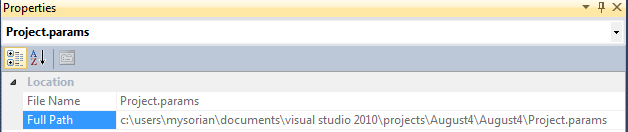
The Project.params is an XML file persisted to the hard drive as shown.

SSIAProj08

SSIAProj09

The XML file has the following entry:

SSIAProj10

Connection Managers folder is a container for connection managers used in the project.

Similarly, the SSIS Packages is a container of SSIS Packages and presently it has the default package Package.dtsx. It can be renamed to a custom name of user’s choice.

Miscellaneous is a folder for other project related items.

Package Properties
 
The following components constitute a package and the tabbed pages under Package.dtsx gives access to them as shown. The Package Explorer shows the various folders associated with the Package as shown.
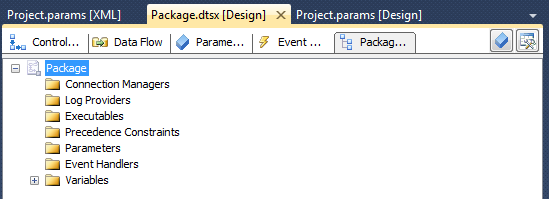
SSIAProj11

At the right extreme is the SSIS Toolbox. If the Toolbox items are not visible this button can be used to make them visible.  The Toolbox components should be visible when any of the Control Flow, Data Flow or Event Handlers pages are active.
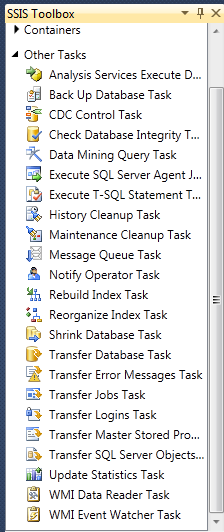
The next figure shows the Toolbox items available.

 
Control Flow
List of tasks available, under ‘Other Tasks’ in the Toolbox, with Control Flow page tab is clicked.

SSIAProj12

The tasks under  Favorites, Common and Containers with the Control Flow Page active are shown.

SSIAProj13
 

Favorites and Common folders contain the following Components:
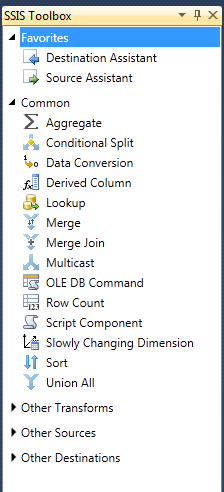
SSIAProj14

The ‘Other Transforms’ folder contains the following components:

SSIAProj15

The components in the ‘Other Sources’ and ‘Other Destinations’ are as shown here.
SSIAProj16

You may note that the SQL Server Integration Services in 2012 is much more feature rich with enhancements  when compared to its first time debut in SQL Server Integration Services in SQL Server 2005.

However, the methodology of creating packages follow very similar lines as before.

For a very exhaustive description of the Visual Studio IDE for the 2005 version is available in my book here:


You can buy this book here:
https://www.packtpub.com/networking-and-servers/beginners-guide-sql-server-integration-services-using-visual-studio-2005

or from  Amazon

http://www.amazon.com/Beginners-Server-Integration-Services-Visual-ebook/dp/B005CG8IKQ/ref=asap_bc?ie=UTF8


Monday, December 6, 2010

Regarding my book on SQL Azure

I hope my latest book "Microsoft SQL Azure Enterprise Application Development" which should be available in a couple of days appeals to the readers as much as my two other books on Microsoft BI. This book covers most of the changes that took place between the CTP and the updates in October 2010. Even as I am writing this post it must be undergoing more changes, a fact that may take away the shine from what is written in the past. Notwithstanding, the core ideas do not change; what changes perhaps are, a few more modified screens; a new UI; and some additional hooks. The more profound changes will be totally new elements that gets added to product with time and that is the time for yet another book.

I take this opportunity to record my sincere thanks to, Microsoft Corporation for evaluation software and allowing me to participate in their events including the boot camps; the third party vendors for evaluation copy of their cloud related software and to Neudesic for giving me a chance to attend their boot camp. I am benefited immensely with my association with the Microsoft MSDN and TECHNET forums and I am thankful for the many forum participants and the moderators for helpful suggestions and answering some of my questions.

Here are the chapter titles of the new book:

1. Cloud Computing and Microsoft Azure Services    Platform
2. SQL Azure Services
3. Working with SQL Azure Databases from Visual  Studio 2008
4. SQL Azure Tools
5. Populating SQL Azure Databases
6. SSIS and SSRS applications using SQL Azure
7. Working with Windows Azure Hosting
8. Database applications on Windows Azure Platform    accessing SQL Server
9. Synchronizing SQL Azure
10.Recent Developments

Some of the details of what you can learn copied from Packt Site is reproduced here:

  •  An easy to understand briefing on Microsoft Windows Azure Platform Services
  •  Connect to SQL Azure using Microsoft SQL Server Management Studio
  •  Create and manipulate objects on SQL Azure using different tools
  •  Master the different types of Cloud offerings
  •  Access SQL Azure through best practices using Client and Server API’s in VB and C# and using hosted services with user authentication Windows Azure
  •  Learn how to populate the SQL Azure database using various techniques
  •  Create Business Intelligence Applications using SSIS and SSRS
  •  Synchronize databases on SQL Azure with on-site enterprise and compact SQL Servers
  •  Learn how to write an application to access on-site data from a cloud hosted service
  •  Get a comprehensive briefing on various updates that have been made to SQL Azure and the projects still in incubation
  •  Understand the future and evolving programs such as the Houston Project, OData Services, Sync Services, and more built to support SQL Azure and transform it into a global enterprise data platform

Monday, September 27, 2010

Importing Geospatial data from an Excel file

Sometimes there is a need to import data / geo-spatial data harvested from the web using built-in tools in Excel to SQL Server 2008 R2. The Import and Export Wizard makes it very easy and read up on this article to learn the details on the SSWUG.ORG web site,

http://www.sswug.org/articles/viewarticle.aspx?id=52687

Sunday, August 29, 2010

Importing Geospatial data from MS Excel 2010 to SQL Server 2008 R2

Capturing geo-spatial data from web pages is something that Excel can do very well and processing of geo-spatial data is a new capability that became available in SQL Server 2008 R2. With Bing and Maps new applications are possible.
Getting data from MS Excel to SQL server 2008 R2 is very easy with the Export and Import wizard.
This article shows how you would bring in geo-spatial data from an MS Excel 2010 Spread Sheet file to a database table in SQL Server. As SQL Server 2008 R2 supports geo-spatial data it is very easy to process it on the SQL Server. SQL Server Import and Export Wizard is used.
 
The SSWUG article can be viewed free by registering as a guest and well sign up as well and get the full benefits.

While you are visiting SSWUG read this other article on Geo-Spatial data :

Saturday, August 7, 2010

Installing AdventureWorks Sample Databases

AdventureWorks  is one of the common sample databases used in Microsoft Database related programming or, in Visual Studio applications. What started off as a single database has grown into a big family and together with this, the installation procedure has undergone a lot of changes. The days of attaching and detaching sample database files are gone. The WinZip installer kicks off the installation.

Recently I wanted to work with PHP training kit which required a SQL Server 2008 Express with a AdventureWorks database. The download link on the Configuration Wizard-PHP on Windows Training kit took me to a dead end (Trust me this happens a lot with Microsoft documentation). Finally, I thought just that any AdventureWorks would do and downloaded the AdventureWorks2008R2_RTM.exe (82.3 MB ) from CodePlex site and installed it on the brand new SQL Express 2008 (SQLEXPRADV_x86.enu.exe). Although it did not provide the right (Which, I don't know what? As yet) AdventureWorks, I could see how the installation procedure has changed.

The installation took 35 minutes. It took 100% of the CPU and 76% of physical memory during installation and installed a bunch of AdventureWorks databases for all kinds of end users. Here are some screen shots of the installation.


Look at all the AdventureWorks databases in this image.


Thursday, July 8, 2010

SQL Server 2008 R2 and Data-Tier Applications

DATPACs
In the August CTP Microsoft introduced Data-Tier Applications and several new features were introduced in the Nov 2009 CTP. Registering; Viewing & comparing and upgrading Data-Tier applications were added.

A Data Application Component is an entity that integrates all data tier related objects used in authoring, deploying and managing into a single unit instead of working with them separately. Programmatically DACs belong to classes that are found in The Microsoft.SqlServer.Management.Dac namespace. DACs are stored in a DacStore and managed centrally. DACs can be authored and built using SQL Server Data-Tier Application templates in VS2010 (now in Beta 2) or using SQL Server Management Studio. This article describes creating DAC using SQL Server 2008 R2 Nov-CTP(R2 server in this article), a new feature in this version.

The following two articles treat DATPACs from two different angles. The first part is what you or a DBA can do in SQL Server Management Studio and in the second what a developer can do in Visual Studio.

Using SQL Server Management Studio
In the first part of this series [http://www.packtpub.com/article/working-with-data-application-components-sql-server-2008-r2] the author shows shows how you may extract a Data Application Component from a SQL Server 2008 and then deploy the component to an SQL Server 2008 R2 Server. The process is Wizard driven and very easy to understand. DAC files in the field of DATA are like *.msi files for applications. Just as you would install an application from an MSI file, you would install a database package with the DAC file with the extension DACPAC. You may even email a database. The cited article shows how all this is done.


Using Visual Studio
In  the second part of this series[http://www.sswug.org/articles/viewarticle.aspx?id=49844] the author shows how you may create a DATPAC from scratch in your Visual Studio IDE. You will start creating a DATPAC which has database with  a table and a view based on the table  even when not  connected to a server. You will then manually deploy the DATPAC to the server after connecting to it and complete the deployment.

Friday, June 4, 2010

Using spatial data types in SQL Server 2008 R2 is not hard

SQL Server 2008 was a major upgrade and one of its new features was support for new data types such as spatial data types. Spatial data types will be increasingly adopted in dealing with globalization and handling the distributed nature of resources and events. Presently it supports 2D data with a possible 3D addition in the future.

Spatial data is basically of two types, the geometry type for flat-earth situations that can be handled by Euclidean geometry principles and the other the Geography type for situations dealing with locations on the ellipsoid or round-earth handled by spherical geometry. 

In the hyper-linked article  a clear guide to understanding spatial coordinates is presented in five easy to follow steps.

Step 1: Gather the resources
Step 2: Create a database
Step 3: Create a table to hold geography data type
Step 4: Populate the table with sample data
Step 5: Populating the geography data type the table's column

With this you can do some geocalculations.

EASY GUIDE TO GEOGRAPHY DATA TYPE IN SQL SERVER 2008

P.s: You can read it for free by becoming a guest.

Friday, May 14, 2010

Using sample databases with SQL Server 2008 R2 Nov-CTP

Often times you may want to test something simple and you don’t want to create a database of your own. You can use Microsoft relational database samples. These samples are available for most versions. Recently samples are not bundled with the servers and you may have to get them from online sources.

After downloading the samples you must attach them to the SQL Server as these are Data and Log files. This article shows you the steps involved for attaching a Northwind database to SQL Server 2008 R2 Nov-CTP, but the procedure is the same for other versions as well. Additionally you can also use sp_attach_db and sp_detach_db stored procedures to attach/detach the databases.

Note: Download the SQL Server 2000 Sample DBS as well as Microsoft Sample Databases from the CodePlex site here:


http://sqlserversamples.codeplex.com/#databases


For SQL 2005 (top right of the URL) and SQL Server 2008 R2 databases you go to this URL:


http://msftdbprodsamples.codeplex.com/releases/view/37109

Attaching a Northwind Database to SQL Server 2008 R2

We will attach a Northwind database from SQL Server 2000 samples to the SQL Server 2008 R2 Nov-CTP


Download the SQL Server 2000 Northwind and Pubs databases ZIP file [SQL2000.Sample.Databases.(Northwind,pubs) zip file, 1.202MB]

http://code.msdn.microsoft.com/northwind/Release/ProjectReleases.aspx?ReleaseId=1401

Unzip to a folder of your choice.

Folder structure is shown here:


Right click databases node in SQL Server 2008 R2 Nov-CTP's SSMS (SQL Server Management Studio) to display the following:


When you choose attach drop-down menu by clicking the menu item you will display the following


Click Add… in the top of the window and it will take you to the default location of your database files as shown.


If you did not unzip the files to this location you can also browse folders on your machine to locate them as shown.


Now click on Northwnd.mdf to highlight it and click OK

This brings in both the mdf [data]and ldf [log] files to the Attach windows as shown.

Click OK and after processing your request, Northwind database will appear in your server as shown.


For moving data from SQL Server 2000 to 2005 read this popular article here [0.5 million page views]

Tuesday, May 11, 2010

phpBB brings interoperability with SQL Servers on Windows OS

One of the bastions of LAMP has arrived at Windows OS with full regalia . This highlights two facts, firstly Microsoft's increasing willingness to accept PHP despite the rich flora and fauna of .NET technology; secondly the world got that much larger with ability to fork out in other directions. It is not just because Microsoft is nice, but because PHP user-base is large and sky is the limit for the cloud. Most importantly it is free.

There are a number of databases including SQL Server 2000 and abvee that this driver can configure connections. The list of databases that is supported is in the read me file.
Where to get phpBB3?
It may be downloaded from here.[http://www.phpbb.com/]

Installation basic steps:
1. Unpack the zip file and place it in the root directory of your web server or a directory accessible by the web server. In my case (Windows 7), I have used C:\inetpub\wwwroot. Make sure you make the config.php altered to have write permission.

2. After you have done this, assuming your IIS7 is working, browse to the index.php in the web folder from within the IIS 7 console as shown.


You should see the following web page:


Now click on Install button and on the displayed page click Proceed to next. In the displayed page scroll down on the right to see if you have a game waiting. Looks like I have both MySQl and SQLServers. Actually I have at least 3 or 4 SQL Servers on this machine. Too bad it did not recognisze by SQL Anywhere server.
 

Well you can also use an ODBC connection.
I believe this can connect to SQL Azure on Windows Azure as well.

Sunday, May 9, 2010

This blog is mostly about Microsoft SQL Servers

Welcome SQL Server users

I have been writing about MS SQL Servers for several years and I will be posting exclusively about SQL Servers to this blog. I will be providing links to my SQL Server articles past and present from time to time. Of course that includes SQL Server BI as well as SQL Azure.

Here is a recent article that appeard on the SSWUG.Org site that you may be interested. This is about some observations regarding installing the latest version of SQL Server 2008 on Windows 7.

http://www.sswug.org/articles/viewarticle.aspx?id=48766

When Identity Security Becomes a Wall — Not a Shield

After a breach that forced a reset of my digital identity, I hit a roadblock I never anticipated: multi-factor authentication (2FA) locked m...