Showing posts with label SQL Server 2016 CTP3. Show all posts

Monday, November 2, 2015

Uninstall SQL Server 2016 CTP2.1

Starting with SQL Server 2016, there has been a number of CTPs. Every time you install a CTP you are ushering in a lot of programs into your computer and the uninstalling does not seem to remove the CTP completely even after uninstalling the database engine.
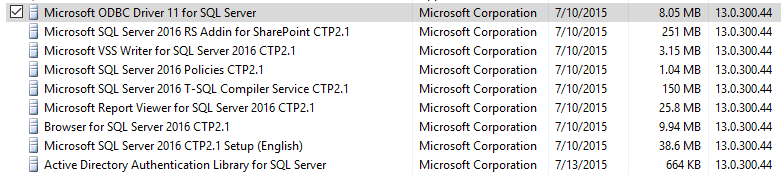


The latest CTP version of SQL Server 2016 is CTP 3 and therefore in order to keep the inventory to minimum, the CTP2.1 was uninstalled prior to installing the CTP3.

Fortunately uninstalling has become a lot easier, still depending on how you uninstall you may be asked to locate the executable used in installing. This post shows some details of uninstalling SQL Server 2016 CTP2.1.

Uninstall starts from Control Panel | Programs | Programs and Features.
This launches the installation Studio which does a rules check and brings up this screen. The CTP2.1 instance May2015 is ready to be removed as shown.

Uninstall2016CTP2.1.png

Click Next.

You can select the features to remove. Herein Select All is the choice including shared items.
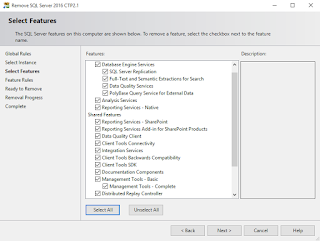


Uninstall2016CTp2.2.png

Click Next.
The Ready to Remove screen is displayed.


Uninstall2016CTp2.4.png

Click Remove.
 

Even after removing all the programs successfully, the items programs are not removed from the Control Panel.


Saturday, October 31, 2015

Download SQL Server Data Tools Preview to work with SQL Server 2016 CTP3

SQL Server Data Tools preview can be used with Visual Studio 2013 or Visual Studio 2015 to work with SQL Server 2016 CTP3. However the preview for Visual Studio 2015 covers most of the features and this post describes downloading and installing the preview.

SQL Server Data Tools can be installed standalone or integrated into an existing Visual studio installation. If you have Professional or higher version of Visual Studio 2013 or 2015 and did not opt out off installing SSDT during setup the computer used must have an existing version of SSDT.

Here is your master reference for SSDT.

If you are using Community editions then standalone is your only option. You can download the SSDT Preview from these links:

  • SSDT Preview for Visual Studio 2013
    SQL Platform Support:
    SQL Server 2005 – 2016 CTP 3.0
    Azure SQL Database
    Azure SQL Data Warehouse

  • SSDT Preview for Visual Studio 2015
    SQL Platform support:
    SQL Server 2005 – 2016 CTP 3.0
    Analysis Services for SQL Server 2008 - 2016 CTP 3.0
    Integration Services for SQL Server 2016 CTP 3.0
    Reporting Services for SQL Server 2008 - 2016 CTP 3.0
    Azure SQL Database
    Azure SQL Data Warehouse
Getting the SSDT Preview for Visual Studio 2015 should cover most of the ground. In preparing for SQL Server 2016 CTP3, the SSDT Preview was installed. Here are some installation screen shots.

Double click the downloaded SSDT Setup.exe to start downloading and installing


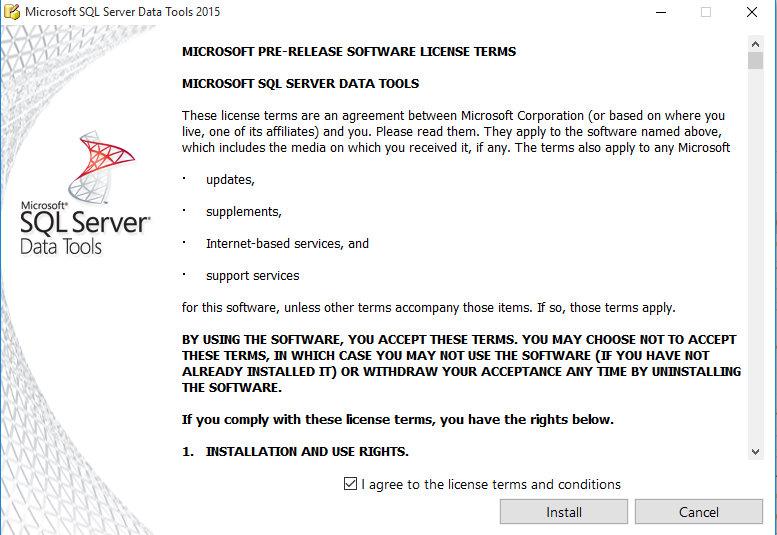
Click Next. Accept license terms as in the following


Click Install. This is going to be a slow process. It starts off like this.


 Downlaods everything needed for CTP3.


It's done.


Lots of programs are added to the computer. Have a look at Programs in the Control Panel's Programs and Features..


Looks like the Analysis Services, Reporting Services and Integration services get integrated with the Visual Studio 2015 Community.


Launching Visual Studio 2015 Community.

The start screen appears after a very long time and I hope it will be faster in the future.  It starts off with Object Browser.


The New Project window appears as shown with the BI | Analysis Services highlighted. 


OK. This is it. Now you can create BI projects with SQL Server 2016 CTP3 and other supported SQL Server Platform items.

Thursday, October 29, 2015

Get SQL Server 2016 CTP3 and work on SQL Server 2016 soon


SQL Server Team blog on 10/18/2015 announced the availability of SQL Server 2016 CTP3 besides quite a few others. This post is related to CTP2 only.

Microsoft has been very active in working on its database product SQL Server 2016 this year as seen in the number of posts. It is still in CTP but then it is not 2016 yet. These are the quoted kye words for this version,'faster transactions and queries, deeper insights on any device, advanced analytics, new security technology, and new hybrid cloud scenarios'.

http://hodentek.blogspot.com/2015/05/sql-serverr-2016-early-bird-special.html -5/13
http://hodentek.blogspot.com/2015/05/start-evaluating-sql-server-2016-ctp2.html -5/28
http://hodentek.blogspot.com/2015/07/sql-server-2016-ctp-21-is-ready-for.html -7/11
http://hodentek.blogspot.com/2015/07/upgrading-sql-server-2016-ctp-2-to-sql.html -7/11
http://hodentek.blogspot.com/2015/07/notes-2-sql-server-management-studio.html -7/13
http://hodentek.blogspot.com/2015/08/regarding-sql-server-2016-ctp-22.html -8/06
http://hodentek.blogspot.com/2015/09/download-sql-server-ctp-23-and-check.html -9/11

You can download from here after the sign in ritual.
https://www.microsoft.com/en-us/evalcenter/evaluate-sql-server-2016.
From the other links on the above site you can download the previous versions of SQL Servers(2014 SP1 and 2012 SP1; both evaluation versions valid for 180 days)

The stated benefits of the CTP3 are the following:
  •     Enhanced in-memory performance provide up to 30x faster transactions, more than 100x faster queries than disk based relational databases and real-time operational analytics
  •     New Always Encrypted technology helps protect your data at rest and in motion, on-premises and in the cloud, with master keys sitting with the application, without application changes
  •     Built-in advanced analytics– provide the scalability and performance benefits of building and running your advanced analytics algorithms directly in the core SQL Server transactional database
  •     Business insights through rich visualizations on mobile devices with native apps for Windows, iOS and Android
  •     Simplify management of relational and non-relational data with ability to query both through standard T-SQL using PolyBase technology
  •     Stretch Database technology keeps more of your customer’s historical data at your fingertips by transparently stretching your warm and cold OLTP data to Microsoft Azure in a secure manner  without application changes
  •     Faster hybrid backups, high availability and disaster recovery scenarios to backup and restore your on-premises databases to Microsoft Azure and place your SQL Server AlwaysOn secondaries in Azure
File formats are 64bit ISO or CAB. The installation is as usual except if you are using Microsoft Edge, you cannot save, you just run. However you do get an option to name a directory (with a default) to save extracted files.

Keep coming back to Hodentek and HodentekMSSS for more posts on SQL Server related information.

When Identity Security Becomes a Wall — Not a Shield

After a breach that forced a reset of my digital identity, I hit a roadblock I never anticipated: multi-factor authentication (2FA) locked m...