It all depends on what version of Visual Studio you have. However, note that, you can install stand alone versions of SSDT.
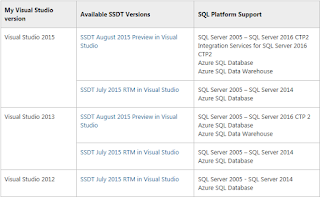
This table shows the versions suitable for Visual studio 2012; Visual Studio 2013; and Visual Studio 2015.
Note the following:
SSDT can be installed standalone or can be integrated into an existing Visual Studio installation. For the preview release, SSDT is supported with Visual Studio 2015 and Visual Studio 2013. If you already have the Professional or higher edition of Visual Studio 2015 or Visual Studio 2013 and did not opt out of installing SQL Server Data Tools during setup, then your machine has an existing installation of SSDT
Download links for the RTM versions:
SSDT 2015 for Visual Studio 2015:
https://msdn.microsoft.com/en-us/mt186501
SSDT 2013 for Visual Studio 2013:
https://msdn.microsoft.com/en-us/dn864412
SSDT 2012 for Visual Studio 2012:
https://msdn.microsoft.com/en-us/jj650015
Well how are they going to function on Windows 10?
If you do not have
Visual Studio 2012/2013/2015 Professional Edition or above you probably will get just a shell with only SSDT related items and nothing else (like VB, C#, etc.)
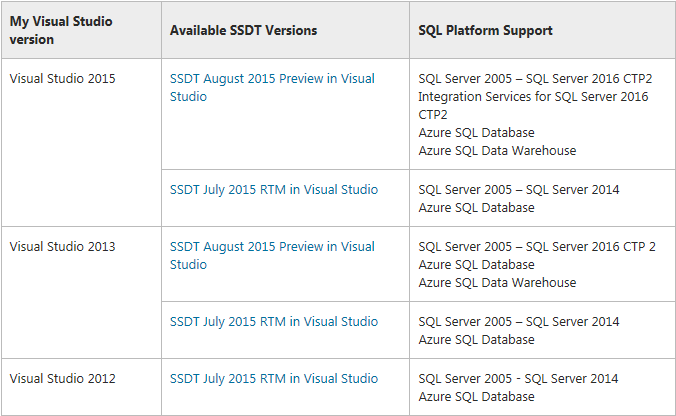
This table shows the versions suitable for Visual studio 2012; Visual Studio 2013; and Visual Studio 2015.
Note the following:
SSDT can be installed standalone or can be integrated into an existing Visual Studio installation. For the preview release, SSDT is supported with Visual Studio 2015 and Visual Studio 2013. If you already have the Professional or higher edition of Visual Studio 2015 or Visual Studio 2013 and did not opt out of installing SQL Server Data Tools during setup, then your machine has an existing installation of SSDT
Download links for the RTM versions:
SSDT 2015 for Visual Studio 2015:
https://msdn.microsoft.com/en-us/mt186501
SSDT 2013 for Visual Studio 2013:
https://msdn.microsoft.com/en-us/dn864412
SSDT 2012 for Visual Studio 2012:
https://msdn.microsoft.com/en-us/jj650015
Well how are they going to function on Windows 10?
If you do not have
Visual Studio 2012/2013/2015 Professional Edition or above you probably will get just a shell with only SSDT related items and nothing else (like VB, C#, etc.)


