Showing posts with label sp_execute_external_script. Show all posts

Thursday, September 29, 2016

Querying a SQL Server Database in SSMS 2016 using R - 1

I described in an earlier post how to query a SQL Server Database using the ODBC DSN which uses the RODBC package.

After the integration of R with SQL Server 2016, it is possible to query a SQL Server database from within SQL Server Management Studio. However at present there are limitations for certain types of data such as XML.

In order to use R in SQL Server Management Studio make sure;
  • The server has started and you can connect to it
  • The Launch Pad service has started as shown:
QueryWithR_00.png

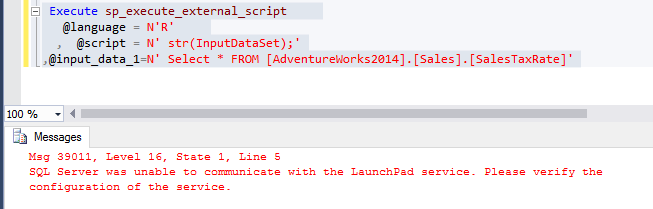
If this service has not started you get the MSG 39011 message as shown.


QueryWithR_01

After launching Launch Pad Service the query runs as shown.


QueryWithR_02

The result is to be understood as result set containing 29 rows and seven columns. It has returned informational message.

If you specify the columns your message will have information about those columns only.


QueryWithR_03

This query shows what data types have no support.


QuerywithR_04


Tuesday, September 6, 2016

Enabling R Service and Verifying Local R script execution

There are several steps  involved in setting up R Services work with SQL Server 2016() and one of which is enabling R Service and Verifying Local R script execution.

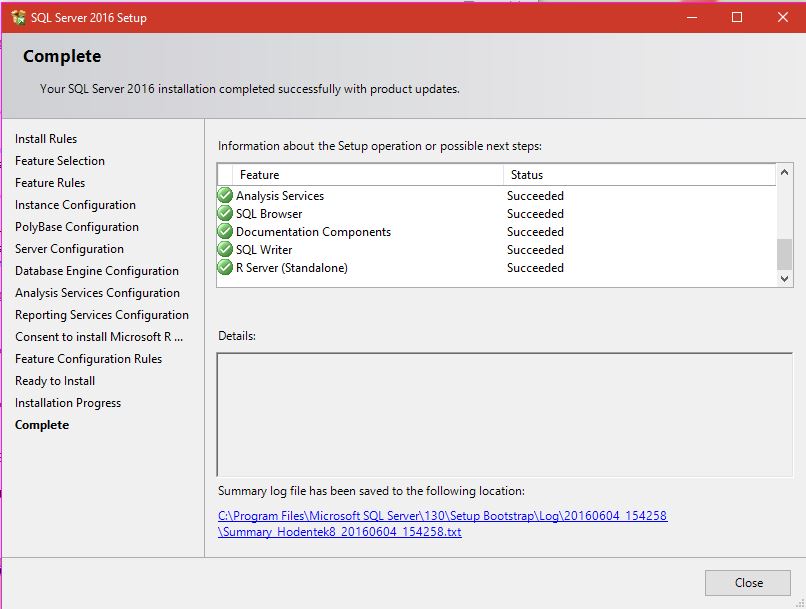
In my previous post (http://hodentekmsss.blogspot.com/2016/07/problem-enabling-r-service-in-sql.html) I have completely described the installation of SQL Server 2016 Developer's edition during which the R Server was also installed as shown here:


Rserver_00
In order to run R in SQL Server 2016 you need to use the sp_execute_external_scripts stored procedure. In order to do use this, you need first set the external scripts enabled option, which by default is OFF.
The suggested way is to configure by running the following statement:
============
sp_configure 'external scripts enabled', 1; 
RECONFIGURE; 
============
When run on the named instance on which R Server is also configured (Hodentek8\Ohana) we see the following result:
sp_config_00


Let us see if  running the sp_execute_external_script written in R works:

exec sp_execute_external_script @language=N'R',
@script=N'OutputDataSet <-InputDataset',
@input_data_1=N'select 1 as hello'
with result sets (([hello] int not null));
go

This returns the following error:

Msg 39011, Level 16, State 1, Line 4
SQL Server was unable to communicate with the LaunchPad service.
Please verify the configuration of the service.


You can open up Services window from Control Panel and start the service. This is the Launch Pad services to work with Analytics.


After this run the R script again as shown.

Booyah! It works! This was the response expected and the stored procedure works.


Enabling R Service and Verifying Local R script execution

There are several steps involved in setting up R Services work with SQL Server 2016() and one of which is enabling R Service and Verifying Local R script execution.

In my previous post (http://hodentekmsss.blogspot.com/2016/07/problem-enabling-r-service-in-sql.html) I have completely described the installation of SQL Server 2016 Developer's edition during which the R Server was also installed as shown here:


Rserver_00
In order to run R in SQL Server 2016 you need to use the sp_execute_external_scripts stored procedure. In order to do use this, you need first set the external scripts enabled option, which by default is OFF.
The suggested way is to configure by running the following statement:
============
sp_configure 'external scripts enabled', 1; 
RECONFIGURE; 
============
When run on the named instance on which R Server is also configured (Hodentek8\Ohana) we see the following result:
sp_config_00

Let us see if  running the sp_execute_external_script written in R works:

exec sp_execute_external_script @language=N'R',
@script=N'OutputDataSet <-InputDataset',
@input_data_1=N'select 1 as hello'
with result sets (([hello] int not null));
go

This returns the following error:

Msg 39011, Level 16, State 1, Line 4
SQL Server was unable to communicate with the LaunchPad service.
Please verify the configuration of the service.


You can open up Services window from Control Panel and start the service. This is the Launch Pad services to work with Analytics.


After this run the R script again as shown.

Booyah! It works! This was the response expected and the stored procedure works.


Saturday, July 23, 2016

Problem enabling R Service in SQL Server 2016

In my previous post I have compeltely described the installation of SQL Server 2016 Developer's edition during which the R Server was also installed as shown here:


Rserver_00

In order to run R in SQL Server 2016 you need to use the sp_execute_external_scripts stored procedure. In order to do use this, you need first set the external scripts enabled option, which by default is OFF.

The suggested way is to configure by running the followwing statement:
============
sp_configure 'external scripts enabled', 1; 
RECONFIGURE;
 
============
When run on the named instance on which R Server is also configured (Hodentek8\Ohana) we see the following result:

EnableXternalScrpts_01

The second line in the above statement does not seem to have any meaning since Reconfigure is the second line of the executed statement.

Now If I ignore the inconsistency and go ahead and run this suggested statement:
=====
exec sp_execute_external_script  @language =N'R',   
@script=N'OutputDataSet<-InputDataSet',     
@input_data_1 =N'select 1 as hello'   
with result sets (([hello] int not null));   
go

============
I get the following error.
========
Msg 39023, Level 16, State 1, Procedure sp_execute_external_script, Line 1 [Batch Start Line 6]
'sp_execute_external_script' is disabled on this instance of SQL Server. Use sp_configure 'external scripts enabled' to enable it.

========
Hence, I believe there is a problem.

When Identity Security Becomes a Wall — Not a Shield

After a breach that forced a reset of my digital identity, I hit a roadblock I never anticipated: multi-factor authentication (2FA) locked m...