Saturday, December 15, 2012

December Update to SSDT

In December 2012 SSDT got updated. Here are some details:

If you are planning to use Visual Studio 2012 you are better off installing the December 2012 update. The December 2012 update to SSDT relates to what you have on your computer in terms of Visual Studio version.

1. If you already have Professional, Ultimate or Premium Edition of Visual Studio 2012 and agreed to install SSDT during installation then the machine will have an earlier version of SSDT. This update will replace the version with the latest.

2. If you do not have Visual Studio Professional or above SSDT will install the Visual Studio 2012 Integrated Shell. This Shell perform very much like the BIDS in the past and you will not be able to do programming as it neither include any Visual Studio programming languages such as VB or C# nor does it support the various types of projects that you can create with the non-shell, full versions of Visual Studio Professional and above. This December update updates the functionality of Express SKUs of Visual Studio 2012. The following are the improvements over the previous version:

Database Unit Testing

Integration of SSDT Power Tools

Updated Data-Tier Application Framework

Bug fixes


If Visual Studio Professional or above is present, SSDT will be integrated with the existing VS program. However SP1 must be manually installed before installing the update.

If VS Professional or above SSDT is not present SSDT installs only the Visual Studio 2010 Integrated Shell. SP1 must first be installed before installing the SSDT (However when the blogger used the web installer the SP1 was already in place). The shell as the name suggests contains only SSDT related items and does not include programming languages such as VB and C#.
Program installed in July 2012 using web installer

The following are the improvements over the previous version:

Database Unit Testing

Integration of SSDT Power Tools

Updated Data-Tier Application Framework

Bug fixes


The platforms that support the updated SSDT are:

Windows Vista SP2 or above

Windows 7 SP1 or above

Windows 8 RTM

Windows Server 2008 SP2 or above

Windows Server 2008 R2 SP1 or above

You can download SQL Server data tools for Visual Studio 2012 from this link:


Additionally you can get an ISO image or download SSDTSetup.exe to create an administrative install point if there is no internet access. For details visit the previous link.

Thursday, September 27, 2012

Breaking News: Packt finished publishing its 1000th Book

Aloha,

Packt is celebrating and I have been a part of this success story. Particpate in the celebration and get a free eBook to mark this occasion.

Just go to Packt's web site and register yourself if you are not already registered. The rest is simple.
If you are looking for jump starting your SQL Server / Applications you search for eBook versions of my books shown here:


Good luck
Mahalo

Wednesday, September 26, 2012

New service update for Azure SQL database

In a recent update to the Azure SQL database service the following features were added:
  • Support for linked servers-
  • Distributed Queries against the database-local & Azure databases
  • Support recursive triggers
  • Support for DBCC Show_Statistics
Firewall configuration at database level (previously at Server level)-You get better control
Firewalls can be set up at the portal or through T-SQL-makes life easier.
If you want to look at earlier service updates you can find them in my book:


Links to linked server, distributed queries etc. here,

MySQL Linked Server | Jayaram Krishnaswamy

jayaramkrishnaswamy.sys-con.com/node/1060191
Aug 4, 2009 – Jayaram Krishnaswamy is a technical writer, mostly writing articles that are related to the web and databases. He is the author of SQL Server ...

MS Access Linked Server, comparing providers | Jayaram ...

jayaramkrishnaswamy.sys-con.com/node/1004765Cached
Jun 16, 2009 – In this article on SSWUG.org web site, the MSDASQL OLE DB ODBC driver is compared with Microsoft Jet 4.0 as related to creating a linked ...


Microsoft Jet or MSDASQL for Linked Servers? | Jayaram ...

https://jayaramkrishnaswamy.ulitzer.com/node/1064612Cached
Aug 7, 2009 – Jayaram Krishnaswamy is a technical writer, mostly writing articles that are related to the web and databases. He is the author of SQL Server ...

Latest Articles in the Category SQL

dotnetslackers.com/articles/sql/?page=1&sort=2Cached
Jayaram Krishnaswamy, May 21, 2009. Views: 18,484 Avg Rating: 0/5 Votes: 0 Comments: 0. This article explains how to set up a Postgres linked server on SQL ...


Creating a linked Postgres Server on SQL Server 2008

dotnetslackers.com › Recent ArticlesSQLCached - Similar
... on SQL Server 2008. Published: 21 May 2009. By: Jayaram Krishnaswamy. This article explains how to set up a Postgres linked server on SQL Server 2008.


MySQL Linked Server on SQL Server 2008 | Packt Publishing

www.packtpub.com › Articles.NETCached - Similar
by Jayaram Krishnaswamy | August 2009 | .NET Microsoft. Linking servers provides an elegant solution when you are faced with running queries against ...


Monday, August 6, 2012

August 2, 2012: SQL Saturday at Honolulu


Guys here in Honolulu are serious and proactive when it comes to SQL Server. They had the
SQL Saturday event two days ahead of Saturday on 8/2/2012. The event was held at the Honolulu Community College.

This PASS event was organized locally by the Pacific Center for Advanced Technology Training.
These were the talks delivered at the event:

SQL Server 2012 EIM (SSIS, DQS, and MDS) at intermediate level was delivered by Matt Hollingsworth of Microsoft. He gave a reasonably good demo of data cleansing using all of the three tools. He barely touched on Project Barcelona (new data lineage and impact analysis) still under wraps.

Rushabh Mehta of SolidQ gave talks on:
A beginner level Introduction to Data Quality Services (DqS)
An intermediate lelvel introduction to Master Data Management
and
SSIS 2012 Management Considerations and Best Practices

I only attended the 3rd talk which was very good. Lots of enhancements to SSIS since I published my book on SSIS.


Matt gave two other talks:
Building a BI Semantic Model for Power View
SQL Server 2012 Always On Enhancements

I have not dabelled with SharePoint but Wen He of eWorld gave two talks on
Reporting Nirvana -SQL 2012 and SharePoint 2010
Self_service BI with SharePoint

Power View rhymes with Power Point!

I attended the first one which was reasonably good.

There was also a lunch break vendor talk from Nimble Storage. The talk was around Nimble Storage Solutions, I only caught the last bit.


Friday, June 15, 2012

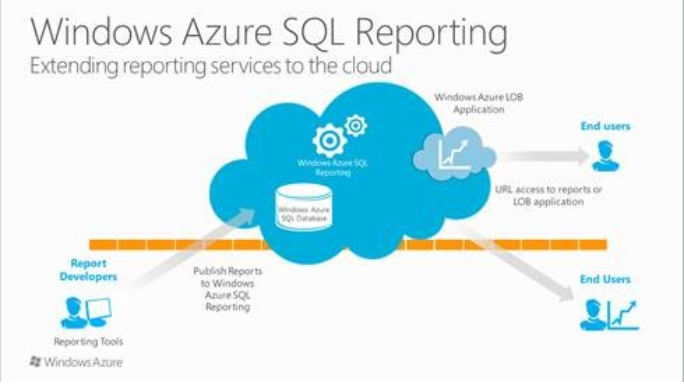
Now SQL Server Reporting Services is on Azure

On June 13 Microsoft released the Windows Azure SQL Reporting. Now the name is official and replaces the SQL Azure Reporting Services. Here is a screen image from one of Microsoft's Advertisment.


Now developers can build reports on Azure using familiar tools such as BI Development Studio and SQL Server Data Tools. Creating reports will be no different from the way on-premises reports are authored. SQL Reporting on Azure provides consistent APIs for viewing, managing and executing reports. It also provides for rich formatting, data visualization and exporting reports in a variety of formats.

These features (Elastic scale and high availability; and secure access)t has already attracted customers to implement this service such as Fujitsu and Biobest (an agriculture based business).

The good news is it is free to use till August 1, 2012 after which you get charged. You need to have an account on Azure to utilize this service.

More details here: http://blogs.msdn.com/b/microsoft_business_intelligence1/archive/2012/06/12/announcing-windows-azure-sql-reporting-general-availability.aspx

For Reporting Services, I recommend my popular book here:


For getting the ins and outs of SQL Azure I recommend my comprehensive book here:


You want to develop front-end with SQL Azure, look no further. Here is a link to my book which is somewhat weighted for data access:
Mahalo

Jay (mysorian)

Sunday, May 13, 2012

LocalDB management using SQLLOCALDB


Sql Server Express 2012 the latest free version of SQL Server from Microsoft has five options of download from a small foot print version (SQL Express 2012 LocalDB or simply LocalDB) to the full  version with all bells and whistles. The product comes in both (32  bit) and (x64bit) versions in several European and Asian Languages.

  LocalDB, an embeddable small foot print version of SQL Server Express ideal for learning as well as providing backend support for desktop,  web, and small server applications is also installed when you choose  to install "SQL Server Express 2012 with tools". In this article the  installation of SQL Server Express 2012 with tools and moreusing the  sqllocaldb executable to administer the LocalDB is described.

Read the full article here,


http://www.sswug.org/articlesection/default.aspx?TargetID=63070

Saturday, May 12, 2012

Microsoft Carnival at Packt Publishing


This is a different kind of carnival not the one in Rio de Janeiro that takes place around February each year.


This is Packt's Microsoft Carnival. You can buy the latest books related to Microsoft's ground breaking software from the best of the breed (with great humility I add myself to this group) authors at great bargains.


Packt Publishing brings to you an exciting choice of discounts for Microsoft books and e-books. They have slashed their prices by 30%, go crazy and make the most of this Carnival before it ends…

* Buy any Microsoft print book from below and get 20% off
* Buy any Microsoft e-book from below and get 30% off
* Buy PacktLib subscription and get 10% off

When Identity Security Becomes a Wall — Not a Shield

After a breach that forced a reset of my digital identity, I hit a roadblock I never anticipated: multi-factor authentication (2FA) locked m...