Thursday, June 12, 2014

SQL Server 2014 and Scalability Improvements with Windows Server 2012 R2

SQL Server 2014 now takes advantage of NIC teaming feature provided by Windows Server 2012 R2 to improve enterprise-class scalability resulting in reduced infrastructure cost and predictable
performance, the magic words (mantras) you love to hear.

But what is NIC Teaming?

NIC teaming also known as Load Balancing Failover(LBFO) is Load Balancing Failover(LBFO)- a feature that allows multiple network adapters on a computer to be placed in a team (group) for the following express purposes:

*Bandwidth aggregation
*Prevent connectivity loss in a network failure event

NIC Teaming architecture
Teaming architectures are pretty much the same across vendors. Baiscally two or more physical networks adpaters(nic)are connected to a NIC Teaming solution to multiplex them to one or more virtual adapters called team network adpaters (tnic) as shown.


Here is a teaming solution from VMWare.

There are two swithching algorithms used in NIC Teaming:
  • Switch dependent mode: Switch participates in teaming
  • Switch idnependent-mode: Switch makes teaming possible but does not participate
There are two common choices for teacming in switch-dependent mode:

  • Generic or static teaming (IEEE 802.3ad draft v1) - prone to errors in configuration as it is static
  • Dynamic teaming (IEEE 802.1ax, LACP)-Uses Link Aggregation Control Protocol and leverages automatic team creation.
Features of NIC Teaming in Windows Server 2012

Traffic distribution:

Hyper-V swithc port
Hashing Algorithms

There is both NIC Teaming Managment Interface as well as Powershell commandlets to manage teaming.

Your master reference to Microsoft NIC teaming is found here:
http://technet.microsoft.com/en-us/library/hh831648.aspx

Also read up on this:
http://www.vmware.com/files/pdf/support/landing_pages/Virtual-Support-Day-Best-Practices-Virtual-Networking-June-2012.pdf
https://learningnetwork.cisco.com/docs/DOC-3729

Friday, June 6, 2014

Three more Microsoft Azure Datacenters operating now


Do not forget to get free books on Microsoft Windows Azure.

Azure Datacenter is now generally available in Brazil. A promotional pricing is offered right now. Geo replication to South US datacenter from Brazil dictates default storage option being Geographically Redundant Storage.

Brazil Datacenter debuts after two other data centers in Asia:
http://windowsitpro.com/azure/microsoft-opens-azure-datacenter-brazil-south-region

Japan GEO
 http://azure.microsoft.com/ja-jp/community/japan-datacenter-geo/


China operated by 21Vianet
 http://www.datacenterdynamics.com/focus/archive/2014/03/microsoft-launches-mainland-china-azure-cloud-data-center


This is what you should do to get your free book. Note only the first three persons (from Brazil, Japan and China) to respond will get the book.

Send an email to hodentek@live.com with Azure SQL in the subject line. Include your email address and your postal address to get a free copy of my book on Windows Azure SQL Database.
http://hodentekmsss.blogspot.com/2010/12/regarding-my-book-on-sql-azure.html


Tuesday, May 20, 2014

Microsoft / SAP Alliance & SQL Server

Your employees can now dig deeper to get value out of your business and the Microsoft / SAP alliance makes it lot more flexible, lot easier and more enriching. Now, this alliance makes it possible to have integrated solutions  meshing up these two technologies making the any where, anytime information critical to business available without much effort.

Microsoft / SAP Alliance has many other facets in addition to Microsoft SQL Server and Microsoft BI. Review this link here:
http://hodentek.blogspot.com/2014/05/microsoft-sap-alliance-enriching-cloud.html

This alliance covers all of MSFT, cloud, mobile, office, BI, etc.

Microsoft SQL Server 2012 is the best suited database for mission-critical environment. It offers the lowest total cost of ownership(TCO) for all of SAP's needs. Probably the recently released SQL Server 2014 will follow in due course.

These cost savings come through,
  • Increased flexibility
  • High database productivity
  • Increased hardware utilization,
  • Minimized surface area against attacks, etc.
Follow this link for more details regarding SAP and SQL Server:
http://scn.sap.com/community/sqlserver

Review these important SAP notes on SQL Server:
http://scn.sap.com/docs/DOC-8286

Sunday, May 18, 2014

Create a Windows Azure Mobile Service and its SQL Database buddy at the same time

It is incredibly easy to add a backend to your connected client application using Windows Azure Mobile Services (WAMS).

With WAMS you can provide a secure and scalable backend to power your apps not only on Windows but many other platforms such as iOS, Android etc. Storing data and authenticating users is effortless and you can even send push notifications. As to programming languagges you can use Node.JS or C#.

There are several data storage options
as well, on-premises or Azure SQL Satabase, blob storage, table storage and MongoDB.

Steps you need to follow to create a mobile service.
To get started you should sign up and get yourself an Windows Azure account and enable Mobile Services feature on Windows Azure.

This following procedure assumes you have an account with Windows Azure.

Login to the Management Portal.

When you click on Mobile Services you will see that you have no Mobile Service


Now you will create one.

Click on CREATE A NEW MOBILE SERVICE
You want something free (I presume).  As a part of the service you will be creating a new server and a SQL Database. You can choose to create a free 20 MB SQL database. I think it is still not available at all datacenters.

If you already have a Azure SQL database you can choose that database instead of creating a new one. Here the West US region is chosen. You can have the backend language to be Javascript or .NET. Here Javascript is chosen.


Click on the arrow a the bottom right which takes you to the database settings for the NEW MOBILE SERVICE as shown.


Enter the details as shown. The SERVER LOGIN NAME and SERVER LOGIN PASSWORD are yours to choose, but passowrd has to be strong (1 number, 1 special charactr, not less than eight charactrs etc). You can place a check mark for CONFIGURE ADVANCED DATABASE SETTINGS.

 
You can go back and change settings using the arrow (appropriate ) or go to the next page of the wizard.

Your collation can also be chosen. Here the default is accepted. This is a free database but if you want to change the size or settings, you may have to pay.
\

Click on the OK icon and your mobile service is pronto as shown.


The URL is being created and it will take some time. In a relatively short time you will have established a mobile service on the Windows Azure platform and a backend SQL database to use.

Well my mobile service was up and running in no time at all.


I will be posting more on this and related topics keep watching this blog or my two other related blogs:
http://hodentekMSSS.blogspot.com
http://hodentekMobile.blogspot.com

Mahalo

Jay

Tuesday, May 13, 2014

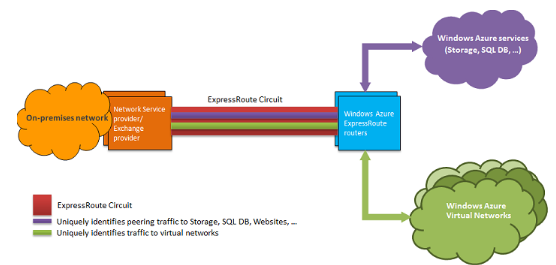
Private route to your Azure Data Center on - ExpressRoute

If you are concerned with some of the concerns you may have with doing business over a public network then this is what you should choose.

ExpressRoute is a private route that you can establish between Azure Datacentr and your enterprise data whehter it is on your enterprise or colocation environment. It is private conneciton and does not go over the Internet (public).

Here is a connectivity diagram from Microsoft website for ExpressRoute:


ExpressRoute is now in GA (General Availability) and provides:
  • Higher reliability
  • Faster Speed
  • Lower Latency
  • Higher reliability
as compared to what you can get over the Internet.
 
As it has entered GA, Microsoft offers 99.99% SLA on ExpressRoute uptime. Microsoft is offering offering two new tiers of bandwith use for the Exchange Provider scenario: 200 Mbps and 500 Mbps.

The following are ExchangeRoute partners (all the biggies in Telecom):

Read more here:
http://azure.microsoft.com/en-us/services/expressroute/

Wednesday, May 7, 2014

Microsoft Azure Preview Portal Video-Don't miss

Aloha,

If you are planning to take your business to the clouds, this is a must see video and takes less than 3 minutes to watch. This video is about the new preview portal detailing how Microsoft ties up the whole Azure stack and deliver a neat service to you.

 
More details with screen shots here:
 

Details of Azure SQL Database Service Tiers and assoicated throughputs

Basic Guide to choosing Azure SQL Databases.

Let us begin with the new acronym DTU. DTU stands for Database Throughput Unit. DTU includes many of the measures such as CPU, memory and read/write rates to a database. DTU provides a guide for the customer to assess the new SQL Database performance levels - Basic, S1, S2, P1, P2,P3. Each of these is designed to provide higher throughput measured as a function of time (Basic in throughputs/hour, Standard(S1,S2) in throughput/minute and Premium (P1,P2 and P3) in throughput/sec.

I wonder whether Microsoft has something for me like throughputs/week!

The following table is from Shawn Bice's blog post.


Here are some throughput/time values tied to service levels:


Microsoft appears to not to say that these are not transaction guarantees for customers but provided to assist  making choices.


When Identity Security Becomes a Wall — Not a Shield

After a breach that forced a reset of my digital identity, I hit a roadblock I never anticipated: multi-factor authentication (2FA) locked m...