Showing posts with label Powershell. Show all posts

Friday, January 17, 2020

PowerShell cmdlets version that works with (compatible) SQL Server 2019

PowerShell is in continuous development mode. New challenges require updating of software to accommodate the changes. This is the nature of such things. PowerShell cmdlets also follow this natural course and we have many versions.

I had an older version, and when I tried to launch contextually from SSMS v 8.4, I got this response:


In order to get the version you want, you may access this link:

SQL Server with PowerShell

Here is a list from the above site:


Wednesday, January 17, 2018

Hands-on Learning Event in Honolulu 1 : Introduction to Structured Query Language


Database skills are essential in whatever organization and in whatever position and it is crucial that you have this in your arsenal (Resume')

Databases, organized repositories of information, have become indispensable in today's world. In this introductory course you will learn about relational databases and the basics of Structured Query Language (SQL) including sorting; grouping result sets; using DDL, DML, DCL, and TCL. All SQL statements will initially be written for one table. Most practical, modern and relational databases will include a large number of tables and SQL queries have to access information from several tables. This course will introduce you to querying more than one table. With this skill you will be able to query two or more tables in a database.

This is a hands-on course which will take you from installing SQL Server 2016 to learning the ins and outs of SQL Server Management Studio and of course a full dose of SQL. The course covers most of the requirements to take Microsoft's certification (98-364), the Microsoft Technology Associate. During each meeting, you will be assessed for your knowledge, competency and proficiency in SQL.

What's new in this session
  • SQL Server Using Powershell 
  • JSON and XML
The class runs from Feb 6 to March 13 at Honolulu Community College.
(Register Online)

Feb 6 - March 13; TTH: 5:30 pm to 7:30 pm; 10 Mtgs

Wednesday, October 5, 2016

Starting and stopping a SQL Server instance using PowerShell

Firstly let us see the status of the SQL Server 2016 on this computer. There are three SQL Servers 2012, 2014 and 2016. Let us take a look at the SQL Server named instance OHANA. It appears to be stopped as seen in the Services window of the Control Panel.


StoppedOHana

Keep the Services screen open.

It is possible to start the SQL Server (OHANA) from the Services screen, but we want to start it using PowerShell.

Launch Windows PowerShelll ISE with Administrator Permission. Type in Start-Service to see the intellisense drop-down as shown.


StartService_00.jpg

Access the parameters available by just typing a hyphen (-) and waiting,


StartService_01.jpg

Pick the DisplayName parameter.

Now you need to provide a display name for SQL Server (OHANA).

Start-Service -DisplayName 'SQL Server (OHANA) '

Run the code or hit F8.

This will produce an error as shown:
PS C:\WINDOWS\system32> start-Service -DisplayName 'SQL Server (OHANA) 'start-Service : Cannot find any service with display name 'SQL Server (OHANA)
'.
At line:1 char:1
+ start-Service -DisplayName 'SQL Server (OHANA) '
+ ~~~~~~~~~~~~~~~~~~~~~~~~~~~~~~~~~~~~~~~~~~~~~~~~
    + CategoryInfo          : ObjectNotFound: (SQL Server (OHANA) :String) [St
   art-Service], ServiceCommandException
    + FullyQualifiedErrorId : NoServiceFoundForGivenDisplayName,Microsoft.Powe
   rShell.Commands.StartServiceCommand


You notice that there is an extra space between (OHANA) and the single quote.

Now, remove that white space and hit F8.

You get the following response:


StartService_02.jpg

In the ControlPanel |..|Services window click Action | Refresh.

You will notice that the SQL Server (OHANA) has started.

You can also stop the SQL Server with the following statement:

PS C:\WINDOWS\system32> Stop-Service -DisplayName  'SQL Server (OHANA)'

WARNING: Waiting for service 'SQL Server (OHANA) (MSSQL$OHANA)' to stop...

Refresh the Services windows and verify that the server has stopped.

Friday, August 19, 2016

Hands-on Learning Event in Honolulu 1 : Introduction to Structured Query Language

The above course will be offered again for the fourth time (Oct 4 - Nov 3, 2016) as a non-credit course by the Pacific Center for Advanced Technology Training.


Course summary:

Databases, organized repositories of information, have become indispensable. Knowledge of databases is a must for professionals and in fact even more relevant since the emergence of Big Data in today's world.

In this introductory course you will learn all about relational databases and the basics of Structured Query Language (SQL) including sorting; grouping result sets; using DDL, DML, DCL, and TCL. All SQL statements will initially be written for one table. Most practical, modern and relational databases will include a large number of tables and SQL queries have to access information from several tables. This course will then introduce you to querying more than one table. With this skill you will be able to query two or more tables in a database. This is a hands-on course which will take you from installing SQL Server 2016; learning the ins and outs of SQL Server Management Studio and of course a full dose of SQL. You will be both coding as well using Graphical User Interface during this training.

During each meeting the students will be assessed for their knowledge, competency and proficiency in SQL.

New this session:

Microsoft SQL Azure Database: SQL Server in Microsoft Cloud
Windows PowerShell for SQL Server
SQL Server 2016


My sincere thanks and best wishes to my students in the previous meets of this course.

PowerShell is written in .NET code (C#), not true anymore

The great productivity tool, PowerShell has entered the Open Source community (both Linux and Mac) according to an article that appeared in redmondmag.com.

This is what the Inventor of PowerShell said about this move:

 "PowerShell on Linux is now designed to enable customers to use the same tools, and the same people, to manage everything from anywhere," Snover said. The initial ports are available on Ubuntu, Centos and Red Hat, he noted. "PowerShell also now runs on Red Hat Linux and Mac OS X with additional platforms planned for the future. The "alpha" builds and source code are now on GitHub
"

IT pros can use this task-based scripts to provide automaton support to Windows OS and all the other Windows Products.

PowerShell skills are highly marketable and now even more.

Read all my PowerShell posts here:
http://hodentekmsss.blogspot.com/search?q=Powershell

Wednesday, March 9, 2016

Hands-on Learning Event in Honolulu 1 : Introduction to Structured Query Language

The above course will be offered again (April 14-May 17, 2016) as a non-credit course by the Pacific Center for Advanced Technology Training.


Course summary:

Databases, organized repositories of information, have become indispensable and in fact even more relevant despite the emergence of Big Data in today's world.

In this introductory course you will learn about relational databases and the basics of Structured Query Language (SQL) including sorting; grouping result sets; using DDL, DML, DCL, and TCL. All SQL statements will initially be written for one table. Most practical, modern and relational databases will include a large number of tables and SQL queries have to access information from several tables. This course will then introduce you to querying more than one table. With this skill you will be able to query two or more tables in a database. This is a hands-on course which will take you from installing SQL Server 2012; learning the ins and outs of SQL Server Management Studio and of course a full dose of SQL.

During each meeting the students will be assessed for their knowledge, competency and proficiency in SQL.

New this session:
SQL Azure Database: SQL Server in Microsoft Cloud
Windows PowerShell for SQL Server

My sincere thanks and best wishes to the January batch of students.

Monday, August 17, 2015

Hands-on Learning Event in Honolulu 1 : Introduction to Structured Query Language

The above course will be offered again as a non-credit course by the Pacific Center for Advanced Technology Training.

Course summary:
Databases, organized repositories of information, have become indispensable and in fact even more relevant despite the emergence of Big Data in today's world.
In this introductory course you will learn about relational databases and the basics of Structured Query Language (SQL) including sorting; grouping result sets; using DDL, DML, DCL, and TCL. All SQL statements will initially be written for one table. Most practical, modern and relational databases will include a large number of tables and SQL queries have to access information from several tables. This course will then introduce you to querying more than one table. With this skill you will be able to query two or more tables in a database. This is a hands-on course which will take you from installing SQL Server 2012; learning the ins and outs of SQL Server Management Studio and of course a full dose of SQL.

  During each meeting the students will be assessed for their knowledge, competency and proficiency in SQL.

New this session:
SQL Azure Database: SQL Server in Microsoft Cloud
Windows PowerShell for SQL Server


Schedule:
Sept 22 - Oct 22, 2015; Tuesdays and Thrusdays; 5:30 pm - 7:30 pm; 10 mtgs

Sunday, June 14, 2015

Powershell Connection string to an instance of SQL Server 2012 on local computer

We are assuming a named instance 'RegencyPark' on a laptop machine named 'Hodentek8'. The Connection string used for connecting to this instance using PowerShell is in the string variable $ConnectionString:


$ConnectionString="Server=Hodentek8\RegencyPark;database=AdventureWorks2012;trusted_connection=true;"

Windows PowerShell ISE provides intellisense support and for the Connection provides the following drop-down:


You can use the following statements to connect to the instance and open the connection (Properties and Methods):


$ConnectionString="Server=Hodentek8\RegencyPark;database=AdventureWorks2012;trusted_connection=true;"
$Connection = New-Object System.Data.SQLClient.SQLConnection($ConnectionString)
$Connection.Open()
$Connection.State

The last statement when executed displays 'Open'

You can further looks at the properties of the connection string as shown here:
------
PS C:\Users\Jayaram>
 $ConnectionString="Server=Hodentek8\RegencyPark;database=AdventureWorks2012;trusted_connection=true;"

PS C:\Users\Jayaram>  $Connection = New-Object System.Data.SQLClient.SQLConnection($ConnectionString)

PS C:\Users\Jayaram>  $Connection.Open()

PS C:\Users\Jayaram>  $Connection.State
Open

PS C:\Users\Jayaram>  $Connection.Database
AdventureWorks2012

PS C:\Users\Jayaram>  $Connection.Credential

PS C:\Users\Jayaram>  $Connection.DataSource
Hodentek8\RegencyPark

PS C:\Users\Jayaram>  $Connection.ConnectionTimeout
15

Thursday, February 5, 2015

Creating a database using Power Shell and SQLServer Management Objects

Review this previous post    http://hodentekmsss.blogspot.com/2014/11/accessing-sql-server-via-smo-using.html

In the above post you will get an introduction to Power Shell and SQL Server maangement Objects. You also learn how to access the SQL Server and carry out a few tasks like listing out all the databases.

In this post you will learn how to create a new database in SQL Server using SMO and Power Shell. Using Transact-SQL or the SSMS you can easily create a database. Using PowerShell is another option to create a database using a script.

Launch Power Shell by right clicking the instnace node as shown.


PS_SMO_DB01

This ensures that you have access to the SQLServer's SMO library.

You will be launching the shell with the following line:
PS SQLSERVER:\SQL\HODENTEK8\REGENCYPARK>

Enter the following code one line at a time. After you enter the line and click enter you may not get any message. Continue with the other lines.

$server= new-object Microsoft.Sqlserver.management.smo.server 'Hodentek8\RegencyPark'
$dbname= "Feb6"
$db=new-object  Microsoft.Sqlserver.management.smo.Database ($server,$dbname)
$db.Create()


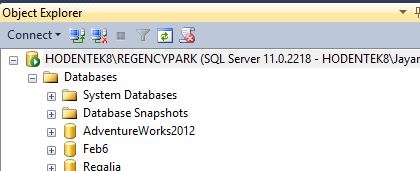
When the final command line is processed you will have created a new database Feb6 in your SQL Server Instance as shown. It will have default settings.


PS_SMO_DB02

Wednesday, November 12, 2014

A quick note on writing PowerShell scripts - Part 1

PowerShell scripts are a sequence of PowerShell commands written one after another (executed in that order) using a text editor such as Notepad. The extension of a PowerShell script file is <filename>.ps1. The 1 ins ps1 has nothing to do with the version of PowerShell on your computer and you may have more than one in
your computer,
 http://hodentekhelp.blogspot.com/2014/08/can-multiple-versions-of-powershell-can.html

You also have the option of choosing which version you want to run
(http://hodentekhelp.blogspot.com/2014/08/if-you-have-multiple-versions-of-power.html).

In addition to Notepad there are other dedicated script editors like,
and many others. For a complete listing follow this link:

In order to run a PowerShell script file you need to create a file with extension ps1 and then run
this script in Windows PowerShell or a similar programme.

In Part 2 you will learn writing a simple script file.

Thursday, June 12, 2014

SQL Server 2014 and Scalability Improvements with Windows Server 2012 R2

SQL Server 2014 now takes advantage of NIC teaming feature provided by Windows Server 2012 R2 to improve enterprise-class scalability resulting in reduced infrastructure cost and predictable
performance, the magic words (mantras) you love to hear.

But what is NIC Teaming?

NIC teaming also known as Load Balancing Failover(LBFO) is Load Balancing Failover(LBFO)- a feature that allows multiple network adapters on a computer to be placed in a team (group) for the following express purposes:

*Bandwidth aggregation
*Prevent connectivity loss in a network failure event

NIC Teaming architecture
Teaming architectures are pretty much the same across vendors. Baiscally two or more physical networks adpaters(nic)are connected to a NIC Teaming solution to multiplex them to one or more virtual adapters called team network adpaters (tnic) as shown.


Here is a teaming solution from VMWare.

There are two swithching algorithms used in NIC Teaming:
  • Switch dependent mode: Switch participates in teaming
  • Switch idnependent-mode: Switch makes teaming possible but does not participate
There are two common choices for teacming in switch-dependent mode:

  • Generic or static teaming (IEEE 802.3ad draft v1) - prone to errors in configuration as it is static
  • Dynamic teaming (IEEE 802.1ax, LACP)-Uses Link Aggregation Control Protocol and leverages automatic team creation.
Features of NIC Teaming in Windows Server 2012

Traffic distribution:

Hyper-V swithc port
Hashing Algorithms

There is both NIC Teaming Managment Interface as well as Powershell commandlets to manage teaming.

Your master reference to Microsoft NIC teaming is found here:
http://technet.microsoft.com/en-us/library/hh831648.aspx

Also read up on this:
http://www.vmware.com/files/pdf/support/landing_pages/Virtual-Support-Day-Best-Practices-Virtual-Networking-June-2012.pdf
https://learningnetwork.cisco.com/docs/DOC-3729

When Identity Security Becomes a Wall — Not a Shield

After a breach that forced a reset of my digital identity, I hit a roadblock I never anticipated: multi-factor authentication (2FA) locked m...