Showing posts with label Windows PowerShell. Show all posts

Thursday, July 5, 2018

PowerShell Pro Tools is a Visual Studio Community 2017 extension that you can try free

I see there is at least one extension, PowerShell Pro Tools that you can download.

You can find it in the Visual Studio Community 2017.


 You can get the installer to modify the Visual Studio IDE


You need to relaunch Visual Studio to see the next screen.  Just for trying it out you can give an email and get a temp license.


This is from GitHub site listing all that you can do with this.


This is the site info for this tool


Monday, October 26, 2015

Idera's PowerShell Plus is a good tool for SQL Server DBAs

This is a useful tool as it can make your life easy as a DBA.
This post shows how to install and configure the tool.

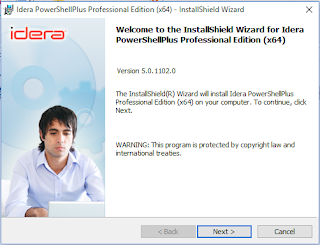
Download IderaPowerShellPlusSetup-x64.zip (25 MB) from Idera's website after registering and get the free tool. Get the tool to match your OS architecture (herein (x64) on a Laptop running Windows 10.


Extract files to a location of your choice and double click to begin installation.


This tool helps to:
  • Create Usefull other Tools
  • Automate Repetitive Tasks and save time
  • Supports multi-server automation
  • Monitoring, exporting/importing files
  • Create PowerShell SMO Scripts
  • Carry out compliance tasks

Configuring the tool
After downloading and running the program you may need to do some configuration.


PSP_05

Please configure as needed by clicking Next.

The first is the execution policy related. Here  unrestricted option chosen.

PSP_6

Click Next. Configuring Remoting Configurations is next. Not added here.

PSP-7

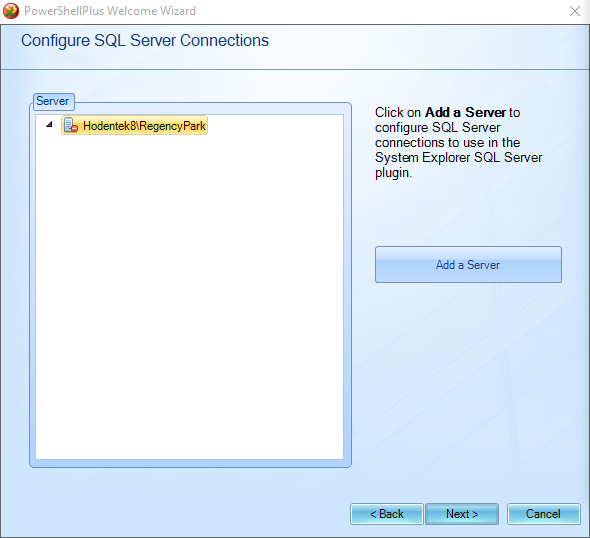
Click Next. Configuring SQL Server Connections is next

PSP-8

In the above, click Add Server to bring up SQL Server Configuration. Server Instance here is,

Hodentek8\RegencyPark with Windows Authentication. The ellipsis button does not (may not)  guide you to get the information.

PSP_9

Find server/instantce from SSMS or otherwise and enter. Server  gets added.


 PSP_9a
 Server  gets added.
PSP_10

Click Next. Next in line is Configuration of Email Settings

PSP_11

If you are an individual with an ISP, use the ISP provider information.


PSP_11b

Click Test to verify, it works. Check email at the receiving end.

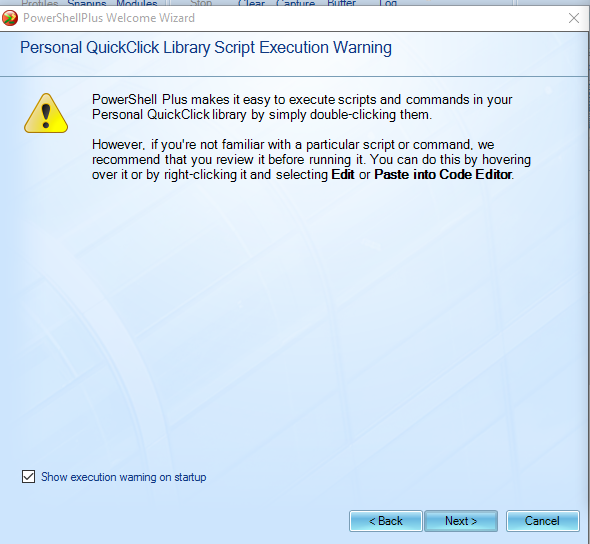
Finally the script execution warning note:

PSP_12

Summarizing with a summary of actions taken.

PSP_13

Click Finish. Now you have the PowerShellPlus UI to work with:

PSP_14

You get an app added to your All Apps menu in Windows 10.
Rock and Roll!

Tuesday, April 28, 2015

Attaching a detached database in SQL Server 2012 with Windows PowerShell

In my previous post a simple way to detach a database from SQL Server 2012 using SQL Server Management Studio was described. The same database will be attached in this post.

It can be attached to the server instance with SQL Server Management Studio in the same way.

However, trying to attach the detached database using Windows PowerShell succeeded but the database name was not restored but the database files were successfully attached. This was an unexpected result.

The next picture shows the databases node before and after attaching the Feb6 database using the code shown in this post. After attaching the database while the name of the database expected was "Feb6", a new system assigned name was given to the attached database.


The PowerShell statements for attaching the detached database were run in Windows PowerShell ISE and are as follows:
--
PS SQLSERVER:\sql\Hodentek8\RegencyPark\databases>
$files = new-object system.collections.specialized.stringcollection
$files.add("C:\Program Files\Microsoft SQL Server\MSSQL11.REGENCYPARK\MSSQL\DATA\Feb6.mdf")
$files.add("C:\Program Files\Microsoft SQL Server\MSSQL11.REGENCYPARK\MSSQL\DATA\Feb6_log.ldf")
$server=new-object Microsoft.SqlServer.Management.Smo.Server('Hodentek8\RegencyPark')
$db=new-object Microsoft.SqlServer.Management.Smo.Server
$dbname="feb6"
$server.AttachDatabase($db,$files)
----------
Note that the code was run in the databases context.

Although I specified the database name as feb6, the database name was [Hodentek8] after attaching. Hodentek8 is the host name.

Looking at the properties of the database [Hodentek8] shows that the files of database 'Feb6' were attached.

I do not find Feb6 in the databases collection.


However, I am still figuring out the name change.

Thursday, February 5, 2015

Windows PowerShell ISE on Windows 8.1


While Windows PowerShell can be accessed by searching for PowerShell in Windows 8.1, the Windows PowerShell ISE is in the Windows Adminsitrative Tools.

WinPowershell02

A search for Administrative Tools brings up the following selection.


WinPowershell02

 
The following Power Shell related items can be found in this folder


WinPowershell03
There appears to be both a x32 bit version and a x64 bit version of Windows PowerShell ISE in Windows 8.1

Wednesday, November 12, 2014

A quick note on writing PowerShell scripts - Part 1

PowerShell scripts are a sequence of PowerShell commands written one after another (executed in that order) using a text editor such as Notepad. The extension of a PowerShell script file is <filename>.ps1. The 1 ins ps1 has nothing to do with the version of PowerShell on your computer and you may have more than one in
your computer,
 http://hodentekhelp.blogspot.com/2014/08/can-multiple-versions-of-powershell-can.html

You also have the option of choosing which version you want to run
(http://hodentekhelp.blogspot.com/2014/08/if-you-have-multiple-versions-of-power.html).

In addition to Notepad there are other dedicated script editors like,
and many others. For a complete listing follow this link:

In order to run a PowerShell script file you need to create a file with extension ps1 and then run
this script in Windows PowerShell or a similar programme.

In Part 2 you will learn writing a simple script file.

When Identity Security Becomes a Wall — Not a Shield

After a breach that forced a reset of my digital identity, I hit a roadblock I never anticipated: multi-factor authentication (2FA) locked m...