Showing posts with label queries. Show all posts

Saturday, June 29, 2024

Does Google's Gemini work with SQL Server without any other downloads?

There are two ways it works. One is commercial, third party and the other is Google's approach.

1. Commercial product: It is called Countersoft Gemini that can be used with SQL Server on your local SQL Server installation. It offers must typical tasks such as performance analysis, change tracking and automating tasks. For using Countersoft, you should install it on your local server. It is not a web based service.


It is not free. There are two prices, $10 monthly per user in the cloud and $850 for 10 users.

Use this link here: https://www.countersoft.com/


2. Google's Gemini: This is the built-in AI assistant for DBMS on the Google Cloud Platform(GCP). It does performance, schema analysis, querying, etc. It is built-in and does not require anything special. However, for SQL Server, you need to have an instance installed in the GCP.

More here: 

https://gemini.google.com/app?utm_source=google&utm_medium=cpc&utm_campaign=2024enUS_gemfeb&gad_source=1&gclid=CjwKCAjw4f6zBhBVEiwATEHFVi_2XLUBnZCVss9YqGvsAFYIth7bzE2rn_4aC0aNY7Q3C4U3UcWa9RoCZe8QAvD_BwE


Monday, June 8, 2015

Running queries against both structured and unstructured data


It is a Microsoft Data tool. It simplifies management of relational and non-relational data with the ability to query both.

With enormous amount of data that is unstructured that grows bigger each day and structured data both archived and live, a single querying technology is most desired. SQL Server has geared up with a new tool, the Polybase.

You want to query non-relational data. Do you modify it and bring it into SQL Server which is relational and then query it? Or do you buy another product to query non-relational data (like data in Hadoop, blobs and files)?

Well Polybase provides the capability to query non-relational data in-situ using the SQL Server using T-SQL. You need not move the data over to SQL Server although SQL Server gives the option to store in SQL Server if you want to do so. Polybase is supported out of the box in SQL Server 2016 CTP2 which means it will be available in SQL Server 2016.

Polybase was not supported out of the box in earlier version. Of course Polybase can process the queries whether it is on the premises or in the cloud.

Here is a rough schematic of what it is about.


Friday, April 17, 2015

Can you use Windows Power Shell to find the login you created?

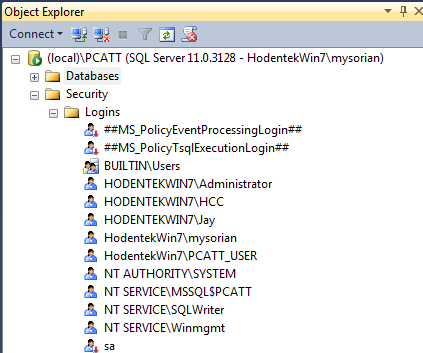
In the previous post you created a login and verified using SQL Server Management Studio but you can also use Windows PowerShell to verify it.
You can do it two-ways. Using Invoke-SQLCMD or use the SQL Server SQL provider -SQLPS

Here are the logins for my instance named PCATT on my laptop Hodentek\Win7 for whim the administrator.


I can use SQLPS after launching as follows:

 
Or I can invoke SQLCMD via Window PowerShell's Invoke as shown here with some sample output:

PS SQLSERVER:\> invoke-sqlcmd -ServerInstance '(local)\PCATT' -Query 'Select * from Sys.syslogins'| export-csv "C:\Users\Public\PCATTLogins"
PS SQLSERVER:\>

The following is a cutout of the PCATTLogins text file on Notepad.


Saturday, March 22, 2014

What are 'views' in SQL Server?

Views are virtual tables created based on existing table(s). Views can have generally fewer columns than the underlying table(s). Views can be based on a single table or on multiple tables. Since you can pick and choose the columns, you can hide columns that you do not want to be seen and display only those you want. Since a view can choose from different tables (that can participate in a join), it is useful in front end design to query all the relevant tables and create a view.

For example the following query returns 91 rows of Customer data from Northwind database in SQL Server 2012 Express:

SELECT [CustomerID]
      ,[CompanyName]
      ,[ContactName]
      ,[ContactTitle]
      ,[Address]
      ,[City]
      ,[Region]
      ,[PostalCode]
      ,[Country]
      ,[Phone]
      ,[Fax]
  FROM [NORTHWND].[dbo].[Customers]

Let us say your front end application needs just CompanyName, Address, City, State, Country. Then you create a query as shown:

SELECT
      [CompanyName]
      ,[Address]
      ,[City]
      ,[PostalCode]
      ,[Country]+', '+[PostalCode]
     
  FROM [NORTHWND].[dbo].[Customers]

Now create the view based on this query as shown which you want to create a mail label

Create view MailLable
as
SELECT
      [CompanyName]
      ,[Address]
      ,[City]
      ,[PostalCode]
      ,[Country]+', '+[PostalCode] as 'Country'
      FROM [NORTHWND].[dbo].[Customers]

This creates a view object in View node of NORTHWND database called MailLable as shown.

The views in the database are themselves stored in a System View and you can find all existing views using the following query:

SELECT * FROM SYS.VIEWS

There are lot more things related to views we will take them up in another post.

When Identity Security Becomes a Wall — Not a Shield

After a breach that forced a reset of my digital identity, I hit a roadblock I never anticipated: multi-factor authentication (2FA) locked m...