This source ( http://blogs.msdn.com/b/lightswitch/archive/2010/11/30/anatomy-of-a-lightswitch-application-part-4-data-access-and-storage-2.aspx) mentions that SQL Server Compact 3.5 is not supported. However in the Microsoft LightSwitch IDE you can indeed get connected to this data without any problem.
What is more, you can even develop a screen to search the data. Where it really fails in when displaying a screen. The Meta Data is retrieved, but not the data.
If you continue, you get a screen related exception.
Probably with a little more tweaking of VSLS (Visual Studio LightSwitch) program this could be even viable.
Saturday, December 25, 2010

Tuesday, December 7, 2010
Windows Azure and SQL Azure are in a new portal
The next day after my book got published Microsoft has announced a new portal. This should not result in major changes to the content of the book but certainly the 1st and 2nd Chapter which introduces the Windows Azure Platform and getting started with the portal look a little different.

 Keep watching this blog for more updates.

This page which you get when you click Use the New Portal offers a navigational aid if you use the new portal.

Monday, December 6, 2010
Regarding my book on SQL Azure

I take this opportunity to record my sincere thanks to, Microsoft Corporation for evaluation software and allowing me to participate in their events including the boot camps; the third party vendors for evaluation copy of their cloud related software and to Neudesic for giving me a chance to attend their boot camp. I am benefited immensely with my association with the Microsoft MSDN and TECHNET forums and I am thankful for the many forum participants and the moderators for helpful suggestions and answering some of my questions.
Here are the chapter titles of the new book:
1. Cloud Computing and Microsoft Azure Services Platform
2. SQL Azure Services
3. Working with SQL Azure Databases from Visual Studio 2008
4. SQL Azure Tools
5. Populating SQL Azure Databases
6. SSIS and SSRS applications using SQL Azure
7. Working with Windows Azure Hosting
8. Database applications on Windows Azure Platform accessing SQL Server
9. Synchronizing SQL Azure
10.Recent Developments
Some of the details of what you can learn copied from Packt Site is reproduced here:
- An easy to understand briefing on Microsoft Windows Azure Platform Services
- Connect to SQL Azure using Microsoft SQL Server Management Studio
- Create and manipulate objects on SQL Azure using different tools
- Master the different types of Cloud offerings
- Access SQL Azure through best practices using Client and Server API’s in VB and C# and using hosted services with user authentication Windows Azure
- Learn how to populate the SQL Azure database using various techniques
- Create Business Intelligence Applications using SSIS and SSRS
- Synchronize databases on SQL Azure with on-site enterprise and compact SQL Servers
- Learn how to write an application to access on-site data from a cloud hosted service
- Get a comprehensive briefing on various updates that have been made to SQL Azure and the projects still in incubation
- Understand the future and evolving programs such as the Houston Project, OData Services, Sync Services, and more built to support SQL Azure and transform it into a global enterprise data platform
Monday, September 27, 2010
Importing Geospatial data from an Excel file
Sometimes there is a need to import data / geo-spatial data harvested from the web using built-in tools in Excel to SQL Server 2008 R2. The Import and Export Wizard makes it very easy and read up on this article to learn the details on the SSWUG.ORG web site,
http://www.sswug.org/articles/viewarticle.aspx?id=52687
http://www.sswug.org/articles/viewarticle.aspx?id=52687
Tuesday, August 31, 2010
Hook up with SQL Azure using Microsoft LightSwitch
Jump start on Microsoft's latest RAD developmental tool - the Microsoft LightSwitch.It is still in Beta but looks very cool. You have data sources and screens. Hook them up and you are done. It has screens that are representative of most of the likely usage scenarios such as searching, point to parent and all the children show up, edit data, etc. You hardly need to write code for most of the common business use. In case you want to write code, you could. There are lot of events to which you can hook up code. I used VS 2010 Express and some coding is limited but I understand with a better VS versio you can do a lot more.
Before you do the big things get a head start knowing about this interface. Read this article and jump start on LightSwitch.
Start here and if you have a problem send me an email
Before you do the big things get a head start knowing about this interface. Read this article and jump start on LightSwitch.
Start here and if you have a problem send me an email
Sunday, August 29, 2010
Importing Geospatial data from MS Excel 2010 to SQL Server 2008 R2
Capturing geo-spatial data from web pages is something that Excel can do very well and processing of geo-spatial data is a new capability that became available in SQL Server 2008 R2. With Bing and Maps new applications are possible.
Getting data from MS Excel to SQL server 2008 R2 is very easy with the Export and Import wizard.
This article shows how you would bring in geo-spatial data from an MS Excel 2010 Spread Sheet file to a database table in SQL Server. As SQL Server 2008 R2 supports geo-spatial data it is very easy to process it on the SQL Server. SQL Server Import and Export Wizard is used.
The SSWUG article can be viewed free by registering as a guest and well sign up as well and get the full benefits.
While you are visiting SSWUG read this other article on Geo-Spatial data :
Getting data from MS Excel to SQL server 2008 R2 is very easy with the Export and Import wizard.
This article shows how you would bring in geo-spatial data from an MS Excel 2010 Spread Sheet file to a database table in SQL Server. As SQL Server 2008 R2 supports geo-spatial data it is very easy to process it on the SQL Server. SQL Server Import and Export Wizard is used.
The SSWUG article can be viewed free by registering as a guest and well sign up as well and get the full benefits.
While you are visiting SSWUG read this other article on Geo-Spatial data :
Saturday, August 7, 2010
Installing AdventureWorks Sample Databases
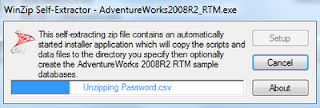
AdventureWorks is one of the common sample databases used in Microsoft Database related programming or, in Visual Studio applications. What started off as a single database has grown into a big family and together with this, the installation procedure has undergone a lot of changes. The days of attaching and detaching sample database files are gone. The WinZip installer kicks off the installation.
Recently I wanted to work with PHP training kit which required a SQL Server 2008 Express with a AdventureWorks database. The download link on the Configuration Wizard-PHP on Windows Training kit took me to a dead end (Trust me this happens a lot with Microsoft documentation). Finally, I thought just that any AdventureWorks would do and downloaded the AdventureWorks2008R2_RTM.exe (82.3 MB ) from CodePlex site and installed it on the brand new SQL Express 2008 (SQLEXPRADV_x86.enu.exe). Although it did not provide the right (Which, I don't know what? As yet) AdventureWorks, I could see how the installation procedure has changed.
The installation took 35 minutes. It took 100% of the CPU and 76% of physical memory during installation and installed a bunch of AdventureWorks databases for all kinds of end users. Here are some screen shots of the installation.

Look at all the AdventureWorks databases in this image.


Recently I wanted to work with PHP training kit which required a SQL Server 2008 Express with a AdventureWorks database. The download link on the Configuration Wizard-PHP on Windows Training kit took me to a dead end (Trust me this happens a lot with Microsoft documentation). Finally, I thought just that any AdventureWorks would do and downloaded the AdventureWorks2008R2_RTM.exe (82.3 MB ) from CodePlex site and installed it on the brand new SQL Express 2008 (SQLEXPRADV_x86.enu.exe). Although it did not provide the right (Which, I don't know what? As yet) AdventureWorks, I could see how the installation procedure has changed.
The installation took 35 minutes. It took 100% of the CPU and 76% of physical memory during installation and installed a bunch of AdventureWorks databases for all kinds of end users. Here are some screen shots of the installation.


Look at all the AdventureWorks databases in this image.


Subscribe to:
Posts (Atom)
When Identity Security Becomes a Wall — Not a Shield
After a breach that forced a reset of my digital identity, I hit a roadblock I never anticipated: multi-factor authentication (2FA) locked m...

-
 This post provides a tutorial approach to authoring a report with Microsoft PowerBI using data on a SQL Server 2012. PowerBI is Microsof...
-
 This post is describes connecting to SQL Server 2022 using the SQL Server Management Studio and the encryption of connection. For installin...
-
 Linked servers offer the following advantages as noted in MSDN documentation: •The ability to access data from outside of SQL Server. •T...